Shopify Inventory Management
Build a more reliable Shopify inventory operation by improving stock visibility, planning what to reorder and coordinating inventory across products, locations and sales channels.
.avif)
What Is Inventory Discrepancy? Causes, Examples & Fixes
An inventory discrepancy happens when stock records don’t match actual counts. Learn common causes, how to spot them, and ways to resolve differences fast.
“The stock count is off again… and we have no idea why.”
Inventory discrepancies like this slow teams down, skew forecasts, and disrupt the entire flow of purchasing and fulfilment. When your numbers don’t match reality, replenishment decisions and order accuracy start to suffer.
Most teams deal with them after the damage is done, but the real value lies in spotting them early, tracing the root cause, and preventing repeat issues.
We’ll understand why inventory discrepancy happens, how to investigate them step by step, and the tools and processes that help keep your operations accurate and dependable.
What is Inventory Discrepancy and Why Does It Matter
Inventory discrepancy refers to the gap between the quantity recorded in your system and the quantity physically available. It signals that your tracking, counting, or stock movement processes aren’t fully aligned.
Consequences extend beyond simple mismatches. Discrepancies increase reconciliation workload, complicate month-end reporting, impact inventory valuation, and erode trust in your data, especially for replenishment and planning decisions.
It’s helpful to clarify how this term differs from related concepts:
- Discrepancy: A mismatch between recorded and actual inventory levels
- Shrinkage: A loss due to theft, damage, spoilage, or misplacement
- Variance: A broader accounting deviation between expected and actual values, which could include quantity, cost, or both.
Understanding these distinctions allows teams to diagnose issues more accurately and apply the right corrective actions.
10 Key Inventory Discrepancy Causes (and How to Detect Each)
Stock discrepancies can stem from a variety of issues. Below are ten of the most common causes, along with how to spot each one quickly and accurately.
1. Errors during manual entry and physical counts
Typos, missed items, or double-counting during stocktakes or data entry can lead to mismatches.
How to detect: Audit count sheets, compare user logs, and track recurring count variances by product or team member.
2. Inconsistent receiving and putaway processes
When items aren’t logged correctly at receiving or end up in the wrong bin during putaway, your system shows stock that you can’t physically locate.
How to detect: Match receiving logs against purchase orders and inventory counts; flag skipped or partial receipts.
3. SKU mismatches or duplicate product listings
Inventory accuracy breaks when similar items are assigned the wrong SKU or when the same product exists under multiple listings.
How to detect: Run SKU audits, check for duplicate listings, and reconcile listings across POS, warehouse, and online channels.
4. Damaged, expired, or stolen items
Items that are lost due to breakage, spoilage, or theft often go unrecorded, leaving inflated inventory levels.
How to detect: You can spot these issues by checking discard logs, reviewing adjustments made during the week, and inspecting areas where damage or loss is more common.
This is especially common for items lost, damaged, or stolen in transit, before they everreach a customer. Brands that offer a shipping guarantee can resolve these cases through aself-service claims process, keeping the reship or refund properly logged instead of leavingstock records out of sync."
5. Supplier or vendor shipment errors
Stock discrepancies can also start at the source when suppliers send the incorrect quantities or items.
How to detect: Match each delivery against the PO and the packing slip, and track repeated issues so you can address reliability concerns with the vendor.
6. Returns and restocking errors
Returned items may get misplaced, restocked in the wrong location, or added back into the system before they’re actually inspected. This can skew counts.
How to detect: Cross-check return authorizations with restock updates and inspect bins for misplaced or unsellable goods.
7. Timing mismatches between transactions and records
Inventory discrepancy can appear when orders, receipts, or adjustments are logged later than they occur.
How to detect: Review transaction timestamps and system sync logs, especially for multi-channel setups.
8. Manual adjustments without proper approvals
Ad-hoc changes to inventory counts without documentation can create confusion and loss of traceability.
How to detect: Review adjustment logs regularly and enforce an approval workflow for all manual changes. Ensure each adjustment has a clear reason and audit trail to help spot patterns or unauthorized edits.
9. Outdated cycle counting or auditing practices
Infrequent or inconsistent counts allow small errors to build up over time.
How to detect: Track variance trends by location or SKU and review the frequency and accuracy of your audit schedule.
10. System integration issues between Shopify, WMS, and POS tools
When platforms don’t sync properly, inventory data can fall out of alignment across systems.
How to detect: Monitor sync logs, look for repeated API errors, and compare on-hand quantities across systems to identify where the data is not matching.
How to Analyze an Inventory Discrepancy Step by Step
When a discrepancy shows up, the goal is to move from “something is off” to “here’s exactly what went wrong and how critical it is.” Use steps below to break it down.
1. Line up physical counts with system numbers
Start by placing the verified physical count side-by-side with the quantities in your WMS, Shopify, or ERP for the same date and time..
This helps isolate where the numbers diverge and removes confusion about whether the issue lies in the data or the physical count.
2. Break variance down by SKU, category, and location
A single total variance isn’t actionable. Segment stock discrepancies by SKU, product category, and storage location.
This reveals patterns, like consistent issues in a specific aisle, with a particular product line, or across a certain sales channel, that point directly to root causes.
3. Classify root cause behind each variance
Assign a cause type to each variance to uncover recurring breakdowns. Common categories include
- Human error: Miscounts, incorrect data entry, or missed barcode scans
- Process issues: Inconsistent receiving checks, poor putaway practices, or weak return handling
- System failures: Integration delays, failed syncs, or misconfigured settings
This simple classification makes trends obvious and tells you what to fix first.
4. Rank discrepancies by business impact
Not every mismatch needs urgent attention. Rank discrepancies by their effect on revenue (based on SKU value, margins, and order frequency) and how often they occur.
Recurring, high-impact issues should move to the top of your list; minor, one-off variances can be addressed during routine clean-up.
Read More: Ghost Inventory: A Complete Guide
Inventory Discrepancy Reconciliation Process (7-Step Framework)
Use below framework for inventory data discrepancy management and bring your records back in sync.
1. Stabilize inventory activity before you begin
You can’t reconcile inventory while stock is still in motion.
Pausing transactions gives you a stable, accurate snapshot to compare against your system. Without this freeze, counts become unreliable, adjustments pile up, and variances are nearly impossible to trace.
How to stabilize inventory activity
- Pause all receiving, picking, packing, and transfers until the count is complete
- Notify warehouse and ops teams to prevent mid-process movement
- Ensure all pending transactions are posted before locking the system
This step sets the foundation for every part of reconciliation that follows.
2. Decide the scope of the count before starting
Before anyone lifts a scanner or clipboard, you need clarity on what’s actually being counted. A reconciliation falls apart quickly when teams operate with different assumptions; some counting everything, others assuming it’s a partial check.
To make the scope unambiguous, outline
- which SKUs or categories are included in this round,
- the specific aisles, shelves, or bins to be covered,
- whether the count is full, partial, or risk-based.
When everyone knows exactly what’s in scope, the count is faster, cleaner, and far more accurate.
3. Run physical counts using a clear and consistent method
Accurate reconciliation starts with how items are physically counted. This is where most discrepancies first appear, so the method is just as important as the numbers.
Instead of rushing, give your team a repeatable structure
- Use the same counting method across all zones to avoid inconsistency
- Assign teams in pairs; one counts, one verifies
- Record quantities directly into your system or inventory discrepancy report template to avoid retyping errors
Consistency reduces noise in your data and makes any variances easier to analyze later.
4. Compare physical counts with system records to understand the variance
Once counting is complete, match physical quantities against what's recorded in your system.
This reveals the exact variance for each SKU and gives you a clear picture of inventory accuracy.
- Positive variance (more stock than recorded) often points to missed receipts or delayed system updates
- Negative variance (less stock than recorded) may signal shrinkage, misplacement, or process failures
For example, if you counted 120 units but the system shows 100, your variance is +20. Understanding these gaps SKU by SKU helps prioritize the investigation and pinpoint where things went wrong.
5. Investigate why the stock discrepancies happened
Now it’s time to understand why the numbers don’t match. Not all variances are equal and identifying the root cause is key to fixing and preventing them.
Start by reviewing the SKU’s movement history: receipts, picks, transfers, and adjustments. Then examine the physical side: was the item in the wrong bin, damaged, mislabeled, or miscounted?
The goal isn’t to assign blame, but to surface broken steps in the process. That’s what makes this one of the most valuable parts of reconciliation.
6. Correct records and apply the right fixes
Once you know what caused the discrepancy, update your system to match reality. Corrections should be clean, intentional, and fully traceable so you’re not introducing new errors while fixing old ones.
A reliable correction process usually includes
- adjusting on-hand quantities to match the verified physical count,
- recording the reason code so you can analyze trends later,
- updating product locations or labels if storage errors contributed to the mismatch.
This is also the moment to improve any broken processes to prevent the same discrepancy in future cycles.
7. Verify the updates and check accuracy again
After the corrections are made, do a quick recheck to confirm the system now reflects the physical stock. This validation step is small but essential because it ensures that no new issues were introduced during the update.
A simple recount of the affected SKUs or storage areas is often enough. If the numbers align cleanly, you can close the reconciliation cycle with confidence. If not, it’s a sign that something deeper needs attention before you move on.
Automating Inventory Discrepancy Detection and Reporting
To reduce manual workload and improve accuracy, you can automate various parts of discrepancy detection, reconciliation and reporting using the right tech.
1. Barcode scanning and RFID for error-free data capture
Using barcode scanners or RFID tags removes the need for manual typing, which significantly cuts down on quantity and SKU-entry mistakes.
These tools ensure every movement is captured instantly, giving you accurate data across receiving, picking, and counting activities.
2. Automated cycle counting for high-risk SKUs
Instead of full physical counts, set up automated cycle counts focused on high-value, error-prone, or fast moving SKUs. This approach helps you identify mismatches early and maintain better accuracy without relying solely on full physical counts.
3. Real-time dashboards for discrepancy trends
Real-time dashboards consolidate data from your systems and highlight patterns such as repeated mismatches, high-variance categories, or problem locations.
Monitoring these trends in real time allows your team to act on issues before they affect customer orders or financial reporting.
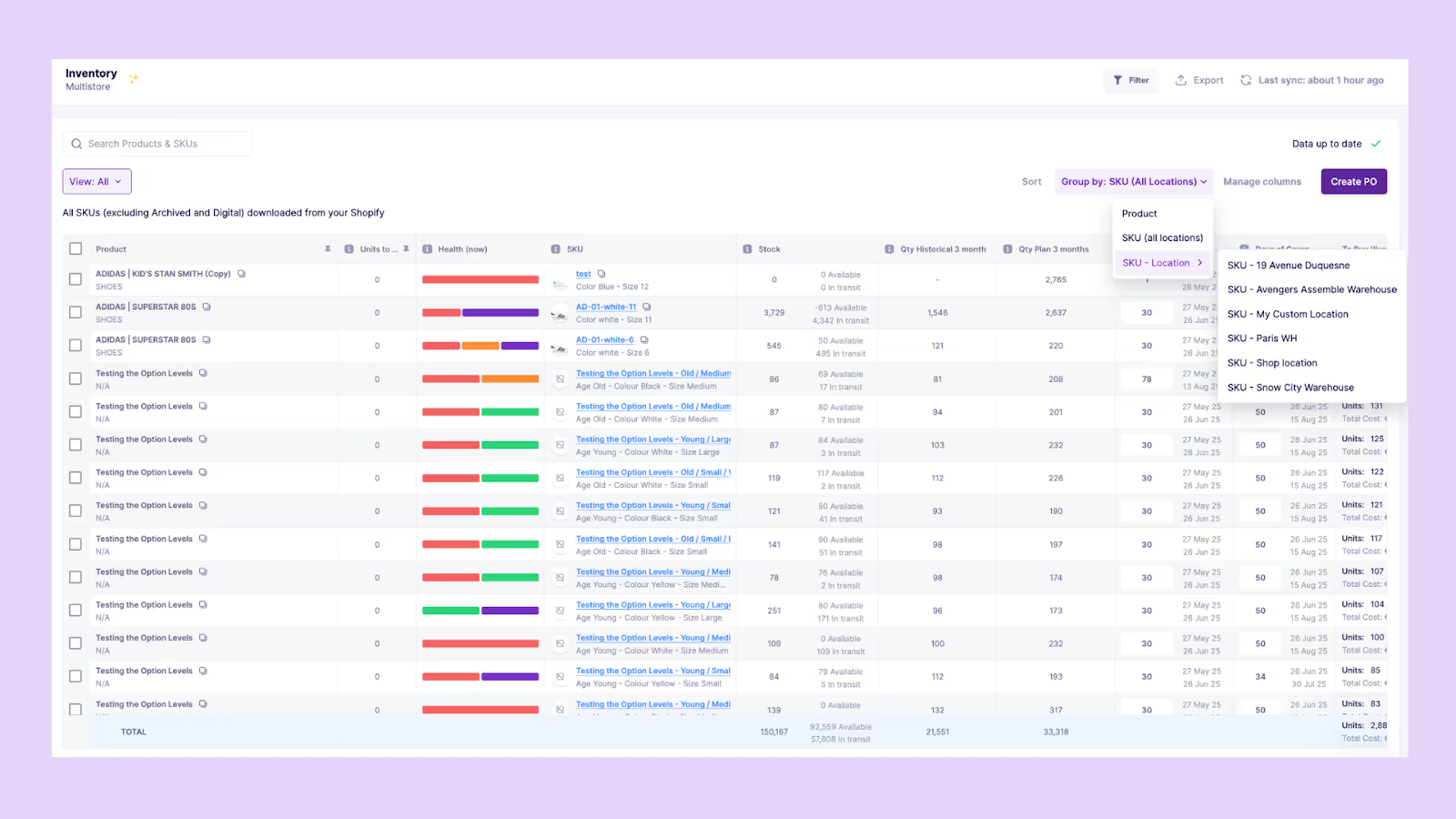
Tools such as Prediko operate in real time, displaying inventory levels across Shopify stores, warehouses, and other locations. They also send low stock alerts to help you stay ahead of replenishment.
4. Alerts for tolerance thresholds
Set thresholds for acceptable variance levels. Automated alerts notify you when discrepancies exceed acceptable tolerances, helping prevent unnoticed errors from accumulating. These alerts keep your team proactive by flagging unusual activity as soon as it happens.
5. Integrated Shopify, POS, and WMS systems for continuous reconciliation
Connecting Shopify, POS, and WMS systems keeps stock levels aligned across every channel, store, and location.
Prediko acts as a real-time source of truth, syncing purchase orders, raw materials, and inventory movements across WMS, 3PLs, and other tools through 100+ powerful integrations.
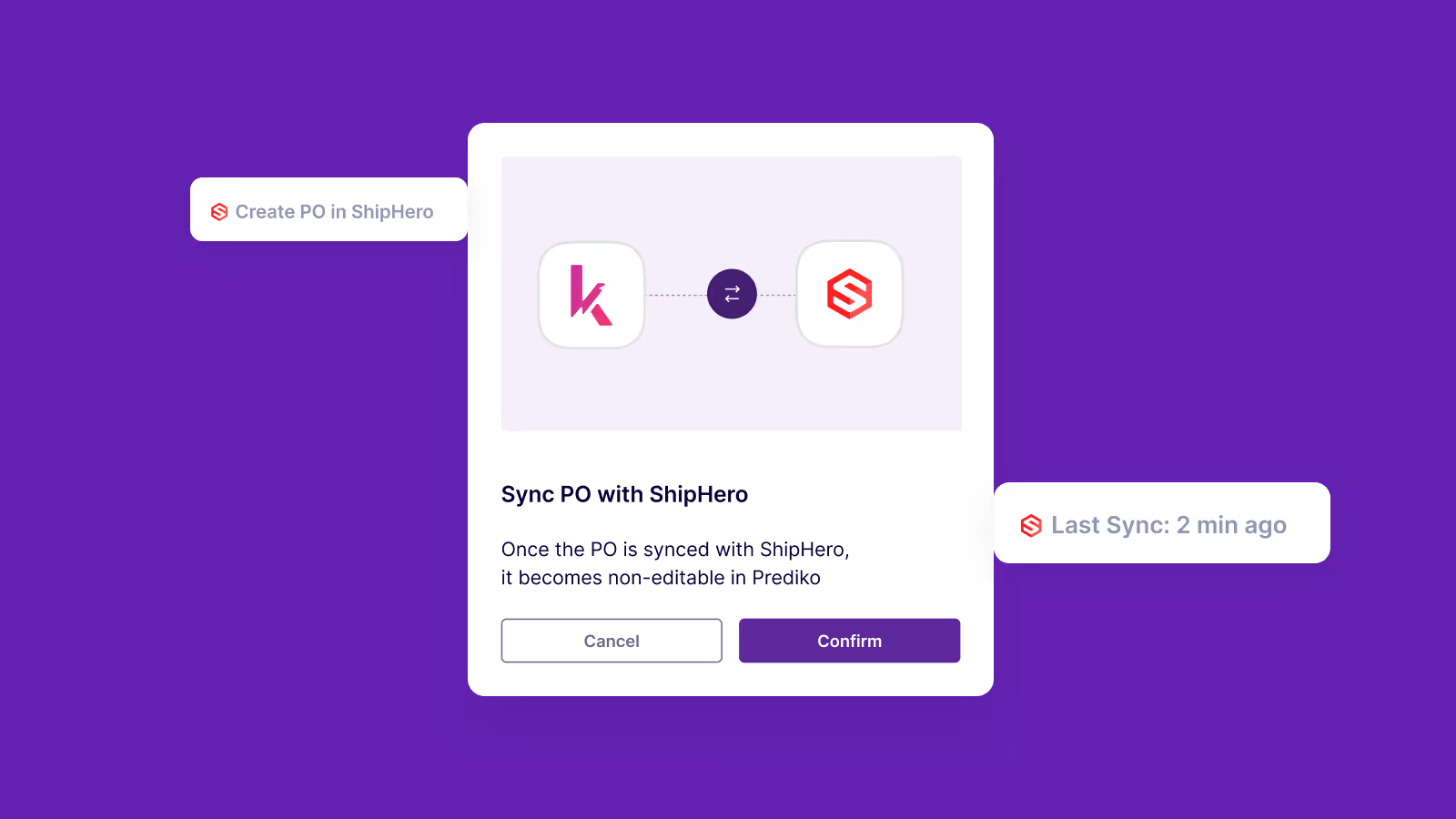
This ensures your next steps, replenishment decisions, and forecasting models always rely on accurate data.
Key Metrics and KPIs to Track Inventory Discrepancy
To evaluate how well your inventory processes are controlling discrepancies, track the following KPIs.
1. Inventory accuracy percentage
Inventory accuracy percentage shows how closely your recorded stock levels match your physical counts.
A higher accuracy rate means your data is reliable enough for forecasting, replenishment, and order processing.
Regular cycle counts help validate these numbers and reveal specific SKUs or locations where accuracy consistently drops.
2. Shrinkage rate and tolerance range
Shrinkage reflects the portion of inventory lost due to damage, theft, spoilage, or administrative handling mistakes.
Tracking your shrinkage rate against a defined tolerance range helps you notice unusual increases or patterns across specific categories. This also highlights where additional controls, surveillance, or staff training may be needed.
3. Discrepancy cost per SKU or category
Discrepancy cost measures the financial impact of mismatches across different products.
Even small quantity differences can add up when they involve high-value SKUs or frequently moving items.
Reviewing cost impact by category or item helps you identify where losses are concentrated and where to focus improvement efforts.
4. Frequency and resolution time of discrepancies
This metric shows how often discrepancies occur and how quickly your team resolves them.
A high frequency of mismatches may indicate weak receiving processes, inconsistent counting practices, or system sync issues.
Tracking resolution time helps you understand whether operational delays or manual checks are slowing down your accuracy corrections.
5. Benchmark targets by SKU class or warehouse type
Different products and warehouse environments have different accuracy expectations.
Setting benchmarks for each category or facility helps you measure performance fairly and identify sites that fall behind.
These comparisons also reveal which processes or teams are maintaining stronger accuracy so you can replicate those practices across your network.
Preventing Inventory Discrepancies Before They Occur
To prevent discrepancies before they occur, reinforce the operational routines that control how inventory is received, recorded, and verified throughout your supply chain.
1. Consistent procedures for receiving, picking, and putaway
Clear and standardised workflows keep stock movements predictable and reduce the chances of items being misplaced or miscounted.
When every team follows the same steps, it becomes easier to isolate mistakes and maintain accuracy across shifts.
Core procedures should include
- Verifying quantities at receiving before logging anything
- Labeling items immediately to prevent SKU confusion
- Storing products in fixed or clearly designated locations
2. Staff training on counting accuracy and system updates
Inventory accuracy relies heavily on the people handling and recording stock. Regular training ensures teams know how to count accurately, update systems in the correct order, and follow protocols for adjustments.
This minimizes repeat errors and keeps day-to-day operations aligned with your inventory records.
3. Automated approval workflows for inventory adjustments
When quantity edits are made manually without oversight, discrepancies multiply quickly.
Automated approval workflows create a controlled environment where every adjustment is reviewed, validated, and logged with a documented reason.
This reduces unauthorised edits and gives you a clear audit trail when discrepancies appear.
4. Regular audits and structured cycle counts
Cycle counts help you catch inaccuracies early instead of waiting for annual physical counts to reveal large discrepancies.
By structuring your cycle counts around risk and movement, you can focus on the SKUs that create the most issues.
Effective cycle counting often includes
- Prioritising fast-moving or high-value SKUs
- Reviewing variances immediately after counting
- Analysing recurring deviations to identify process gaps
5. Vendor verification and shipment accountability
Discrepancies often start before inventory even reaches your facility. Verifying deliveries against purchase orders helps catch incorrect quantities or substitutions before they enter your system.
Holding vendors accountable for recurring mistakes improves upstream accuracy and eliminates a major source of mismatched records.
6. Monitoring system logs for irregular manual overrides
System logs show where manual edits happen, how frequently, and whether they follow expected patterns.
Regularly reviewing these logs helps identify risky behavior, training gaps, or repeated changes to specific SKUs. This oversight safeguards inventory integrity and prevents small overrides from turning into larger systemic issues.
Go From Detecting to Preventing Inventory Discrepancy
When your inventory data is accurate, everything improves; forecasts become sharper, purchasing is more informed, and orders flow through your system without disruption. Quick identification and resolution of discrepancies ensure your entire operation stays on track.
Prediko gives you that control. It syncs data from Shopify, WMS, 3PLs and POS and provides real-time visibility you need to take action before stock levels or fulfilment are affected.
With real-time visibility and reliable demand insights, your inventory stays aligned and predictable.
Start your 14-day free trial and see how Prediko strengthens your inventory workflows end to end.
Frequently Asked Questions (FAQs)
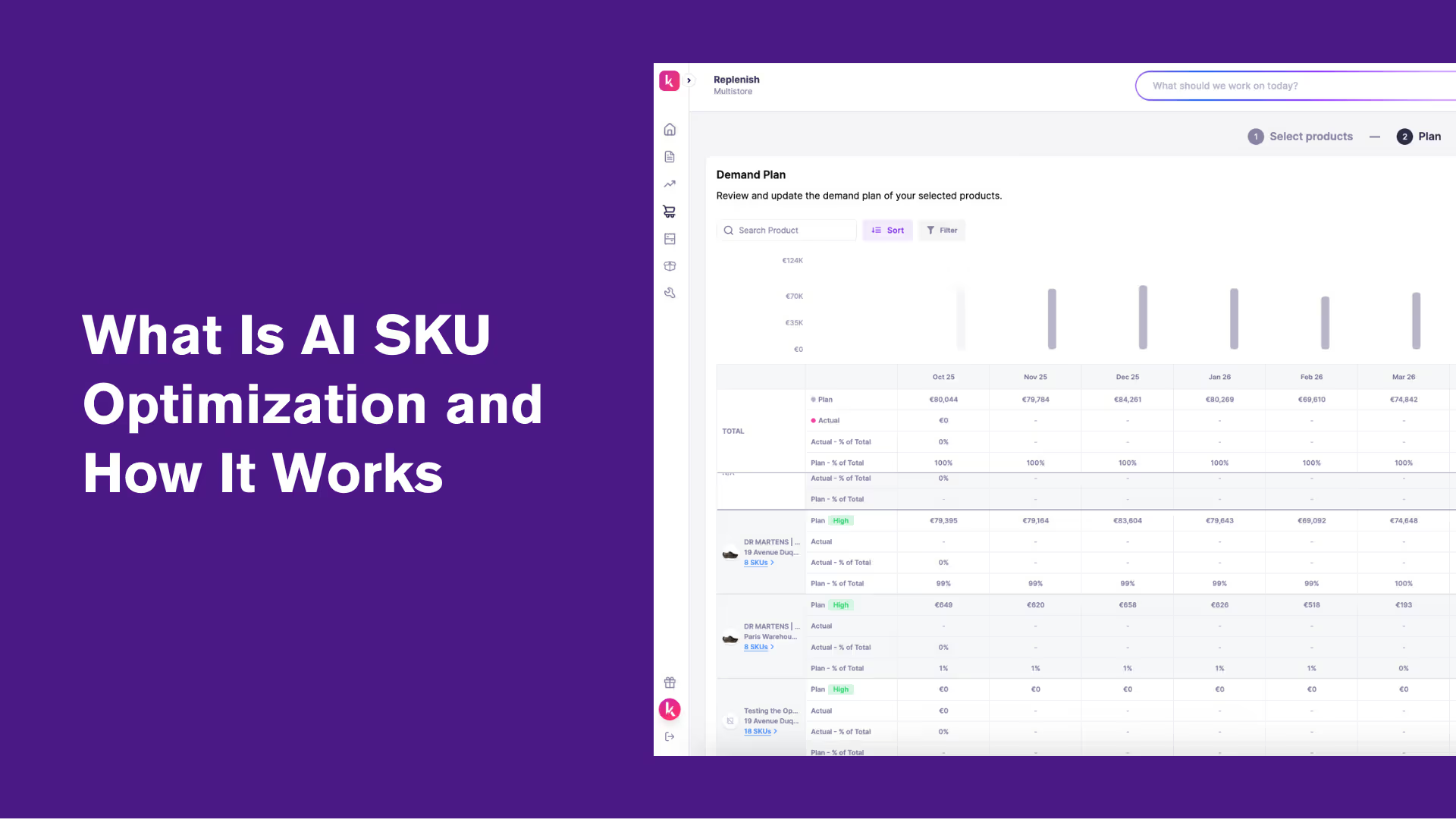
What Is AI SKU Optimization? A Guide for Shopify Brands
AI SKU optimisation uses machine learning to forecast demand, automate replenishment, and balance stock at the SKU level, turning real-time Shopify data into smarter purchasing, fewer stockouts, less excess inventory, and healthier cash flow.
Most Shopify brands know the pain of guessing which SKUs will perform next season.
Traditional planning relies too heavily on spreadsheets and gut feeling, leading to stockouts on bestsellers and piles of unsold inventory elsewhere.
AI SKU optimization solves this by using machine learning to forecast demand per SKU, automate replenishment, and free up cash tied in slow movers.
We explain what AI SKU optimization is, how it works for Shopify brands, and how it helps maintain balanced stock, better forecasting accuracy, and healthier cash flow.
What is AI SKU optimization and how it works
AI SKU optimization is the process of using artificial intelligence to determine the ideal mix, quantity, and timing of products to stock at the SKU level. As product catalogs grow, SKU proliferation becomes a real operational burden. More variants, more channels, and more locations mean more complexity for every purchasing and stocking decision.
Instead of relying on guesswork or static spreadsheets, AI SKU optimization uses real-time sales, inventory, and marketing data to forecast demand and guide smarter purchasing and replenishment decisions, while improving service levels and reducing costs.
Every SKU behaves differently. Some move fast during peak seasons, others have steady year-round sales, and a few may never pick up. AI analyzes these variations by studying patterns like sell-through rate, seasonality, marketing performance, and even regional preferences.
It then recommends which SKUs to restock, slow down, or discontinue, a process often called assortment rationalization. This is how brands keep their product mix lean and focused on what actually drives revenue.
This way, SKU-level decision-making turns into a continuous, data-driven process. Rather than reacting to past sales, Shopify merchants can predict inventory needs ahead of time, minimize stockouts, and improve margin consistency.
Why AI SKU Optimization Is Crucial for Shopify & Ecommerce Brands
As Shopify brands scale, SKU proliferation becomes unavoidable. More products, more variants, more locations, and shifting customer preferences create assortment complexity that manual methods can't keep up with. Shopify provides a strong foundation for selling and tracking products, but its built-in inventory management has limits.
The system mainly reports what's in stock or sold, not why inventory moves a certain way or when it will move next. This reactive setup often leaves brands relying on manual exports, spreadsheets, and static reorder points that can't adapt to changing demand patterns.
AI SKU optimization fills this gap by forecasting, prioritizing, and managing each SKU based on actual sales behavior and real-time signals. It turns raw Shopify data into continuous insights that guide replenishment, purchasing, and pricing decisions.
For more on how this technology is applied across ecommerce functions, see these practical AI agents examples helping brands automate everything from inventory planning to customer support.
Here’s how this translates into real business outcomes.
- Higher order accuracy: AI analyzes both historical and live sales data, enabling precise demand predictions per SKU. This accuracy helps avoid missed sales and supports consistent fulfilment.
- Reduced manual work: With AI automating restock recommendations, brands spend less time managing spreadsheets. It minimizes overstock and lowers deadstock, keeping operations efficient.
- Improved forecast accuracy and cash flow: AI models forecast future inventory needs using variables like SKU sales velocity, time of year, regional demand, and marketing activity. This allows brands to align purchasing cycles with actual sales patterns, improving cash allocation and turnover rates.
Traditional methods vs. AI-driven optimization
In a nutshell, AI SKU optimization helps Shopify brands move from gut-based decisions to data-driven inventory planning, so that brands can keep stock lean, forecasts accurate, and operations efficient.
In a growing number of Shopify businesses, these decisions are being delegated to an inventory AI agent that automates ai demand planning & forecasting, purchasing, and replenishment in real time , reducing human error and unlocking faster, data-driven execution across the entire inventory lifecycle.
Step-by-Step Process to Implement AI SKU Optimization in Shopify
Now that we’ve seen why AI-driven SKU optimization outperforms traditional methods, let’s look at how you can set it up and implement it effectively.
Step 1: Collect and clean your data
Start by pulling your raw inventory and sales data from Shopify. The AI model can only learn patterns that exist in your data, so accuracy here determines every prediction that follows.
Pull detailed SKU-level data covering
- Orders: Quantity sold, order frequency, and time of purchase help map true demand patterns
- Returns: Identify items frequently returned and analyze reasons to avoid biasing demand forecasts
- Lead times: Track supplier delivery timelines and update them regularly to prevent stock gaps
- Stock levels: Capture on-hand, reserved, and in-transit inventory to give AI a real view of available stock
Your AI forecasts are only as good as your data. When your Shopify exports are clean and consistent, the model can correctly learn demand patterns, supplier timing, and seasonality.
Here’s what to do to clean your data:
- Remove duplicate or inactive SKUs that may confuse the model
- Fill in missing dates, stock counts, or order details
- Standardize SKU naming and units of measure so the system can match products correctly
- Use AI and automation to generate consistent product codes from product variants
- Exclude unrealistic data, such as zero or negative orders
Step 2: Configure AI forecasting models
Once your Shopify data is ready, the next step is to configure AI forecasting models that predict demand for each SKU.
Setting up these models manually can be difficult if you're doing it from scratch. You'll need to choose the right algorithms, tune them, and keep them updated as data changes. This is where most in-house AI efforts stall. Doing this in-house often leads to
- High setup time and technical complexity
- Dependence on data science or engineering resources
- Inconsistent results if models aren’t maintained or retrained regularly
- High costs for integration, testing, and model management
Prediko removes the need to build or manage forecasting models manually. It syncs with your Shopify store in a click, and its built-in AI engine automatically applies proven forecasting algorithms to your Shopify SKU data. It detects demand shifts, learns seasonality and growth patterns, and updates forecasts in real time.
Step 3: Analyze and classify SKU performance
After your AI forecasting models are configured, the next step is to analyze how each SKU performs and group them by their business value. This gives you clarity on which products drive revenue, which drain cash, and which need attention.
Start by classifying your SKUs using three key factors
- Velocity: how quickly each SKU sells over a given period
- Profitability: how much net profit each SKU contributes after costs
- Margin contribution: how each item impacts overall gross margin and cash flow
Once classified, you can clearly see which SKUs are high performers, steady movers, or slow sellers.
AI models like that of Prediko can analyze these classifications continuously and recommend what to do next.
They flag SKUs that are consistently slow to move and suggest marking down, identify fast-selling items that need restocking before they run out, and highlight high-margin SKUs worth promoting.
Step 4: Automate replenishment and purchase orders
Once SKUs are classified, your next step is to automate how stock gets replenished. The aim is to let AI handle reordering based on data and live performance instead of static spreadsheet rules.
- AI tracks inventory velocity, forecasted demand, and supplier lead times
- When inventory drops below a dynamic reorder point, it automatically triggers a purchase order
- Reorder points adjust continuously as sales patterns change, keeping stock levels balanced
This creates a real-time feedback loop where replenishment adapts to actual demand, reducing both overstocking and stockouts.
Prediko’s AI automates the entire buying process per SKU. It lets you select the SKUs, reviews their data, flags what need to be reordered, and generates ready-to-approve purchase orders with supplier, quantity, and timelines pre-filled.
How to measure the success of AI SKU optimization
To determine whether your AI SKU optimization is delivering results, track the following KPIs.
1. Forecast accuracy (MAPE)
Mean Absolute Percentage Error, or MAPE, shows how close your AI-driven forecasts are to actual sales results. A lower MAPE means your demand predictions are more reliable and better aligned with real market behavior.
For instance, a brand using manual forecasting may record a MAPE of 25%. After introducing AI SKU optimization, that figure can drop to 10%, reflecting a 60% improvement.in accuracy.
More precise forecasting leads to smarter replenishment and fewer overstock or stockout events.
2. Stockout rate
Stockout rate measures how often SKUs are unavailable when customers want to purchase them. This indicator reflects how effectively the AI system anticipates changes in demand and manages replenishment schedules.
For example, after implementing Prediko’s SKU-level forecasting, We Are Jolies, an underwear brand reduced stockouts by 60%. The AI predicted demand across seasonal peaks and automatically triggered timely restocks, so that their bestsellers were always available without overstocking
3. GMROI (Gross margin return on inventory)
GMROI measures how much gross profit your inventory generates for every dollar invested.
A higher GMROI means AI SKU optimization is working efficiently, products are selling quickly and yielding stronger margins.
This also means you are focusing on high-performing SKUs, reducing slow movers, and rebalancing stock so that every dollar invested drives maximum profit.
4. Cash tied in inventory
This metric shows how much working capital is locked in unsold inventory. A lower cash-tied-in figure indicates healthier inventory flow and better liquidity.
AI SKU optimization helps achieve this by aligning reorder quantities and timing with actual demand trends, reducing excess stock and freeing up cash for marketing, product development, or growth initiatives.
Common pitfalls when doing AI SKU optimization (and how to avoid them)
AI SKU optimization delivers value only when data, process, and oversight work together. Following are the most common mistakes brands make, along with ways to prevent or fix them.
1. Poor data quality leading to inaccurate forecasts
When inventory, sales, or supplier data is incomplete or inconsistent, AI models produce unreliable predictions. Wrong SKU IDs, missing timestamps, or outdated stock counts can cause large forecast errors.
How to fix it
- Standardize SKU naming and data entry formats across all systems
- Run weekly data validation checks to detect anomalies
- Connect data from Shopify, POS, and WMS through APIs or integrations instead of manual uploads
- Retrain AI models only on cleaned and verified data
2. Over-reliance on automation without human validation
AI can process patterns faster than any analyst, but it still needs human oversight. Blindly following algorithmic outputs can result in missteps, especially when data inputs are incomplete, demand patterns suddenly shift, or external factors like marketing campaigns or supplier issues aren’t captured by the model.
How to fix it
- Use AI for recommendations, not final approvals, especially during early adoption
- Set review checkpoints for unusual reorder spikes or drastic forecast changes
- Combine AI outputs with input from demand planners or category managers
3. Ignoring lead times and seasonal/ promotional spikes
Even accurate forecasts fail if they don’t account for supplier lead times, holidays, or campaigns that temporarily shift demand. Many models underperform because these external factors are not modeled properly.
How to fix it
- Include supplier lead times as a variable in AI forecasting inputs
- Flag or adjust seasonal events and planned promotions in the system before training new models
- Run scenario testing to predict how spikes will affect stock levels and reorder timing
4. Letting SKU proliferation go unchecked
Adding new products without reviewing existing ones inflates your catalog over time. More SKUs doesn't always mean more revenue. It often means more complexity, more carrying costs, and more noise for AI models to sort through.
When your catalog is bloated with underperformers, even good AI models lose accuracy because the signal-to-noise ratio drops.
How to fix it
- Run regular assortment reviews to identify and retire consistently underperforming SKUs
- Use AI-driven performance classification to flag SKUs that drain cash without contributing meaningful revenue
- Set clear criteria for adding new SKUs, including minimum margin thresholds and demand projections
How Prediko simplifies AI SKU optimization for Shopify brands
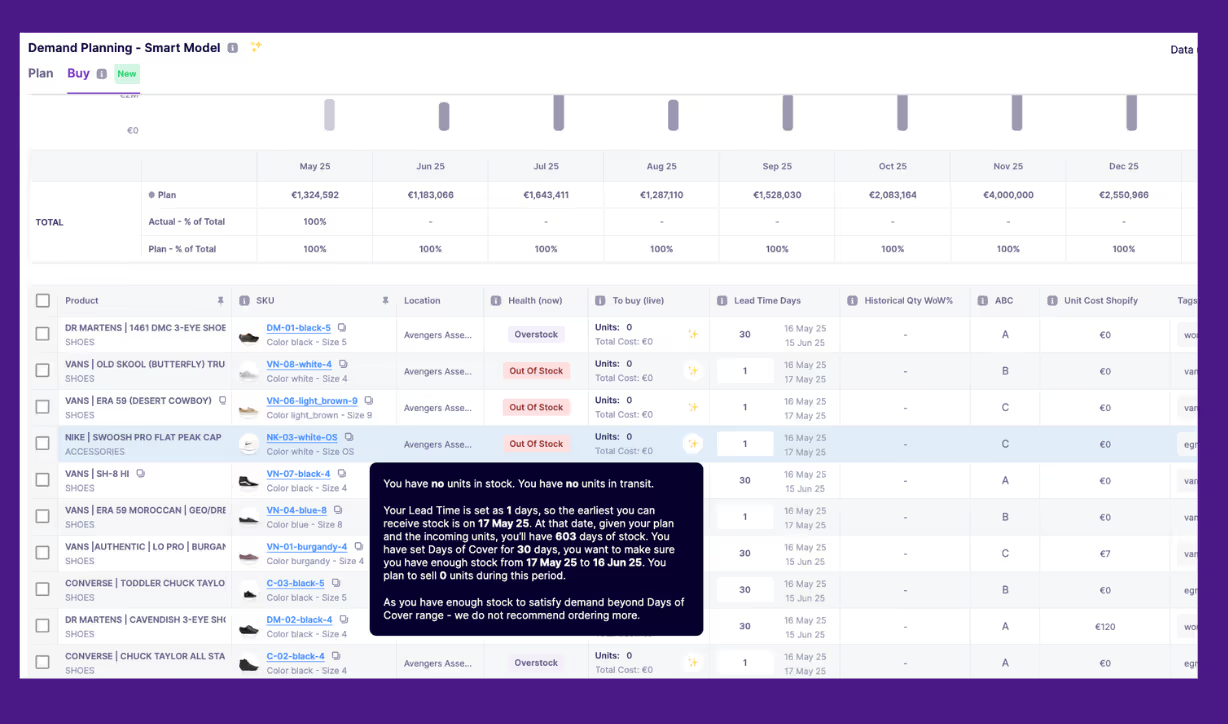
Prediko brings every part of SKU management into one platform built for Shopify: forecasting, raw materials planning, and replenishment.
Instead of stitching together spreadsheets and disconnected tools, it connects directly to your Shopify stores, pulls real-time inventory data, and applies AI models to forecast, classify, and automate inventory actions.
Key features include:
- SKU-level real-time visibility across channels: Prediko syncs data from all your Shopify stores, regions, and sales channels into a single view. You can see every SKU’s performance, stock level, and forecasted demand side by side, making cross-channel inventory decisions faster and more accurate.
- AI-powered SKU-specific demand planning: Its AI model forecasts demand for each SKU individually, accounting for sales velocity, seasonality, and lead times. This precision helps you order the right quantities and avoid both overstocking and missed sales, making it a powerful example of AI demand planning software built specifically for Shopify merchants.
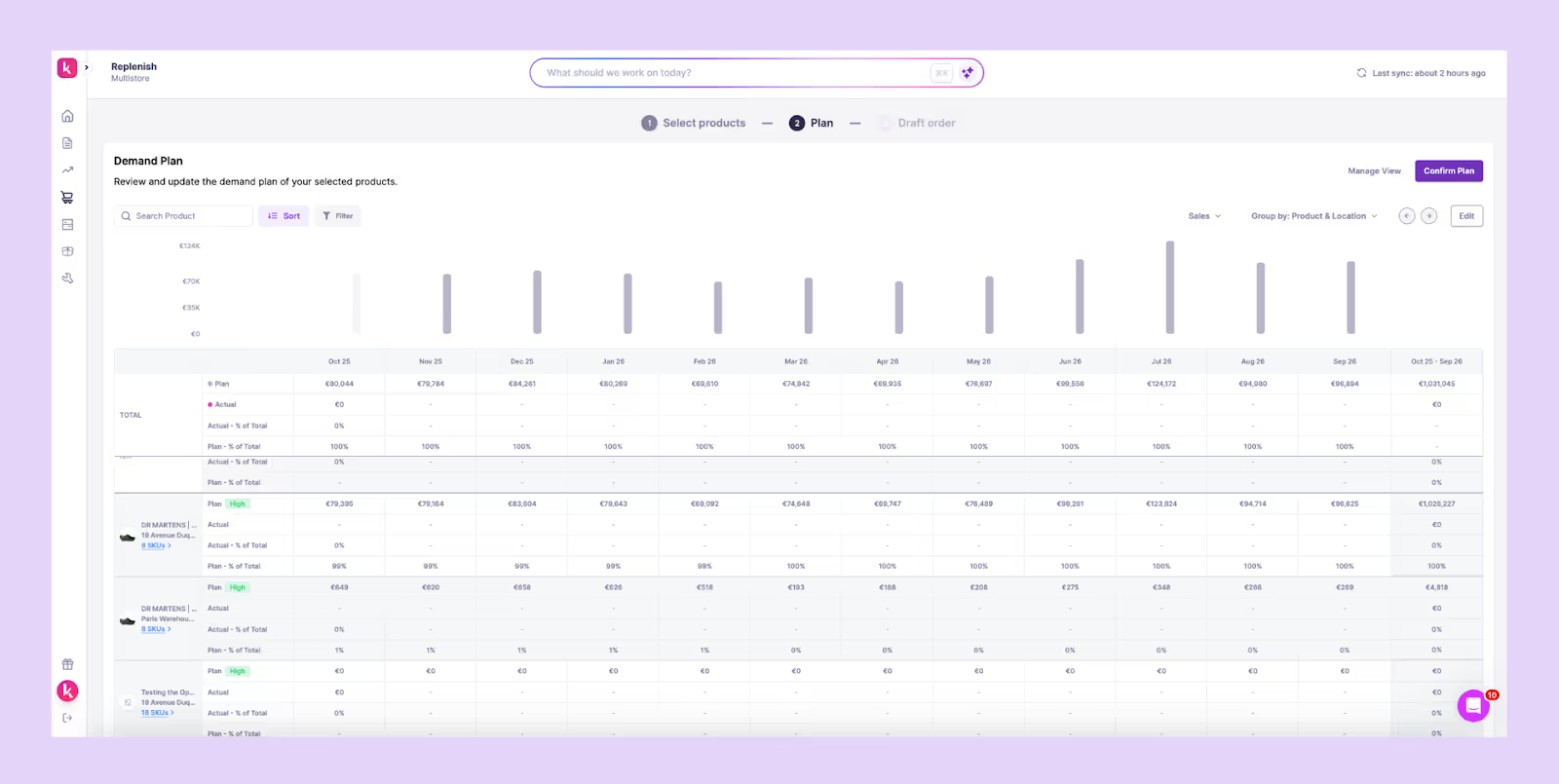
- Automated purchase orders and replenishment: Prediko recommends which SKUs need replenishment, when to reorder them, and in what quantities. It automatically creates purchase orders based on real-time data and updates reorder points and quantities continuously using your real-time sales and supplier timelines.
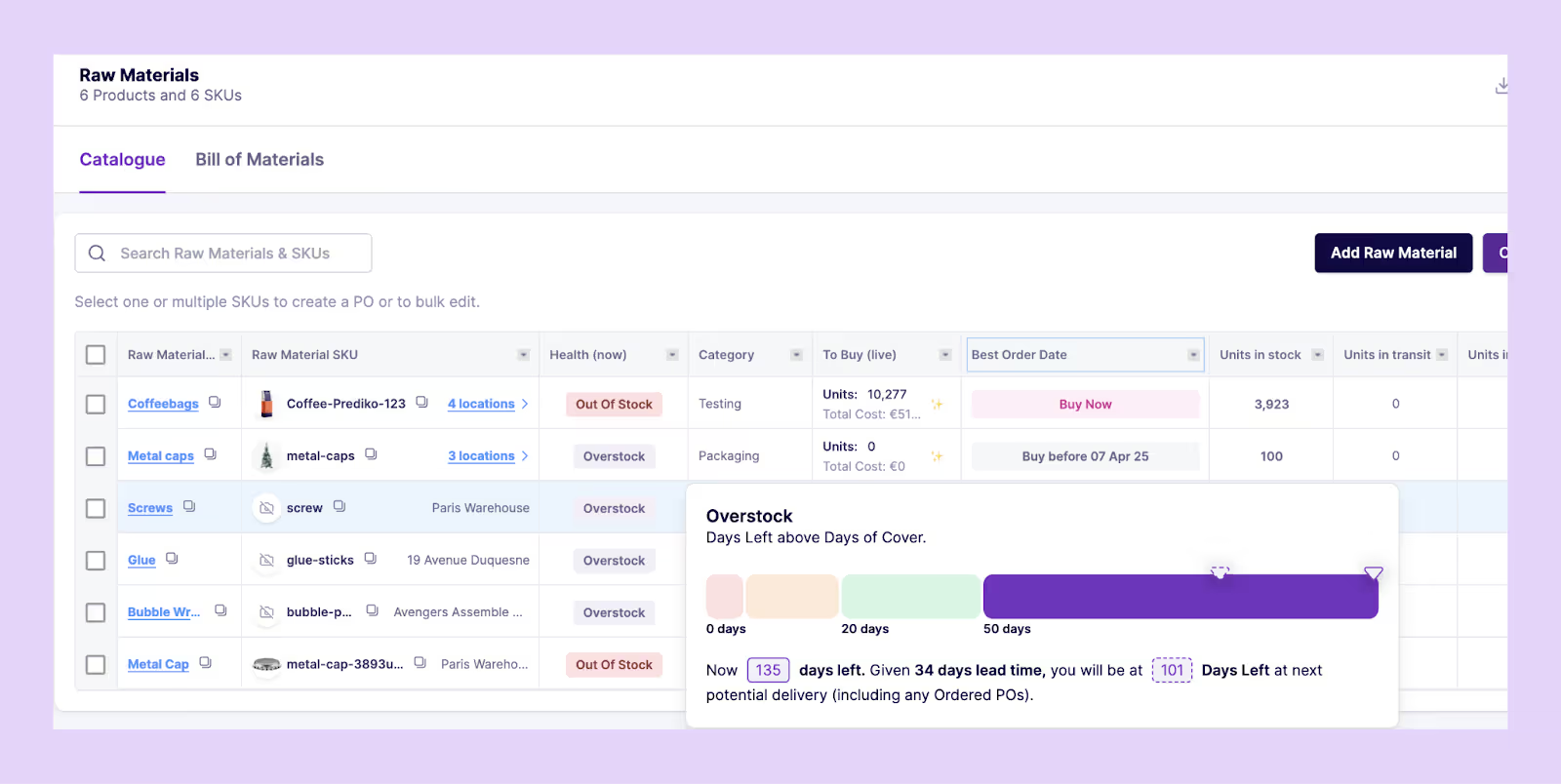
- Raw materials and bundle-level forecasting: If you sell kits/bundles or procure raw materials, Prediko forecasts raw material needs and bundle demand as well. This prevents shortages in SKUs that affect multiple bundles and keeps production running smoothly.
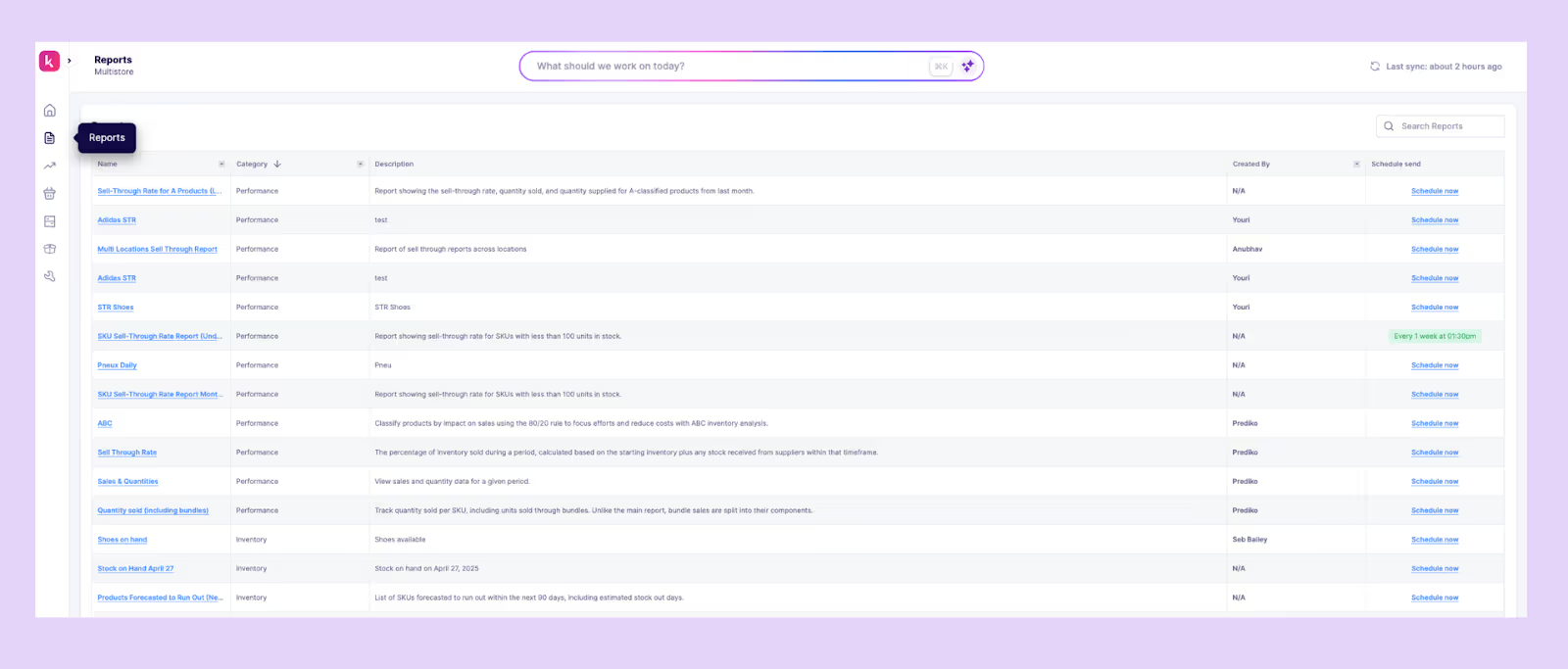
- SKU-level low-stock alerts and inventory reports: Prediko monitors every SKU and alerts you when levels drop below defined thresholds. Reports show where stock is running low, which items are overstocked, and how forecast accuracy is trending.
Prediko's AI agents further turn AI SKU optimization from a complex technical process into a clear, automated workflow built specifically for Shopify brands.
Switch to AI SKU Optimization for Higher Profitability
AI SKU optimization helps you strike the right balance between overstocks and stockouts.
By analyzing real-time sales data, supplier lead times, and demand trends, AI continuously determines which products deserve more investment and which should be scaled back. This allows brands to reduce excess inventory, improve turnover, and free up cash for growth.
Shopify merchants using AI-driven SKU optimization tools like Prediko have seen direct bottom-line impact –fewer stockouts, higher forecast accuracy, and improved cash flow.
Instead of reacting to inventory problems, your business stays ahead of them, optimizing every SKU for profit, not just availability.
Start your 14-day free trial with Prediko today and see how simple and reliable AI-driven inventory management can be.
Frequently asked questions (FAQs)
.avif)
Connected Inventory Shopify: What It Means and Why It Matters
Learn how connected inventory in Shopify works, why it matters, and which tools help sync stock across stores, bundles, and locations in real time.
According to a global survey by Fluent Commerce, 58% of retail and D2C brands operate with less than 80% inventory accuracy.
That means more than half are selling with broken stock data –missing sales, overselling, or sitting on inventory they can’t move.
For Shopify stores, this shows up as orders that can’t be fulfilled, bundles that draw from outdated counts, and team hours lost fixing sync errors.
The problem here isn’t just speed, it’s reliability.
We’ll show how connected inventory in Shopify solves this problem, along with what it is, how it works, and how to set it up properly with the right apps.
What Does it Mean to Have Connected Inventory in Shopify?
Connected inventory in Shopify means all your stock data, across products, variants, bundles, locations, sales channels, apps, and warehouses, is synced in real time and updated from a single source of truth.
Creating that single source of truth is one of the most effective ways to improve inventory visibility across your entire operation.”
Instead of each system (Shopify, 3PLs, warehouses, retail stores, marketplaces, apps) holding its own version of inventory, connected inventory ensures they all read, update, and adjust the same data instantly.
With connected inventory
- A sale on any channel updates stock everywhere
- Bundles pull from accurate component quantities
- 3PLs and warehouses update Shopify automatically
- Purchase orders and inbound stock flow back into the system
- Multi-location inventory stays consistent across all apps
Simply put, connected inventory means no more mismatched quantities, overselling, or manual reconciliation. It’s the foundation for reliability, speed, and accurate forecasting inside Shopify.
Why Connected Inventory is Crucial for Shopify Stores
Inventory errors cost sales, time, and customer trust, and when your stock data isn’t connected, those mistakes spread quickly across every channel.
Here’s why connected inventory in Shopify is important.
1. Prevent overselling and stockouts
A study found that around 40% of online sellers must cancel at least 1 in every 10 orders due to inventory mismatches.
When every sales channel, location, and app reads from the same real-time inventory data, you stop selling products you don’t actually have.
Connected inventory updates stock the moment an order is placed or fulfilled, reducing stockouts, preventing overselling, and protecting your revenue.
2. Save time and reduce manual work
When inventory isn’t connected, teams waste hours updating stock across spreadsheets, tools, and platforms. Every manual step adds delay and increases the chance of errors.
Connected inventory fixes this by updating everything in real time. Whether you sell, restock, or process a return, the change reflects across all channels instantly with no extra work.
3. Maintain consistency and fulfillment accuracy
When stock levels are aligned everywhere, fulfillment becomes more reliable. Orders flow to the right location, bundles pull accurate component quantities, and warehouse teams work with correct counts.
The result is fewer fulfillment mistakes, fewer customer issues, and smoother day-to-day operations so that what the customer sees matches what gets shipped.
Key Use Cases for Connected Inventory on Shopify
Connected inventory isn’t just about syncing numbers. It solves real problems for stores that sell across channels, work with partners, or manage complex setups.
Here’s where it makes the biggest difference.
1. Multi-store operations
Brands running multiple Shopify storefronts for different regions, customer segments, or sub-brands often sell the same SKUs across stores.
See how 4Endurance unified 10+ Shopify stores in Prediko to centralize sales and inventory reporting across a complex multi-store setup.
Connected inventory links each storefront to the same product catalog, so any sale, return, or restock updates inventory across all stores instantly.
This setup allows every store to run its own language, pricing, or promotions while pulling from a connected inventory stock source. Operations stay consistent behind the scenes without needing separate inventory tracking for each store.
2. Selling bundles
Stores selling bundles, kits, or multipacks built from products that are also sold individually need both to pull from the same inventory. A sale in one listing should update the other automatically.
Connected inventory handles this by linking SKUs across bundle and individual listings, keeping both accurate on the storefront without manual tracking or conflicting stock levels.
3. Working with suppliers, distributors, or retail partners
Retailers working with suppliers, distributors, or manufacturers often rely on third-party stock for fulfillment.
In these setups, inventory is synced directly from the supplier into Shopify, which then allows stores to show live stock, only accept orders for available items, and operate lean without storing excess product.
Connected inventory is essential here, especially for dropshipping, made-to-order, or distributed fulfillment models.
4. Multi-location fulfillment
When fulfilling from warehouses, retail stores, or 3PLs, inventory needs to stay consistent across locations.
Connected inventory keeps Shopify aligned with every fulfillment point in real time, ensuring accurate order routing, faster picking, and smooth fulfillment –without needing separate systems for each location.
How Connected Inventory Works on Shopify
Connected inventory relies on one core principle: every stock change updates everywhere instantly. This works through real-time data flowing across your stores, WMS, and other connected systems.
Here’s how that looks in practice.
1. A customer places an order
The moment someone buys a product, Shopify reduces the inventory for that SKU.
2. Stock levels update instantly
That change is picked up by the sync tool, which adjusts quantities across all connected stores, bundles, and listings.
3. The update reflects across systems
Every location, storefront, or listing linked to that SKU reflects the new count without delay.
4. Returns or restocks also trigger updates
If a product is returned or replenished, the system updates all linked quantities automatically.
Depending on how you’ve set up your sync, this can happen in one of two ways:
- One-way sync: Inventory flows from one source (the master store) to connected stores. Changes move in a single direction.
- Two-way sync: Inventory changes can come from any connected store, and the update flows both ways. Useful when stores operate independently but share stock.
To keep connected inventory running smoothly, here are a few terms you should know:
- Master store: The main store where inventory is managed. All others mirror this data.
- Child store: A store that reflects stock from the master. It doesn’t change inventory on its own.
- Product mapping: Linking products with different SKUs or names across systems. This ensures updates apply to the right item.
- Real-time sync: Changes reflect instantly without manual input. Tools like Prediko manage this automatically in the background.
Best Connected Inventory Solutions for Shopify
.avif)
When you’re managing multiple channels, bundles, or fulfillment locations in Shopify, you need an inventory tool that keeps everything aligned, and Prediko is built to do exactly that.
Prediko isn’t just an inventory sync app; it brings real-time sync, AI-powered demand and supply planning, inventory transfers, raw materials management, PO management, inventory agents, and multi-location control together in one platform.
Its key features include
- Real-time Shopify sync: Instantly updates stock across all Shopify stores, locations, listings, and variants with no delays
- Multi-store & warehouse inventory management: Keeps inventory consistent across regional stores, wholesale, sub-brands, and warehouses
- Bundle & component syncing: Ensures bundles, kits, and multipacks always pull from accurate component SKUs
- 100+ 3PL & WMS integrations: Syncs inbound and outbound stock from warehouses so Shopify always reflects the correct quantities
- Purchase order automation: Creates draft POs, tracks them, shares directly with suppliers, and syncs incoming inventory automatically
- AI-powered demand and supply planning: Forecasts demand based on past sales, seasonality, and growth to tell you what to order, when, and how much
- Stockout & overstock alerts: Surfaces fast-moving SKUs, low-stock risks, and aging inventory before they cause issues
- Raw materials management: Lets you forecast and manage raw material requirements in sync with finished goods demand
- Reports and analytics: Provides analytics on stock health, sell-through rate, dead stock, with the ability to schedule reports to be delivered to your inbox automatically
Prediko’s AI agent further expedites inventory management and execution by handling tasks, surfacing insights, and automating decisions in real time.
Beyond Prediko, here are other connected inventory solutions available for Shopify stores.
For a deeper comparison of inventory sync apps and how Prediko stacks up, check out this article.
How to Set Up Connected Inventory on Shopify Step-by-Step
This step-by-step setup will take you from a siloed Shopify setup to a fully connected system where SKUs, bundles, stores, and locations stay perfectly synced at all times.
Step 1: Prepare your catalog
Start by reviewing your entire product list in Shopify. Fix any duplicate SKUs or inconsistent naming across variants. This is especially important if products are sold both individually and in bundles.
Once SKUs are aligned, double-check that your stock levels match what’s physically available in each location.
If your store is already running, back up your product and inventory data before making changes. This gives you a clean baseline and avoids issues during the sync setup.
Step 2: Connect an inventory sync app like Prediko
Next, install Prediko from the Shopify App Store and follow the steps to connect your store. Once connected, Prediko automatically imports your product catalog, SKUs, and locations.
If you operate a 3PL or WMS systems, you can connect it through Prediko’s built-in integrations.
There’s no need to upload anything manually. Your Shopify data becomes the live source Prediko works with, so what you see in your store is what gets synced.
Step 3: Map products and locations
Inside Prediko, review how SKUs are mapped across listings and locations. Pay close attention to products that appear in more than one listing, such as items included in bundles or kits.
These need to share inventory so stock counts stay accurate. If you fulfill from more than one location, confirm that quantities are assigned correctly.
Step 4: Test with sample orders
Before going live, run a few test orders to check that the sync works. Place one for a standard SKU, one for a bundle, and one from a different fulfillment location. After each order, verify that inventory updates correctly in both Prediko and Shopify.
Then process a return or cancel an order to confirm that the stock gets added back as expected. Testing helps you catch issues early and ensures the system behaves as it should.
Step 5: Set alerts and reports
Once everything is set up, use Prediko’s inventory alerts to stay ahead of low stock across individual SKUs, bundles, or specific locations.
These alerts help your team act before inventory runs out. You can also schedule inventory reports to track movement over time. This gives you visibility without having to check everything manually.
Step 6: Go live and monitor
When everything is tested and alerts are active, activate sync across your full catalog. During the first few days, monitor orders, stock levels, and sync performance closely.
Prediko will now update inventory across stores, products, bundles, and warehouses in real time, keeping your counts accurate.
Common Connected Inventory Problems and How to Fix Them
Even with connected systems in place, inventory issues still show up in day-to-day operations.
Here are the most common challenges and how to fix them without slowing down your store.
1. Overselling after bundle orders
When bundles and individual SKUs aren’t connected to the same inventory source, a sale in one listing doesn’t update the other.
A bundle can sell out the last available unit while the individual SKU still appears in stock. This leads to negative inventory, fulfillment delays, and frustrated customers.
Solution
Use a connected inventory Shopify app that links bundles and their component SKUs so every order (bundle or individual) pulls from the same real-time stock. This ensures that if a component unit sells out, all related listings update instantly and prevent overselling.
Prediko automatically syncs bundles with their component SKUs, so any change in one reflects everywhere else.
Beyond syncing, Prediko also forecasts demand at both the bundle level and the child SKU level, combining the demand from individual sales and bundle sales into one forecast.
Based on this, it generates accurate purchase recommendations so you always order enough stock to fulfill both bundle and individual demand.
2. SKU mismatches across systems
SKUs that differ between Shopify, supplier catalogs, or connected apps cause sync errors. System can’t match orders to the correct product, and inventory fails to update accurately. This becomes harder to fix as your catalog grows.
Solution
Standardize SKU mapping across every system –Shopify, your WMS/3PL, supplier catalogs, and any connected apps.
When all tools reference the same identifier, inventory updates flow correctly without manual intervention. For larger catalogs, this often requires a one-time cleanup plus an automated mapping layer offered by Prediko that keeps everything consistent going forward.
3. Sync delays or missing updates
Not all tools update inventory in real time. Some push changes every few hours, which creates gaps in availability. This causes storefronts to show outdated data, especially during peak sales periods.
Solution
Switch to a real-time inventory sync like Prediko. It updates quantities instantly after every sale, return, or restock, so stock counts stay current.
4. Location-specific discrepancies
If you ship from multiple warehouses or retail stores but don’t track stock by location, you lose visibility into what’s available where. Shopify may assign orders to locations that are out of stock, leading to fulfillment errors.
Solution
Track and sync inventory at the location level so every warehouse, retail store, or fulfillment center reports its stock independently. Prediko tracks inventory across all locations as well as at the individual location level, so each sale updates the correct source.
Best Practices for Managing Connected Inventory on Shopify
Connected inventory only works if the data stays clean and the system is actively monitored. Following these practices helps prevent issues before they turn into bigger problems.
1. Regular SKU audits
Keep your Shopify SKUs consistent across all stores and systems. Duplicate SKUs, old product codes, or mismatched naming can break the sync.
Run regular audits to clean up inactive SKUs, fix formatting issues, and confirm each product is correctly mapped between Shopify and any external tools.
2. Monitoring and reporting
Just because a sync is running doesn’t mean it’s working as expected.
Set up basic monitoring to track inventory updates, failed syncs, or sudden stock level changes.
Look for patterns like negative stock or orders failing to assign a location. Reviewing inventory reports weekly can help catch small problems early.
3. Defining ownership
Someone on your team needs to own inventory accuracy. Whether it's ops, fulfillment, or IT, assign clear responsibility for setup, monitoring, and maintenance.
Shared tools often get ignored when it’s unclear who handles what. Ownership ensures someone’s watching the system and fixing issues fast.
4. Use alerts and automated reports
Don’t wait for a customer complaint to find out inventory is off. Use alerts to catch stockouts, overstocking, or sync failures in real time.
Prediko can send automatic reports to your inbox and low-stock alerts per location based on coverage, order frequency, and safety stock, giving your team enough time to restock or correct issues before they affect sales.
Migrating from Manual Inventory Tracking to Connected Inventory
Switching from manual inventory tracking to a connected setup doesn’t have to break your store. A phased approach keeps everything running while the new system goes live in the background.
1. Choose a central platform
Start by selecting where your inventory will live. This becomes your source of truth. For most Shopify merchants, it’s either the primary Shopify store or an inventory tool like Prediko. All other systems will pull data from this one place.
2. Migrate in phases
Don’t move everything at once. Begin with one sales channel, product group, or location. Set up the connection and monitor how it syncs with your central platform. This phased rollout helps isolate issues without affecting your full catalog.
3. Run parallel testing
Keep the old manual system running during migration. Track inventory in both systems for a short period and compare results. This helps confirm the sync works as expected without risking stock errors or fulfillment delays during the switch.
4. Use data checkpoints
Set checkpoints during setup, such as verifying SKU mappings, inventory counts, and location-level stock for data accuracy. Reviewing these checkpoints prevents sync errors later and ensures the system stays reliable before you shut off manual workflows.
Make Connected Inventory Work For You
Connected inventory isn’t just a backend upgrade; it’s how Shopify brands protect revenue, reduce errors, and scale without operational chaos.
When every SKU, bundle, store, and location stays perfectly in sync, your team spends less time fixing mistakes and more time growing the business.
Tools like Prediko take this even further by combining connected inventory with forecasting, PO automation, and AI-driven execution, so you’re not just syncing stock, you’re optimizing it.
Set it up once, keep your data clean, and let connected inventory handle the day-to-day. See how Prediko can help with a free 14-day trial.
Frequently Asked Questions (FAQs)
.avif)
What Is Inventory Management Predictive Analytics? [Full Guide]
Predictive analytics transforms inventory management by using AI and data to forecast future demand, anticipate stock needs, reduce stockouts and overstocks, and improve working capital, helping brands plan smarter and stay agile with real-time insights.
When Gareth Southgate, the Three Lions manager, wore a navy polka-dot tie at the Euro 2020, no one expected it to trigger a retail frenzy. Within days, demand for similar ties skyrocketed across the UK.
John Lewis reported that sales of its navy polka-dot tie doubled in a week, while TM Lewin saw a 250 percent increase right after the semi-final.
Moments like these show why traditional forecasting, based on past sales and gut instinct, can’t keep up with real-world unpredictability. Predictive analytics fills that gap by combining data, AI, and external trend signals to anticipate shifts before they happen.
We’ll explain what inventory management predictive analytics is, how it works, and how it helps brands plan smarter, stay agile, and avoid their own “polka-dot tie” moment.
What is Inventory Management Predictive Analytics?
Inventory management predictive analytics is the use of data, statistical models, and AI to forecast future inventory needs with greater accuracy.
It goes beyond traditional reporting by analyzing historical sales, seasonality, lead times, and even external factors like promotions or market trends to predict demand before it happens.
Instead of reacting to what’s already sold, predictive analytics helps brands anticipate what will sell, allowing them to stock the right products, in the right quantities, at the right time.
The result is fewer stockouts, less overstock, and smarter cash flow management across the supply chain.
Why Predictive Analytics is Important in Inventory Management and Forecasting
Acting after the fact often leads to costly mistakes. Predictive analytics in inventory management helps you
1. Reduce stockouts and overstocks
By studying patterns like sales velocity, lead times, and seasonality, predictive analytics anticipates demand well before it happens.
This prevents stockouts, where you lose sales because products are unavailable, and overstocks, where excess inventory ties up cash and storage space.
With accurate predictions, you can order just enough inventory to meet demand, reduce waste, and keep operations running smoothly.
2. Improve forecast accuracy
Traditional forecasting methods rely on historical data and static formulas, which quickly become inaccurate when trends shift.
Predictive analytics, on the other hand, learns dynamically from new data –sales patterns, returns, marketing campaigns, even weather and regional behavior.
This helps you plan purchasing and replenishment with confidence, reducing last-minute adjustments and ordering mistakes.
3. Optimize working capital
Inventory is one of the biggest capital assets in a product business.
Predictive analytics helps you align purchasing with demand so that every dollar in stock is working efficiently.
Instead of bulk-buying to “play it safe,” you maintain lean inventory while still meeting customer demand.
That directly improves liquidity and return on capital employed (ROCE).
4. Tackle operational challenges early
Most inventory issues, like supplier delays or unexpected demand spikes, are visible in data before they become visible in operations. Predictive analytics monitors lead times, stock levels, and PO performance to flag early warnings.
So when a manufacturer starts shipping late or a product suddenly gains traction from a viral post, your system alerts you ahead of time.
That allows you to course-correct with alternate suppliers or safety stock adjustments, avoiding last-minute firefighting.
5. Enable smarter, data-driven planning and forecasting cycles
Every forecasting cycle improves the next one.
Predictive analytics captures learnings from each plan-versus-actual comparison, refining assumptions over time.
Instead of static reorder points or once-a-quarter reviews, you get rolling forecasts that evolve with your sales patterns and marketing performance.
The result is a more agile planning process, one where marketing, finance, and operations align around the same data.
Data and System Requirements to Set Up Inventory Management Predictive Analytics
For predictive models to deliver accurate, timely insights, you need a foundation of complete, high-quality, and continuously updated data. Real-time data keeps predictions relevant as conditions shift across demand, supply, or operations.
1. Types of data you need
A predictive inventory model needs a mix of historical, operational, and external data to forecast accurately. The core inputs include
- Sales history: At least 12–24 months of transaction-level data to identify trends and seasonality
- Lead times: Supplier delivery timelines to forecast reordering needs accurately
- Promotional and marketing data: Campaign periods, discount intensity, and ad spend to correlate sales spikes
- Supplier and purchase data: Vendor reliability, MOQ limits, and past PO timelines
- Product attributes: Category, color, size, or material, since variants perform differently
- External factors: Seasonality, holidays, and market trends that influence demand
2. Cleaning and preparing your data
Before running models, data must be standardized, complete, and consistent. Common errors, like mismatched SKUs, missing lead times, or outdated product IDs, can distort forecasts.
Key preparation steps include
- Normalizing SKUs across Shopify, WMS, and ERP systems
- Filling missing values for supplier or lead time data
- Removing anomalies like one-off bulk orders or canceled transactions
- Ensuring timestamps are uniform (e.g., daily or weekly aggregation)
3. Integration with existing systems
Predictive models work best when integrated directly into your operational tools rather than sitting in isolation. The most effective setups connect with
- Shopify and POS for real-time sales and inventory data
- WMS platforms for warehouse-level visibility
- Marketing tools like Meta or Google Ads for campaign-driven demand shifts
Ultimately, AI predictive analytics for inventory management depends not just on algorithms but on data readiness and interoperability; how well your systems talk to each other and how cleanly they share information.
The more unified your data foundation, the sharper and more reliable your forecasts will be.
Step-by-Step Process for Implementing Predictive Analytics in Inventory Management
The real power of predictive analytics comes from structured execution. Here’s a breakdown of how to move from setup to measurable results.
Step 1: Identify goals and define key KPIs
Before implementing predictive analytics, the first step is to understand what you want to achieve.
Clear goals set the direction for the entire project and determine what data and models you’ll need.
You can start by focusing on measurable outcomes such as reducing stockouts, improving forecast accuracy, or optimizing working capital.
Once goals are established, define the key performance indicators (KPIs) that will track progress. Common KPIs include inventory turnover rate, stockout frequency, forecast accuracy, etc (more on this later.)
These metrics will act as your success benchmarks.
Step 2: Audit data quality and integrations
Before predictive analytics can deliver accurate insights, the data feeding it must be trustworthy. A data audit helps identify gaps, inconsistencies, and integration issues that could distort model outputs or lead to poor decisions.
Start by evaluating your existing data sources
- Check data accuracy and completeness: Look for missing fields, duplicate entries, and outdated information
- Assess consistency across systems: Ensure data formats, naming conventions, and measurement units align between WMS, POS, and inventory platforms
- Review integration points: Confirm that data flows smoothly between systems without lags or manual intervention
Once data is accurate and integrations are reliable, you establish a strong foundation for predictive modeling.
Step 3: Select the appropriate predictive model or software
With clean, connected data in place, the next step is to choose the right model or software for your predictive analytics. The goal is to match the tool’s capabilities to your inventory challenges, data maturity, and available resources.
Start by evaluating what type of model best fits your operations.
- Time-series models work well for stores with consistent, historical sales data and seasonal demand cycles
- Regression models are ideal for identifying relationships between variables like pricing, promotions, and demand
- Machine learning models like Prediko offer advanced AI capabilities, continuously learning from new data to improve forecast accuracy over time
Step 4: Run a pilot with a limited SKU set
Before scaling predictive analytics across your entire inventory, start small. Running a pilot program with a limited SKU set allows you to validate model performance, identify process gaps, and fine-tune parameters without risking large-scale disruption.
Select SKUs that represent a mix of product types: fast-moving, slow-moving, and seasonal items to test how the model handles different demand patterns. Check if it's producing accurate forecasts and sending replenishment alerts for timely action.
Use this stage to gather feedback from involved teams, such as operations, procurement, and demand planning. Their insights will help identify where the system performs well and where adjustments are needed, building confidence in the model’s accuracy.
Step 5: Measure success and scale across product categories
After the pilot, evaluate performance against your original KPIs. Look at forecast accuracy, stock availability, and inventory turnover to see where predictive analytics delivered measurable improvement.
Use the findings to refine model parameters and strengthen your process before scaling. Next, start expanding into additional product categories, applying what worked best during the pilot.
Keep all stakeholders aligned. Share results with supply chain, finance, and merchandising teams so they understand the value and stay engaged as the system grows.
Measuring ROI of Predictive Analytics in Inventory Management
A few key KPIs can help you measure how predictive analytics translates into real business outcomes. Here’s what each metric tracks and how it reflects your system’s impact.
1. Forecast accuracy (%)
When your predictive model is performing well, forecast accuracy is the first metric that reflects it. This shows how closely predicted demand matches actual sales.
Higher accuracy reduces both stockouts and overstocks, leading to fewer missed opportunities and less money tied up in excess stock.
2. Fill rate (%)
Next is the fill rate. A higher fill rate means more customer orders are fulfilled without delay.
Predictive analytics improves this by aligning replenishment schedules with real demand, strengthening customer trust and retention.
Enabling sales with data at this level means reps can close faster on high-demand items, reducing the gap between what operations knows and what the customer-facing team communicates.
3. Inventory turnover ratio
When forecasts are accurate, inventory moves faster.
A higher turnover ratio indicates products are selling efficiently and working capital is being put to use, not tied up in storage.
4. Carrying cost (% of inventory value)
Lower carrying costs are a direct result of accurate forecasting powered by predictive analytics.
By maintaining optimal inventory levels, you spend less on warehousing, insurance, and depreciation, freeing up cash for growth initiatives.
5. Stockout rate (%)
Predictive analytics helps anticipate demand spikes and reorder before they cause shortages.
A lower stockout rate reflects stronger supply continuity, better customer experience, and more accurate predictions.
Common Pitfalls in Inventory Management Predictive Analytics (and How to Avoid Them)
Even with the right tools and data, predictive analytics can fail to deliver results. Below are the most common issues you may face and how to avoid them.
1. Poor or inconsistent data quality
When data from different systems is incomplete or inconsistent, the model’s predictions become unreliable.
Missing sales history, duplicate entries, or mismatched product identifiers can skew predictions and lead to poor decisions.
Solution
- Regularly audit and verify all data sources to maintain accuracy and consistency
- Automate sync between connected systems to eliminate manual updates
- Standardize formats, remove duplicates, and use automated cleaning tools to keep data reliable and ready for analysis
2. Overfitting models leading to unreliable predictions
Overfitting happens when a model learns too much from historical data, performing well on past trends but failing on new scenarios.
This causes inaccurate forecasts when market conditions change.
Solution
To prevent overfitting, simplify your model and regularly validate it against unseen or real-world data.
Continuously retrain models with fresh data (turn on automatic sync) instead of relying solely on historical patterns, and use techniques like cross-validation and regularization to maintain reliability when market conditions shift.
3. Ignoring team training and adoption
Even the most accurate model will not be effective if teams do not understand how to use it. Lack of adoption often results in missed insights and inconsistent decision-making.
Solution
Train all relevant teams, from planners to buyers, on how to interpret and act on predictive insights.
Make analytics a part of daily workflows instead of a separate tool.
4. Not recalibrating models as product mix or seasons change
Demand patterns change constantly. If models are not updated to reflect new products, discontinued SKUs, or seasonal shifts, predictions quickly lose accuracy.
Solution
Schedule regular model recalibrations or plan refreshes.
Incorporate new data sources and adjust parameters before key seasonal cycles or product assortment changes to keep forecasts current and relevant.
How to Choose the Right Predictive Analytics Solution for Inventory Management
Choosing the right predictive analytics solution is important to achieve desired results. The best tools integrate easily with existing systems, scale with your business, and deliver insights your team can act on quickly.
What to look for
Focus on software or a solution that offers
- Accurate models that reflect real-time demand patterns
- Scalability to handle growing data and product lines
- Seamless integration with WMS, POS, and inventory platforms
- User-friendly dashboards that make insights easy to interpret
- Automatic updates or sync as new data becomes available
Questions to ask vendors
Once you’ve shortlisted your options, it’s important to evaluate vendors carefully. During the evaluation phase, make sure to ask the following questions
- Do you provide pilot testing before full rollout?
- Is your pricing transparent, with no hidden fees?
- What customer support and onboarding assistance are included?
- Can your platform integrate with our existing systems easily?
- How often are models retrained or improved?
Selecting a platform that combines accuracy, scalability, and ease of use will help you achieve measurable, long-term results.
Prediko for Predictive Analytics in Inventory Management
Predictive analytics is most effective when it’s seamlessly integrated with real-time inventory data, and that’s exactly what Prediko does.
Built natively for Shopify, Prediko uses predictive AI algorithms to help brands plan smarter, buy better, and operate with complete visibility across their supply chain.
Here’s how Prediko brings predictive analytics to life for growing Shopify brands:
- AI-powered demand forecasting: Prediko’s AI analyzes historical sales, seasonality, sales velocity, and your inputs to generate SKU-level forecasts. These forecasts adapt automatically as new trends or data emerge, keeping predictions accurate and timely.
- Automated purchase order recommendations: Using forecast data and supplier lead times, Prediko predicts when and how much to reorder for each SKU as well as bundles. It then automatically generates and sends POs, helping you restock on time.
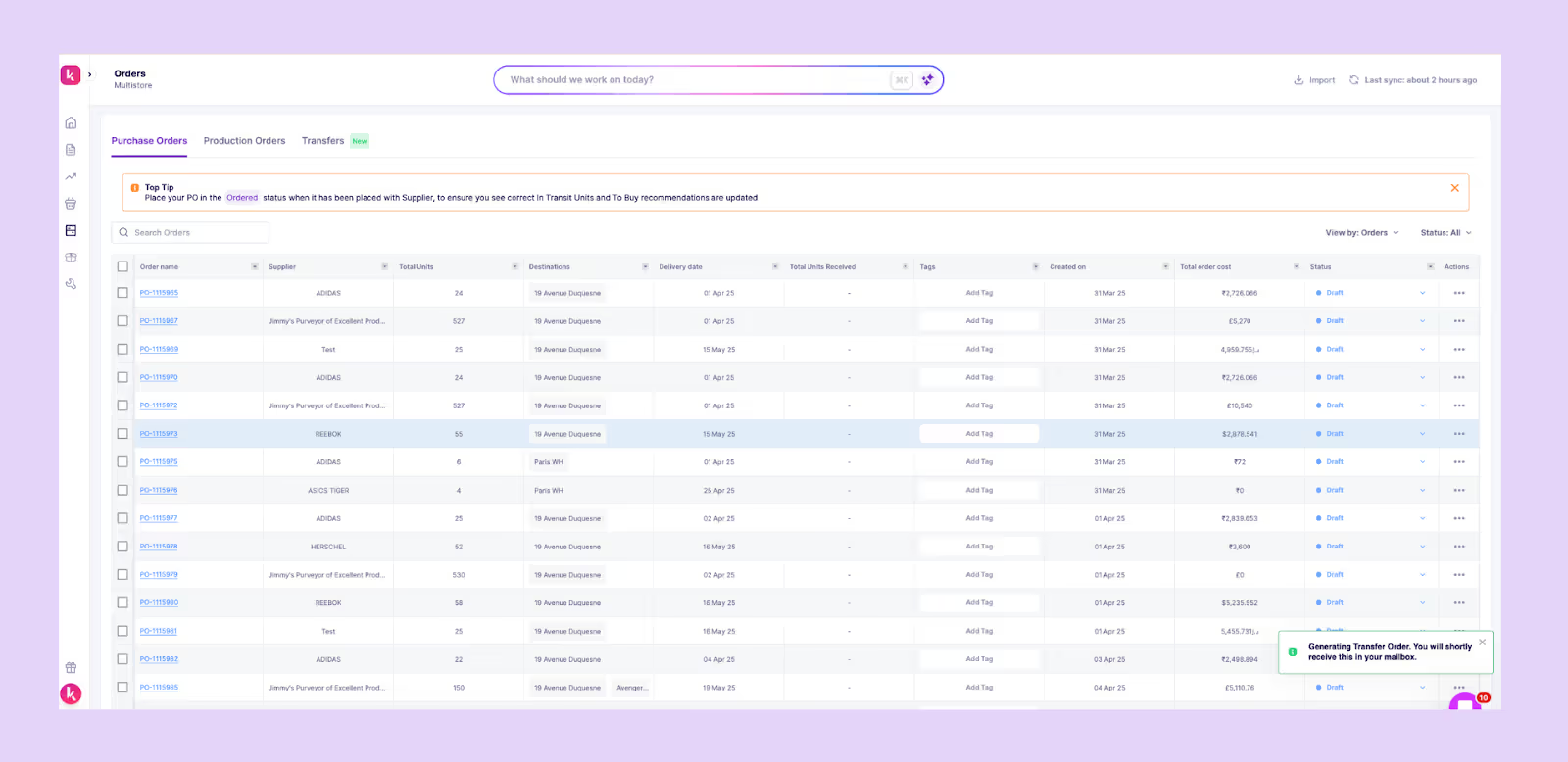
- Raw material & production forecasting: For in-house manufacturers, Prediko extends predictive analytics to raw materials. It calculates upcoming material requirements based on finished goods demand for smooth production.
- Smart replenishment alerts: Get notified before issues arise. Prediko flags low stock, overstock, or at-risk SKUs early, letting teams act before it impacts sales or working capital.
- Reporting and analytics dashboard: Prediko turns raw data into actionable reports, from ABC analysis and sell-through rates to stock coverage and COGS trends. You can also schedule these reports to be delivered to your inbox at set times.
- 100+ integrations: Prediko connects seamlessly with WMS, 3PL, and other inventory tools to centralize your inventory data so that every update happens automatically, eliminating manual syncs and data gaps.
Prediko turns predictive analytics into practical, everyday decision-making. Instead of reacting to sales trends after they happen, Shopify brands can anticipate what’s next, keeping inventory lean, cash flow healthy, and growth sustainable.
Start a free 14-day trial and experience the Prediko difference.





.avif)