Shopify Purchase Order Management
Manage Shopify purchase orders more efficiently by improving supplier coordination, ordering accuracy and stock receiving, while keeping replenishment decisions aligned with real inventory needs.
.avif)
AI Purchase Orders: A Complete Guide for Shopify Stores
Go from manual reordering to a fully automated process. Understand how AI purchase orders work, their benefits, and why top retailers are switching now.
There’s a moment that almost every operations team recognises. A purchase order gets buried in someone’s inbox, a supplier chases for confirmation, and another team is stuck waiting to move forward.
On its own, it’s a small hiccup. But when you’re managing dozens or hundreds of POs each month, those hiccups become costly delays.
AI purchase orders are designed to eliminate exactly this kind of hidden friction.
We’ll break down how AI purchase orders work, the benefits they bring, and why they’re quickly becoming essential for teams.
What Is an AI Purchase Order?
An AI purchase order (AI PO) is a system that automatically creates, tracks, approves, shares, and manages purchase orders based on real-time inventory data, sales trends, and supplier lead times.
Instead of relying on manual calculations or spreadsheet tracking, AI POs use algorithms to predict when stock needs replenishing and generate accurate orders for each SKU, before a shortage or overstock occurs.
Its core components work together to replace manual data entry and static rule-based workflows
- OCR: Converts PDFs and scanned files into machine-readable text
- Machine learning models: Identify and extract key fields such as SKUs, quantities, prices, dates, and supplier details. They can also suggest optimal order quantities and timing.
- Validation logic: Verifies extracted data against business rules, historical trends, and required field criteria to ensure accuracy.
- Integration layer: Sends the validated data to suppliers, ERP, WMS, or procurement platforms
How AI Purchase Orders Work in Practice
Before we break down the steps, let’s take a quick look at how purchase orders actually work in practice.
1. Data capture
The system begins by capturing incoming purchase orders from multiple sources, such as emails, PDF to link shares, scanned documents, or system uploads. Using OCR (Optical Character Recognition), it converts these files into machine-readable text that can be analyzed automatically.
The system turns all of these into a clean digital input, so the next steps never depend on a single format or layout.
2. Intelligent extraction
Once the document is in the pipeline, the system reads it and identifies the fields you care about. OCR converts the visuals into text, and machine learning models determine which text belongs to which field.
A simple scenario explains it well. One supplier labels a column as “Qty”, another uses “Units Ordered”, and a third prefers “Quantity”. The model learns these patterns and maps them to the same internal field. The same happens for SKUs, dates, totals, and other common elements.
3. Validation and exception handling
Now that AI in purchase order data extraction is implemented, the system validates it against pre-defined business rules, historical trends, and mandatory field requirements. When something doesn’t align, it doesn’t fail silently; it surfaces as a clear exception.
Any discrepancies, like missing data, incorrect SKUs, unfulfilled MOQ, or pricing mismatches, are flagged for quick human review. This ensures high accuracy without slowing down the process.
4. Learning from historical POs
Every correction or approval helps the system learn. Over time, it recognizes recurring suppliers, common field formats, and ordering patterns, reducing friction in future POs and lowering exception rates.
5. Integrating into your operational systems
Finally, the validated data flows into connected systems such as ERP, WMS, or supplier platform, and this is where the real impact shows.
Clean, verified PO data moves through your operations with minimal manual effort, enabling automatic follow-up actions like updating stock levels, notifying suppliers, or initiating an invoice.
The result is a faster, more reliable procurement flow that runs smoothly end to end.
Business Benefits of AI Purchase Orders
Before you invest in any operational technology, it’s worth understanding how it actually changes the day-to-day work of your Shopify store. AI purchase orders deliver several advantages that teams notice quickly.
1. Reduced processing time, errors, and operational costs
AI removes the slowest parts of PO handling. Manual data entry, template setup, and back-and-forth corrections are replaced with automated extraction and smarter validation. This shortens processing cycles and lowers labor costs.
Fewer manual touches also mean fewer mistakes, which reduces rework and prevents issues from spreading into receiving or accounting.
2. More scalability
As order volumes grow, traditional workflows often can’t keep up. Teams either fall behind or have to add more people just to manage the load.
AI purchase order systems scale effortlessly, whether you’re processing fifty purchase orders a week or several thousand a day; they handle variations in format and volume without the need for extra headcount.
3. Real-time visibility
With every PO digitized and centralized, you get real-time visibility into the status of every order, from creation to fulfillment.
Instead of relying on manual updates, digging through folders, or waiting for supplier confirmations, the system continuously tracks each PO as it moves through your workflow.
4. Improved supplier relationships
When errors decrease and processing becomes faster, suppliers feel the difference. Orders are acknowledged sooner, mismatches decline, and disputes take less time to resolve.
The consistency of AI purchase order handling helps both sides avoid unnecessary delays, which leads to smoother communication, fewer disputes, quicker confirmations, and more trust built over time.
Key Features of an Effective AI Purchase Order System
Choosing the right AI purchase order tool can define how efficient your operations become. Here’s what to look for.
1. Pre-trained PO models
Strong Gen AI purchase order tracking systems come with models that already understand common PO structures, formats, and field types. This reduces setup time and delivers accurate extraction from the start.
Pre-trained models usually include:
- Recognition of standard PO fields
- Familiarity with common supplier layouts
- Support for multiple document formats
- Handling of noisy scans or low-quality files
2. High field level accuracy
Extraction quality determines whether your team can trust the output.
Look for AI purchase order generators that reliably capture SKUs, quantities, pricing, taxes, dates, delivery details, and other important fields.
Higher accuracy keeps exception volume low and eliminates downstream correction work.
3. Human-in-the-loop validation
Even the most advanced AI needs occasional human oversight. A built-in validation layer lets team members review flagged entries, correct anomalies, and feed those learnings back into the model, improving accuracy over time without slowing down the process.
4. Clear exception management
Strong AI purchase order automation agents surface issues with context so reviewers can act quickly. Instead of vague warnings, you want structured, actionable signals.
Look for
- AI purchase order matching, i.e., visibility of the original text and extracted value
- Clear explanations for each exception
- Prioritized review queues based on risk
- Simple actions to approve, correct, or escalate
5. API access and ERP connectors
Integration is what turns automation into impact. Look for AI purchase order automation systems with robust APIs and ready-made connectors for ERPs, WMS platforms, and procurement tools. This ensures validated PO data flows seamlessly across your tech stack in real time.
6. Usability for daily users
Interface needs to work for the people who use it every day. An AI purchase order tracking system that is easy to navigate improves adoption and lowers training requirements.
A few usability traits include
- Fast approval actions
- A clean, uncluttered review screen
- Clear field highlighting for corrections
- Role-based views for procurement, receiving, and finance teams
7. Compliance and data security
Purchase orders contain sensitive information. The platform should include encryption, access controls, audit trails, and support for the compliance standards your industry requires. Strong security protects supplier relationships and internal data.
Creating an AI Purchase Order: Step-by-Step
Implementing AI purchase order processing completely typically takes 8–12 weeks. The goal is to set up the system, train it on your data, connect it to your existing tools, and measure performance against clear success metrics.
Here are the steps involved.
Step 1: Start with discovery and define success
Begin by getting everyone aligned on what you want AI to achieve. You, your AP manager, your IT lead, and your data analyst should sit together and map out your goals, the PO formats you handle, and the systems that need to connect.
This is also where you define the metrics that will tell you whether the rollout is working. Processing time, exception rate, and field accuracy are usually the best starting points. With these agreed upfront, the rest of the implementation stays focused and structured.
Step 2: Set up a focused pilot
Instead of launching everything at once, choose a small group of suppliers or a specific PO type to test first. This lets you see how well the model recognizes your fields, how it handles supplier variations, and how the workflow feels in real.
During the pilot, you are not trying to scale. You are trying to learn. Pay attention to the types of exceptions that surface and how comfortable your reviewers are with the interface and review process.
Step 3: Prepare and refine your training data
Now that the pilot is running, you can strengthen the model by cleaning historical POs, reviewing field mappings, and validating your business rules.
Your data analyst plays a big role here, making sure the samples are accurate and representative of real supplier formats. The cleaner the data, the faster the model adapts and the fewer unnecessary exceptions you’ll see.
Step 4: Connect your systems
Once the model is performing well in the pilot, it is time to integrate with your ERP, WMS, or procurement tools. IT handles the setup, API access, and testing to make sure data flows cleanly into downstream systems. This is the point where the AI moves from a testing environment into your actual operational workflow.
Step 5: Roll it out across more suppliers
When the pilot feels stable, expand gradually. Bring in more suppliers, more PO types, and higher volume.
You will notice that as the system encounters more documents, its accuracy improves, and reviewers spend less time correcting fields. This stage turns AI from a controlled experiment into a core part of your workflow.
Step 6: Monitor results and keep tuning
Even after rollout, improvement continues. Track your success metrics, monitor exception trends, and use reviewer feedback to adjust rules as suppliers change their formats.
Think of this as ongoing tuning, not constant fixing. The goal is to help the model keep learning so your team experiences fewer interruptions over time.
Measuring ROI from AI Purchase Orders
To understand the financial impact of AI tools for purchase order approval & automation, break ROI into three parts: time saved, errors avoided, and software cost. This gives you a simple, repeatable framework for evaluating value.
A common formula many teams use is: (manual effort saved × hourly rate) + reduced errors − software cost
This captures both productivity gains and the reduction in costly mistakes.
Here’s how to calculate each component:
1. Manual effort saved
Start with the baseline effort required to process POs today
- Average minutes spent processing a single PO
- Number of POs processed per month
- Expected time reduction after automation
- Hourly rate of the team handling POs
Formula: time saved per month × hourly rate
2. Reduction in errors
See how AI improves purchase order accuracy. Identify the cost of typical PO errors, such as
- Incorrect SKUs leading to returns or reships
- Price mismatches
- Receiving delays
- Accounting reconciliation time
Formula: average cost of an error × expected reduction in error volume
3. Software investment
Include subscription fees, onboarding, and internal training time
4. Final ROI
Combine all three: (Total time savings + Total error cost savings) − Total software cost
This gives you a clear number of what AI purchase order automation returns to the business.
Common Pitfalls When Adopting AI Purchase Orders
Even with the best AI tools for Shopify, teams can face challenges that slow adoption or reduce accuracy. Here are the most common issues and how to avoid them.
1. Poor training data
When the data used to train or refine your model is incomplete or inaccurate, extraction quality drops. Missing fields, inconsistent SKU formats, or outdated supplier information can reduce model confidence and increase exceptions.
Solution
- Audit and clean your item master and supplier data before deploying AI
- Standardize naming conventions for SKUs, units, and pricing
- Remove duplicates and update fields that frequently cause mismatches
2. Weak field mapping
If fields are not mapped correctly during setup, the model struggles to align extracted values with your internal structure. This can lead to misplaced SKUs, incorrect prices, or data landing in the wrong fields.
Solution
- Review initial field mappings carefully during onboarding
- Validate sample POs from multiple suppliers to confirm accurate alignment
- Adjust mapping rules as the model encounters new formats
3. Skipping pilot phases
Jumping straight to full deployment without a pilot can create confusion and unnecessary exceptions. A controlled rollout helps your team understand how the system behaves with real POs and gives the model time to learn.
Solution
- Start with a focused group of suppliers or PO types
- Monitor accuracy, exception rates, and reviewer feedback
- Expand gradually once performance stabilizes
4. Mishandling exceptions
Ignoring exception workflows or allowing unresolved errors to pile up can undermine trust in AI purchase orders. When exceptions are not reviewed promptly, the model misses valuable signals that can improve future accuracy.
Solution
- Set clear guidelines for reviewing and resolving exceptions
- Route exceptions to the right teams with priority levels
- Use patterns from past exceptions to refine validation rules and improve model performance
Choose Prediko for AI Purchase Orders
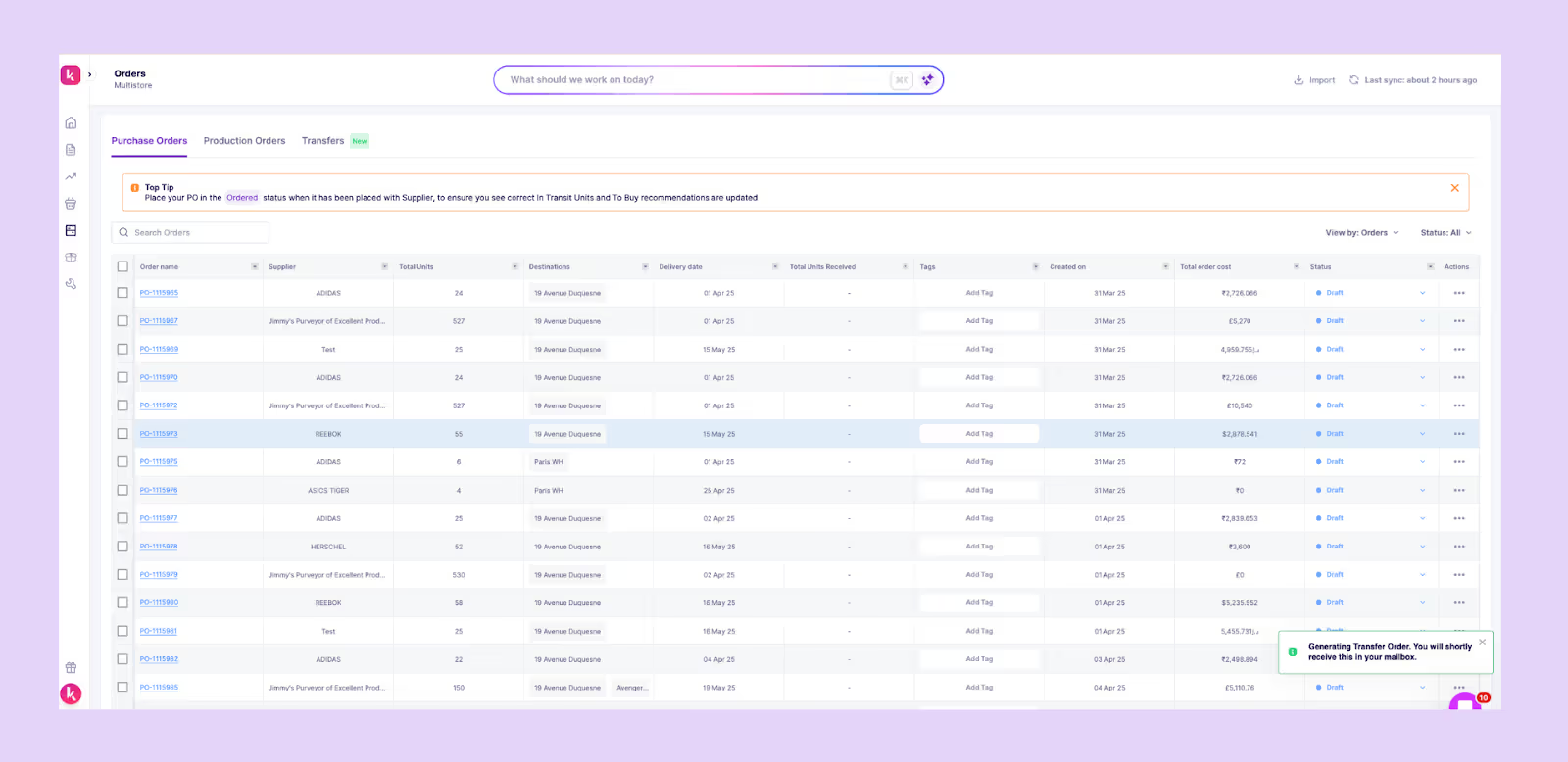
Prediko brings intelligence, accuracy, and speed to every stage of your purchase order workflow.
Instead of managing POs manually or relying on rigid templates, Prediko automates the process, powered by real-time inventory insights and an AI model trained on millions of SKUs across industries.
Here’s what makes Prediko’s AI purchase orders a smarter choice
1. AI-generated purchase orders: Prediko’s AI automatically recommends what to order and when, using live sales, stock levels, lead times, and safety stock rules. With a single click or through its AI agent, you can generate a PO in seconds with all fields pre-filled.
2. Real-time inventory sync: Your POs are always aligned with current inventory across warehouses, stores, and channels. Every recommendation reflects your latest stock position and incoming POs.
3. Supplier-aware recommendations: Prediko learns each supplier’s MOQs and lead times, and case packs, generating POs that fit the way your supply chain actually works.
4. Built-In validation and exception control: Every AI-generated PO goes through checks for SKUs, quantities, pricing, MOQs, and timelines. If anything looks off, it’s surfaced clearly for quick human review.
5. One-click approvals: Approve, adjust, or regenerate POs in seconds. Prediko turns purchase planning from a weekly chore into a fast, controlled workflow.
6. Automated sending and tracking: Once approved, POs can be sent directly to suppliers and tracked through fulfilment. No more inbox-hunting or lost documents.
7. Integrations with your entire stack: Prediko offers 100+ integrations with ERPs, 3PLs, WMS systems, and accounting tools, ensuring your PO data flows cleanly across operations, finance, and forecasting.
Ready to give it a try? Start your 14-day free trial with Prediko and see how simple, flexible, and dependable AI purchase order automation can be.
Frequently Asked Questions (FAQs)
.avif)
Best Purchase Order Management Shopify Apps. Learn Why Prediko is No.1
Get the list of the best purchase order management apps on the Shopify App store.
A simple search for "purchase order management apps" within the Shopify App ecosystem throws up 1000+ options. To help you avoid the process of trying out all the apps, we tried out all the apps and compiled a list of the best Purchase Order Management Shopify Apps.
These Shopify apps have been carefully selected based on their features, user reviews, and overall performance. Whether you're a small business owner or a large enterprise, these apps streamline your entire purchase order management system workflow. At Prediko, we believe that we have created a Shopify app that caters to both SMBs as well as large D2C brands on Shopify for creating, tracking and managing purchase orders. That’s why we have kept ourselves at the top of the list.
No. 1 👉 Prediko's Purchase Order Management App
TL;DR: Best for end-to-end Shopify PO workflows—create, track, and receive POs with built-in recommendations and visibility. Prediko is designed for D2C brands managing complex inventory and production processes.
4.9 ⭐ (250+ Reviews on Shopify Store)
Here is a quick video walkthrough of Prediko
Features that set apart Prediko from rest of the Purchase Order Management apps in the Shopify ecosystem
- All existing POs are listed and grouped into three categories- Created, Ordered and Received.
You can also import your POs from an external system - Create a new purchase order in just 2 steps. Search for your product, select your SKU and create your draft order.
- Prediko generates a recommended units to order for your product.
- See partially received POs to see what are the units you have recieved or how many units are in transit.
- Weekly insights on how many POs are right now open, late or due for delivery.
- Manage multiple suppliers per SKU. Assign several suppliers to one product, each with its own lead time and pricing
Explore Case Studies of Top Ecommerce Brands Successfully Managing Their Shopify Inventory with Prediko
- How Kimaï saves 10 hours/week on Inventory management?
- How Sync Protein saves 10 hours per week?
- How Azio Beauty improved inventory operations & NPS?
A good purchase order feature management can also help you to create a great procurement plan for your Shopify brand. But to truly optimize procurement, you need inventory purchasing tools that go beyond order creation — offering demand-driven recommendations, stock visibility, and centralized control over what, when, and how much to buy.
Comparison of the Top Purchase Order Management Apps
2. Auto Purchase Orders
TL;DR: Ideal for straightforward PO creation and supplier management. Auto Purchase Orders centralizes your PO operations and lets you forward orders directly to vendors.
Auto Purchase Orders helps you to create, manage, email, and track all of your purchase orders in one place.
Main features of this Shopify app
- This app makes it straightforward to receive inventory from your POs
- It allows brands to manage suppliers or vendors
- Forward your POs straight to your suppliers via email
Also Read: Multi-Store Inventory Management apps for Shopify brands.
3. Ultimate Purchase Orders
TL;DR: Suitable for brands seeking advanced PO customization and supplier coordination. This app covers everything from dropshipping to production orders and inventory tracking.
Ultimate Purchase Orders helps you to create, manage, send & track purchase orders (POs) with easy efforts
Main features of this Shopify app
- Brands easily streamline their purchase order management process.
- Create professional purchase orders and packing slips, run dropshipping, manage suppliers, and receive incoming inventory all in one app
- Additional features such as email sending, inventory tracking, and customizable templates
In addition to PO management, brands can also create and manage Production orders using the Raw Materials Feature within Prediko.
.png)
4. Full Shelf Purchase Orders Shopify App
TL;DR: Designed for fast and efficient PO creation tied directly to products and suppliers. Automatically restocks inventory on PO receipt.
Create purchase orders directly for your products. Save time receiving inventory with just a few clicks.
Main features of this Shopify app
- Full Shelf Purchase Order management allows for creation and sending of purchase orders for your suppliers.
- Automatically restock inventory quantities when a purchase order is received
- Get the ability to customize purchase orders (POs) and create POs directly from Shopify orders.
Related Reads: Best Raw Materials Management Shopify Apps for D2C Brands in 2025
5. Purchase Management Shopify App
TL;DR: Perfect for assigning suppliers to products and managing incoming shipments. Lets you track POs, set quantity limits, and control supplier approval.
Purchase management Shopify App helps you to add multiple suppliers. Assign products to suppliers & request purchase orders from them.
Main features of this Shopify app
- This app helps D2C brands to manage purchase orders and incoming shipments.
- Add & assign suppliers and set quantity limits for purchase orders.
- Track purchase orders in transit and suppliers can accept or reject purchase order requests.
6. StockSavvy Barcode Scanning
TL;DR: Best for barcode-based inventory teams needing PO generation and label printing. Highlights low inventory and top sellers in real-time.
This Shopify app helps you to scan barcodes, create purchase orders and print labels.
Main features of this Shopify app
- Create & track your purchase orders.
- The software provides a dashboard displaying low inventory and top-selling items.
- Allow brands to create purchase orders, and print product labels, improving the efficiency of inventory management and purchase ordering processes.
7. Inventory Planner Forecasting
TL;DR: Excellent for brands focused on demand forecasting and PO generation. Automates purchasing decisions with customizable order workflows.
Inventory Planner app can help you create, track and manage purchase orders within Shopify.
Main features of this Shopify app
- Customizable purchase orders for D2C Shopify brands
- Send your purchase orders and production orders via email
- Save time when you are looking to create purchase orders
Want a deeper look? See how Inventory Planner forecasting works for Shopify brands.
8. Purchase Order Automation
TL;DR: Ideal for automating POs via FTP workflows. Supports supplier-level order splitting and PO review before placement.
This app helps in having a purchase order workflow for your Shopify D2C store
Main features of this Shopify app
- Forward your purchase orders to suppliers
- Hold incoming orders and review them before placing a purchase order.
- Place purchase orders via FTP
List of the free Shopify Purchase Order Management Apps
1. Easy Purchase Orders
TL;DR: Suitable for stores offering PO options to customers during checkout. Draft orders are saved directly in Shopify with customizable PDF and email templates.
This app enables your customers to create professional purchase orders within Shopify.
Main features of this Shopify app
- This app allows businesses to add a purchase order option to their cart page for customers.
- Purchase orders are saved as draft orders directly inside Shopify admin.
- The Shopify app allows for complete customization of purchase order PDF and email templates.
2. Mimoran: Purchase Orders Plus
TL;DR: Great for manual PO creation and restocking across multiple Shopify locations. Allows partial receiving and easy inventory updates.
This Shopify app helps D2C brands create purchase orders (PO) & restock inventory.
Main features of this Shopify app
- This app enables you to receive purchase orders partially or fully
- This Shopify app allows manage inventory in multiple locations
- It is straightforward to create manual purchase orders for suppliers and restock inventory.
3. Purchase Order Automation
TL;DR: Tailored for rule-based automation using FTP/XML/CSV. Useful for brands needing hands-free PO creation by supplier.
Main features of this Shopify app
- Place purchase orders via FTP (place XML, TXT or CSV files on a FTP server)
- Split orders up based on the supplier of the product.
- Create automation workflows
Ending our review of Shopify's premier purchase order management apps, we strong recommend the use of the right software in enhancing your brand's ability to order, track, and manage purchase orders within Shopify itself.
It's also important to find the right Shopify app to forecast your inventory to meet the requirements of your brand. Our guided onboarding is designed to address your D2C brand's purchase order management problems effectively.
Frequently Asked Questions
.avif)
How to Send Orders to Suppliers on Shopify?
Streamline the process of sending orders to suppliers on Shopify efficiently with practical steps and tips.
Purchase orders are crucial to running an online (or retail) store. It ensures that stock levels never drop below demand and that customers are satisfied with the store. For Shopify merchants, sending orders to suppliers varies widely—ranging from manual spreadsheets to advanced automated tools.
Whether you're a small business owner or a growing e-commerce empire, you’re leaving money on the table with bad planning. Every year businesses lose a trillion dollars from inventory distortion due to bad planning.
And purchase order management is at the heart of it. Most businesses take a reactive rather than a proactive approach with their order management system. The right purchase order management process will save you time, reduce errors, and improve supplier relationships:
- Build an accurate supply plan with historical data and demand planning instead of guestimates
- Use data driven buying- analyse trends, seasonality to optimize for your goals.
This guide will walk you through different methods of sending purchase orders in Shopify—from manual approaches to seamless automation that helps you take a more proactive approach and scales with your business.
Step-by-Step Guide: How to Send Orders to Suppliers on Shopify?
Scenario #1: Using Spreadsheets
You’ve started a side business on Shopify OR are testing the waters before you go big. You have a few product variants and one or two suppliers.
At this stage:
1. Manual stock takes
You rely on Shopify’s inventory management system to track inventory. Because of its limited features, you need to perform manual stock takes and update inventory through the admin login in your store.
2. Use templates to create orders
Whether it is a basic, dynamic or minimal purchase order, you can find free order templates online to create orders and create a standardized structure for all your supplier communication.
3. Mail suppliers
Since Shopify doesn’t have an inbuilt mail system, you need to rely on third-party email like Gmail and Yahoo or messaging apps like Whatsapp and Telegram to send your orders. You can even use project management tools like Asana and Slack if you want a more professional setup.
Due to the scale of things a simple spreadsheet suffices when you need to track inventory or determine how many items to purchase. However, as your business grows, this manual approach can become time-consuming and prone to errors, making scaling your operations a challenge.
Scenario #2: Using Inbuilt Features to Send Orders to Suppliers on Shopify
As your product range expands and supplier relationships multiply, Shopify's built-in purchase order management system becomes increasingly valuable. It offers a centralized platform to:
- Create and manage purchase orders
- Track inventory levels
By leveraging Shopify's inbuilt tools, you can streamline parts of your supply chain management. Here’s how you can create and manage orders for suppliers:
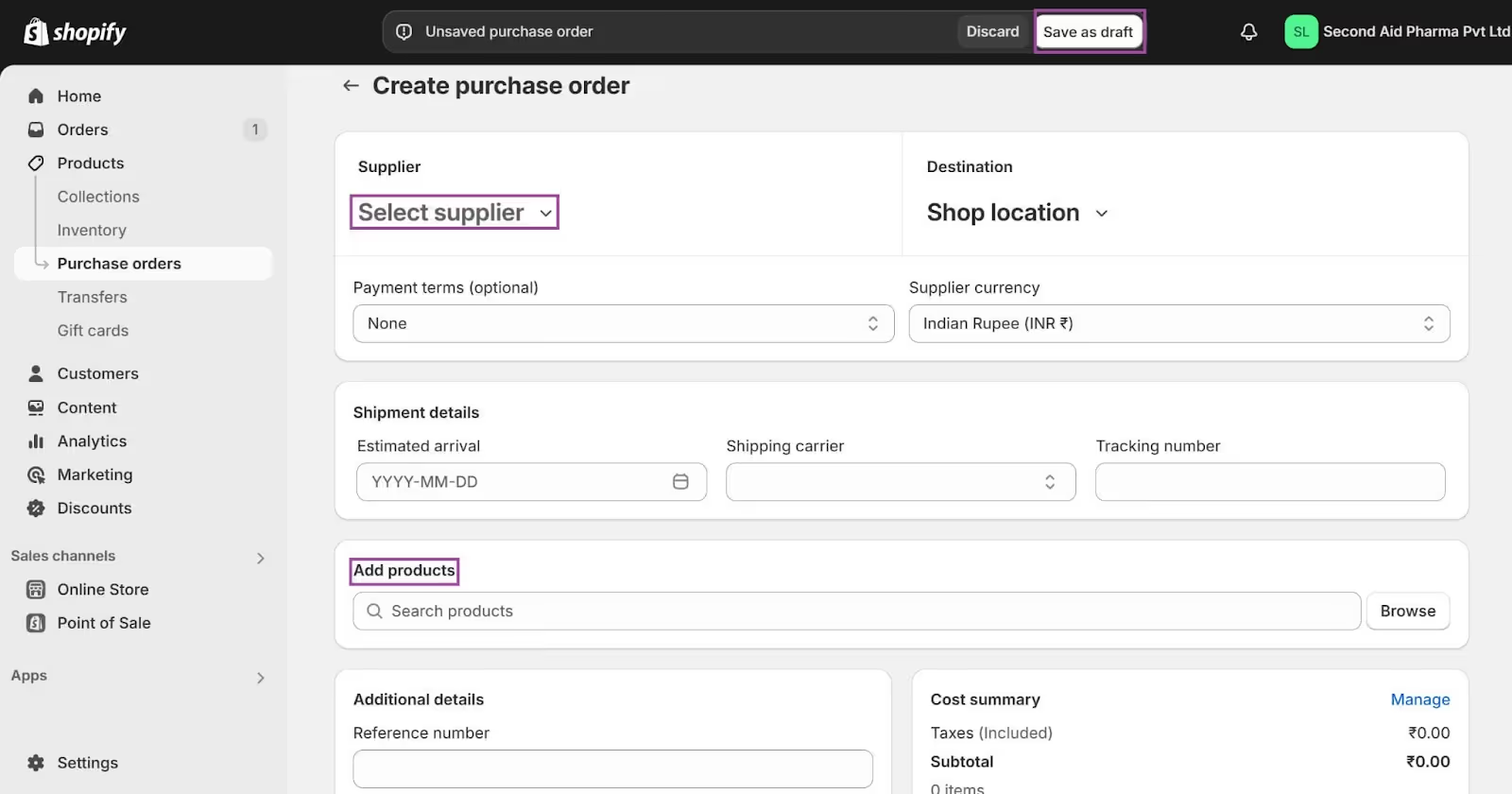
1. How to create a purchase order in Shopify:
- Head to Products > Purchase orders in your Shopify admin
- Click Create purchase order

- Select the supplier you're placing the order with
- Choose the products you need to restock and enter the desired quantities
- (Optional) Add a delivery date or any relevant notes for your supplier
- Click Save as Draft to create the purchase order
2. How to download a purchase order in Shopify:
- Once your purchase order is created, click on its name to open the details page
- In the top right corner, you'll see a button labeled Export PDF. Click this to download a printable copy of the purchase order for your records or to share with your supplier

3. How to update inventory according to purchase orders:
- When you create a purchase order, it doesn't directly affect your inventory count. It acts as a planned order to track what you've ordered
- Once your supplier delivers the products, mark the order as received to update your inventory levels
- Go back to the purchase order details page
- Click the “Receive Inventory” button
- Enter the quantity of each product you received
- Click Save to update your inventory with the received goods
It’s a small step up from Spreadsheets. It is less hassle, but equally time-consuming, as each step of the process relies on manual inputs. Careful attention is crucial throughout the process, which can limit scalability as your business continues to grow.
Scenario #3: Automating sending orders to suppliers on Shopify
As your Shopify business grows, you will find yourself managing multiple warehouses, suppliers, and Shopify storefronts. You’re juggling with 100s of SKUs. At this stage, you’re losing precious man hours and money by manually tracking inventory items and entering quantities in purchase orders.
Your team is less than satisfied. They would rather spend time creating stronger supplier relationships, and managing risks of supply chain break disruptions. This is where automation can save you hundreds of hours and reduce errors. An automated tool like Prediko can make your life easier. Here’s how:
Interactive buying table:
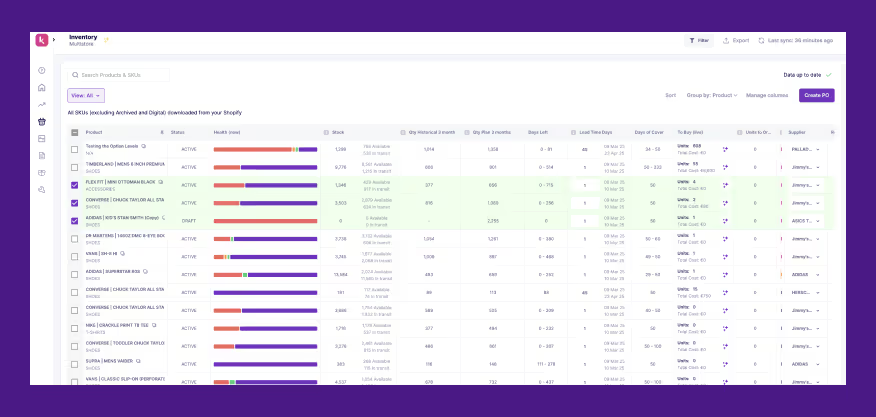
Prediko replaces Shopify’s simplistic inventory with an interactive Buying Table. This table categorizes your SKUs into four clear categories:
- Healthy: These SKUs are well-stocked and don't require immediate action
- At risk: These SKUs are at risk of running out and need a "Buy Before" order
- Excess: These SKUs have excess stock and potentially require adjustments
- Stock out: These SKUs are out of stock and require a "Buy Now" order
Note: Prediko also accounts for the lead time and labels products as “At Risk” after factoring in this data.

Prediko also recommends the number of units to order. These recommendations are based on historical sales data:

To place a purchase order for products that are “At Risk” or facing “Stockout”, you simply
- Select the SKUs and click on “Create PO”

You can even place an order via the New Order dashboard:
- Click on “New Order” and select the desired SKUs
The raw material dashboard allows you to do the same for raw materials:
.avif)
With just two simple clicks you can place a purchase order with Prediko! It eliminates any fiction in the process of placing purchase orders:
- No need for manual inventory analysis
- Shows inventory for multiple stores in one view. No switching back and forth to manage different stores on Shopify.
Additionally:
- Prediko's in-app messaging feature, allows you to directly communicate with your suppliers, eliminating the need for external email tools.
- The platform automatically syncs with your Shopify store, ensuring accurate inventory levels and eliminating the need for manual updates.
- Prediko's integration with Shiphero WMS further enhances your supply chain visibility, allowing you to track inventory across multiple platforms.
- Prediko has a strong integration with Gorgias as well. If a popular item is out of stock but has an expected restock date, automated customer service responses can be triggered through Gorgias to inform customers immediately. Prediko and Gorgias integration helps businesses half their inventory ticket response time!
To summarize,
See Prediko in action:
Effective purchase order management is crucial for the success of any online business. However, manual processes can be time-consuming and prone to errors. In the next section, let’s take a look at some best practices for managing supplier orders within Shopify.
Best Practices for Managing Supplier Orders in Shopify
Effectively managing supplier orders is critical for maintaining smooth operations and ensuring that your Shopify store is running efficiently.
In this section, let’s take a look at some key practices that will improve your order management process and optimize the overall efficiency of your supply chain.
1. Establish effective communication channels with suppliers
To ensure effective communication, establish a reliable communication channel—such as email or a dedicated supplier portal.
This will help avoid any back-and-forth caused by the use of different communication channels and ensure your team as well as the suppliers are on the same page. Additionally, set up regular communication schedules to discuss order status, potential issues, and plans to streamline the process.
2. Standardize order documentation to avoid errors
Make sure to use a standardized format for orders. These orders should include important details such as:
- Product details: Item descriptions, quantities, and specifications
- Shipping address: The destination address for the order
- Delivery date: The expected delivery date
- Payment terms: The agreed-upon payment method and terms
- Variant details: size, color, and material for variants you order.
3. Track shipments and follow up proactively with suppliers
If you are relying on Shopify’s inbuilt features, you need to ensure you take the following steps to track deliveries and follow up with your suppliers:
- Choose a reliable tracking system: Select a system that provides real-time updates on the status of your shipments.
- Track shipments regularly: Monitor the progress of your shipments to identify any potential delays or issues.
- Set up alerts: Use alerts or notifications to be informed of any significant changes in shipment status.
- Schedule regular check-ins: Establish regular check-ins to discuss order status, potential issues, and upcoming shipments.
4. Implement quality control measures to maintain consistency
Quality control ensures customer satisfaction and maintains brand reputation:
- Conduct incoming inspections: Inspect all incoming shipments to verify product quality and quantity.
- Establish quality control checkpoints: Identify key points in the production process where quality checks are necessary.
- Use quality control tools: Employ tools like checklists, inspection reports, and statistical process control (SPC) to monitor quality.
Learn how to easily manage purchase orders on Shopify.
Automating the Order Sending Process with Shopify
As we’ve seen above, automating order sending process with tools like Prediko can make a significant impact on your day-to-day operations. It also makes it easier to implement the best practices for order management:
Benefits of automating supplier orders
- Saves Time and Reduces Manual Errors: By automating the order-sending process, you eliminate the need for manual data entry, reducing the risk of human error.
- Ensures Consistent Communication with Suppliers: Automated systems can send standardized purchase orders and notifications to suppliers, ensuring consistent communication and reducing misunderstandings.
- Automates Reorder Points Based on Inventory Levels: Automated systems can automatically trigger purchase orders when inventory levels reach predefined reorder points, minimizing stockouts and overstocking.
- Improve Inventory Accuracy: Automated systems can track inventory levels in real time, ensuring accurate data and preventing stockouts or overstocking.
- Minimize Stockouts: Automated reorder points can help you maintain optimal inventory levels, reducing the risk of stockouts and lost sales.
- Enhance Demand Forecasting: By analyzing historical sales data and current trends, automated systems can provide more accurate demand forecasts, helping you plan your inventory and purchasing accordingly.
Popular Shopify tools and apps for automating supplier orders
- Stocky: A user-friendly inventory management app that automates purchase order generation and supplier communication.
- TradeGecko: A comprehensive inventory and order management solution that offers advanced automation features, including automated purchase order generation and supplier integration.
- Prediko: An AI-powered supply chain management platform that automates inventory management, purchase order generation, and supplier communication.
Kimai reduces manual workload by 20 hours per week with Prediko’s automated ordering
Kimai, a leading health and wellness brand, struggled with manual inventory management as their business grew. Spreadsheets and manual order processing became time-consuming and prone to errors.
By implementing Prediko, Kimai automated their supplier order process. Prediko's features like automated purchase orders based on real-time inventory data and reorder points saved them a significant amount of time. Kimai reports a reduction of 20 hours per week previously spent on manual inventory tasks. This freed up their team to focus on other critical areas like product development and marketing.
Top Shopify Apps for Supplier Order Management and Automation
Shopify's ecosystem offers a variety of apps designed to streamline and automate supplier order management. Here are some of the top contenders:
1. Prediko
Prediko is a powerful AI-driven supply chain management platform integrating seamlessly with Shopify. It automates inventory management, purchase order generation, and supplier communication, saving you time and reducing errors. Key features include:
- Real-time inventory sync: Prediko automatically syncs with your inventory, automatically updating received items so you don’t have to waste time making the changes manually.
- Automated purchase order generation: Automatically generate purchase orders with recommended quantities based on demand forecasts and reorder points. Prediko’s buying table highlights items that are “at Risk” or “Stockout”. With one simple click, you can place orders for these items.
- Supplier communication: Prediko has an inbuilt mailing system. You can directly communicate with suppliers within the platform.
- Real-time PO tracking: Every purchase order is available in one view with Prediko. You can create and review purchase orders on the same platform. Prediko also allows you to import and track outstanding POs with ease.
2. Stocky
Stocky is a user-friendly inventory management app that simplifies supplier order management. It helps you track inventory levels, generate purchase orders, and manage supplier relationships effectively. Key features include:
- Inventory tracking: Monitor stock levels and set low-stock alerts.
- Purchase order creation: Easily create and manage purchase orders.
- Supplier management: Centralize supplier information and communication.
- Barcode scanning: Quickly scan products and update inventory levels.
However, for brands needing deeper forecasting, supplier performance tracking, and SKU-level visibility, Prediko is often considered the top Stocky app alternative for growing Shopify stores
3. TradeGecko
TradeGecko is a comprehensive inventory and order management solution that offers advanced features for supplier order management. It helps you streamline operations, improve efficiency, and scale your business. Key features include:
- Inventory management: Track inventory across multiple warehouses and locations.
- Purchase order management: Create and manage purchase orders with ease.
- Supplier management: Centralize supplier information and communication.
- Advanced reporting: Gain insights into your business performance.
4. Spocket
Spocket is a dropshipping app that connects you with suppliers worldwide. It offers a wide range of products and streamlined order fulfillment, making it easy to manage supplier orders. Key features include:
- Product sourcing: Access a vast catalog of products from various suppliers.
- Order fulfillment: Automatically fulfill orders directly from suppliers.
- Inventory management: Track inventory levels and reorder points.
- Shipping and tracking: Manage shipping and track orders.
5. Zendrop
Zendrop is another popular dropshipping app that simplifies supplier order management. It offers a user-friendly interface, fast shipping times, and excellent customer support. Key features include:
- Product sourcing: Access a wide range of products from various suppliers.
- Order fulfillment: Automatically fulfill orders directly from suppliers.
- Inventory management: Track inventory levels and reorder points.
- Shipping and tracking: Manage shipping and track orders.
When choosing a Shopify app for supplier order management, consider your specific needs, budget, and the level of automation you require. By leveraging these powerful tools, you can streamline your operations, improve efficiency, and grow your business.
By automating your purchase order process with Prediko, you can significantly reduce these operational headaches and improve efficiency.
Prediko's powerful features, such as real-time inventory tracking, automated purchase order creation, and seamless supplier communication, empower you to focus on strategic initiatives rather than these mundane check-ins and tasks.
Ready to streamline your supply chain? Sign up for a free trial of Prediko today and experience the difference.
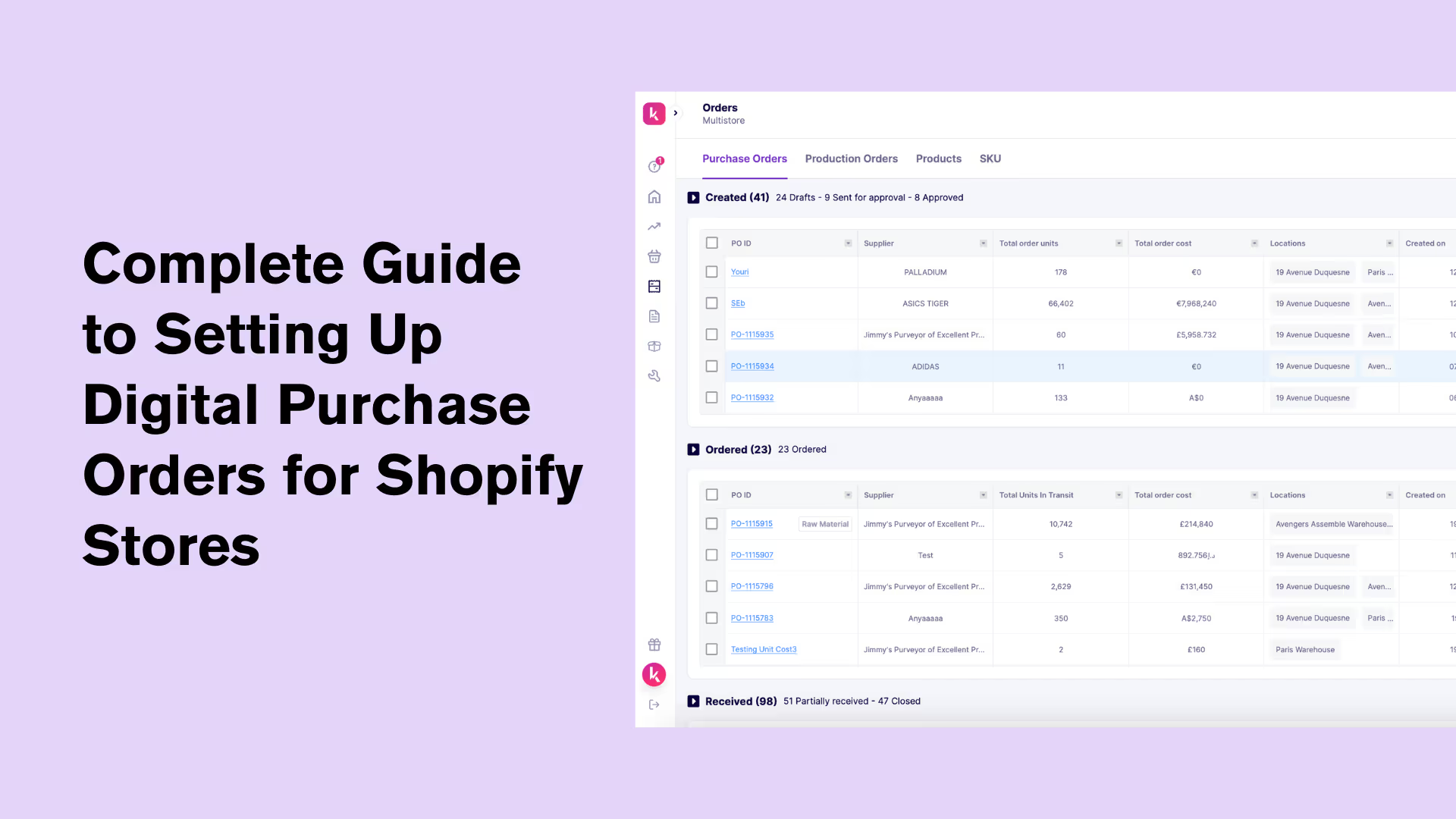
How to Create Digital Purchase Orders in Shopify (+Tools You Can Use)
Do you want to replace traditional purchase orders? This post explains how to set up digital purchase orders in Shopify quickly with the right tools.
Purchase orders (POs) are a super-important part of your supply chain. But when managed manually, they’re slow, disorganized, and hard to track.
Digital Purchase Orders make the entire process seamless, from creation to approval to delivery, so your team can move faster with fewer errors.
They’re especially useful for Shopify stores managing multiple SKUs, frequent supplier orders, or seasonal demand shifts.
All you need is the right setup, a tool that connects to your store, and a clear process.
In this post, we’ll walk you through how to set up digital purchase orders in Shopify, step by step.
Understanding Digital Purchase Orders
A Digital Purchase Order (DPO) is an electronic version of a standard purchase order used to request goods or services from a supplier. It lays out what’s being ordered, how much it costs, and when it’s expected. Unlike a paper-based PO, a DPO is created, shared, and stored entirely online.
The main reason businesses use DPOs is to eliminate the inefficiencies of paper-based systems. With DPOs, teams can create, approve, and send purchase orders instantly. No printing, scanning, or email threads required.
All the PO data is stored in one place, making it easier to track status, manage supplier communication, and avoid errors or duplicates. Compared to manual POs, digital POs speed up the procurement process, reduce admin work, and give real-time visibility into your supply chain.
Benefits of Digital Purchase Orders for Shopify Brands
Businesses are quickly switching to digital purchase orders and for good reasons. These include
1. Increased efficiency and expedited processes
Manual purchase order workflows slow teams down. Every PO means filling out forms, chasing approvals, and keeping track of email threads. It’s time-consuming, especially when you're placing multiple orders across different suppliers.
Digital purchase orders expedite the process. POs are created using pre-set templates, automatically routed to the right approvers, and tracked in real-time, all from one place. This reduces the need for manual follow-ups and ensures clean and fast execution.
Working with multiple vendors? You can send POs in batches. Reordering frequently? Use saved PO drafts to place repeat orders in seconds. In short, digital POs take the lag out of your supply chain and let your team move faster, every step of the way — especially when synced with your inventory purchasing workflows to ensure the right products are ordered at the right time.
💡 Free Purchase Order Templates For Shopify Inventory Management
2. Higher accuracy and reduced errors
It's easy for inaccuracies to creep in when you're manually managing multiple products, vendors, and timelines.
A single wrong SKU, incorrect quantity, or outdated price can lead to missed deliveries, overstock, or awkward vendor conversations, especially in fashion where you deal with complex POs with multiple sizes and color variants.
Digital purchase orders reduce that risk. Product details, pricing, and vendor data are pulled from saved records or integrated systems. There’s no need to enter things twice or guess what's current.
And because you have order templates, it keeps fields consistent. If something does change, like pricing or supplier terms, it’s updated across the system, so you’re always working with the right info.
3. Improved tracking and management of orders
Once a purchase order is submitted, visibility often drops off. Teams are left wondering what got approved, what was sent to the vendor, and when it’s supposed to arrive. If something gets delayed, there’s no easy way to trace what went wrong.
A digital PO solves that. Every PO has a status, drafted, submitted, approved, received, or paid, and a full activity log. Anyone on the team can check where an order stands without manual back-and-forth with suppliers or pinging other departments.
Learn more about managing Shopify purchase orders effectively.
4. Cost savings and better resource allocation
When purchase orders are handled manually, spending often goes untracked until it shows up in accounting. Duplicate orders slip through. Budgets get stretched. And teams spend hours managing approvals, not strategy.
Digital purchase orders change that by giving brands full control over what’s being spent and why. You can tie every PO to a forecast or budget, so teams can see the full picture.
Over-limit POs can be flagged automatically. Duplicate requests are caught before they’re approved. And, if your spending spikes in one area, you’ll spot it fast enough to analyze the cause.
How to Set Up Digital Purchase Orders in Shopify
Shopify doesn’t have built-in purchase order (PO) management. It tracks inventory and suppliers, but creating or sending purchase orders requires external Shopify apps or custom setups. That’s where tools like Prediko come in.
Prediko is built for Shopify stores and offers multiple ways to create POs, from the Buying Table, from the Orders page, or by uploading existing POs using the Import option. It is designed to handle real-time inventory and supplier workflows without workarounds.
Key factors to look for before choosing a Digital PO system
Before you choose a digital PO system for your Shopify store, here are key things to look for
Direct Shopify integration
The software should automatically pull product, inventory, and vendor data directly from Shopify. This cuts down manual entry and keeps POs synced with your real-time stock levels.
Customizable PO templates
You’ll want full control over how POs look, add your logo, custom payment terms, multiple warehouse addresses, or currency formats. This is important for suppliers who have strict requirements.
Automated reorder logic
Look for tools that can trigger POs when stock hits a threshold or forecast demand based on seasonality or sales trends. This reduces overordering and avoids stockouts.
Multi-supplier support
If a single SKU can come from more than one vendor, your digital PO system should let you assign multiple sources with different lead times and costs. Useful for brands juggling different supplier delays or pricing changes.
Receiving and reconciliation
A good digital PO system tracks what’s ordered vs what’s received. It should support partial deliveries, backorders, and flag mismatches automatically so you can follow up with vendors right away.
Popular digital PO systems for Shopify stores
Some of the popular Shopify Apps for handling digital purchase orders include
1. Prediko

Prediko is the #1 inventory app designed for Shopify brands that has more than just PO management. It automatically connects to your store and offers in-built demand forecasting, restock alerts, and purchase recommendations to generate accurate POs in a click.
PO creation is simpe and fully data-backed. You can track every order from draft to delivery in one place. No spreadsheets, no manual follow-ups, just smooth, scalable operations.
Key features
- 1-click PO creation based on AI-generated demand plans and real-time stock levels
- Restock alerts based on sales trends and lead times
- Easily edit quantities, suppliers, and costs before sending
- Supports multi-supplier SKUs and warehouse-level planning
2. Auto Purchase Orders

Auto Purchase Orders is built for Shopify merchants who want to automate supplier reordering without manual intervention. It creates and emails purchase orders when inventory hits minimum levels, reducing out-of-stock risks.
Key features
- Set custom reorder points per SKU
- Automatically generate and email POs
- Track PO status: open, sent, received
- Export PO data in CSV or PDF
3. Ultimate Purchase Orders
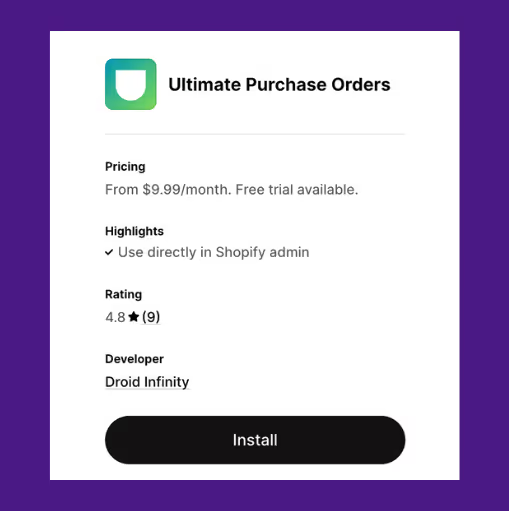
Ultimate Purchase Orders is designed for teams who prefer creating and managing digital purchase orders manually. It allows full control over PO content, supplier details, and branding, ideal for stores with more complex or custom order workflows.
Key features
- Build POs manually with product and vendor info
- Add custom terms, delivery notes, and due dates
- Export or email branded PO PDFs
- Record received quantities by item
4. Mimoran Purchase Orders

Mimoran is built for Shopify merchants handling B2B or wholesale orders that involve multiple suppliers. It supports complex purchase flows like splitting orders by vendor, using supplier-specific SKUs, and customizing templates per recipient.
Key features
- Auto-split orders by supplier
- Customize the PO layout for each vendor
- Map internal SKUs to supplier codes
- Track PO activity with audit logs
5. Full Shelf Purchase Orders

Full Shelf is aimed at fast-growing stores that reorder frequently across large product catalogs. It simplifies bulk PO creation and groups SKUs by vendor, making it easier to place regular restock orders with minimal effort.
Key features
- Bulk PO creation from the product grid
- Assign preferred vendors to SKUs
- Reorder suggestions based on sales trends
- Auto-group products by supplier
Wish to dive deeper? Here’s a through comparison of the 2025’s best purchase order management apps.
Creating a Digital Purchase Order: Step-by-Step Process
We will now show you how to create a digital PO using Prediko.
There are three ways to do it:
1) Through the Buying Table
2) Through the orders page
3) Importing your POs
1. From the Buying Table
Step 1: Open the buying table
Toggle to the Buying Table from the Plan dashboard. Here, you’ll see a full list of all SKUs, their stock levels, inventory days left, suppliers, and lead times.

Step 2: Select the SKUs you want to reorder
Use the checkboxes to select one or more SKUs you want to reorder. Then click “Create PO” in the top-right corner of the table.

Step 3: Edit PO details
You’ll be taken to the PO editing screen. Adjust quantities in the “Units to Order” column or leave them as recommended. If you’ve set MOQs (Minimum Order Quantities), Prediko will flag items that don’t meet the minimum. You can click to scale them up.

Step 4: Customize columns and costs
Click “Columns” to customize visible fields like landed cost, estimated delivery, or SKU notes. You can only edit cost values once the PO is in Draft status.

Step 5: Add notes, warehouses, and finalize
You can
- Add internal notes and tracking info
- Split the order across warehouses using the “Distribute by Warehouse” option
Once ready, click “Create Draft Order”

Once a draft order is created, it will appear in the 'Orders' section with the status set to 'Draft'. If you need to make changes, reopen the draft to edit additional costs or add options like Shipping or Tax.
Step 6: Share the purchase order
When everything looks good, select the ‘Share’ button to either download the PO as a PDF or Excel file, or send it directly to your supplier via email.

2. From the Orders Page
Step 1: Go to the Orders page and click on ‘New Order’.

Step 2: Use the search dropdown to locate and add the SKUs or products you need.

After that, the process is the same as the steps used for creating a PO through the Buying Table.
3. To import a purchase order into Prediko
To bring in an existing purchase order, go to the Import section under Settings and choose Purchase Orders. From there, follow the on-screen instructions to upload your file.

Start Creating Digital Purchase Orders Using Prediko
You deserve a purchase order app that moves as fast as your inventory does. Manually tracking inventory, emailing suppliers, and juggling spreadsheets leave too much room for delays and stockouts.
Prediko is built for Shopify brands that need accuracy and control in managing purchase orders.
It connects directly to your store and gives you three flexible ways to create purchase orders—from the Buying Table, through the Orders page, or by importing existing POs.
There’s no need to worry about how much, when, and what to order as Prediko suggests everything so thar you can generate a purchase order in one click.
It’s more than just purchase orders. Prediko also helps with demand forecasting, MOQ checks, lead time tracking, and multi-supplier SKUs.
See it for yourself by starting your 14-day free trial of Prediko.





.avif)