




Advantage+ Shopping Campaigns are averaging 4.52x ROAS right now, against a 2.79x category average. That's the kind of number serious brands build budgets around.
But none of it matters if the product you’re spending against sold out an hour ago. This is exactly where your ad budget and ROAS quietly disappear.
We walk you through how to keep your inventory and your Meta Ads strategy in sync, so every dollar you spend goes toward products people can actually buy.
Link Between Inventory and Meta Ads Performance
Inventory management and Meta Ads are tightly connected, even though it doesn't always feel that way from the Ads Manager dashboard.
Dynamic Ads, catalog ads, and Advantage+ Shopping Campaigns don’t rely on fixed creatives. They automatically pull product titles, prices, images, and stock availability from your Meta catalog, which syncs with Shopify.
When that data is off, here's what breaks:
- Out-of-stock products still appear in dynamic product ads, because Meta hasn't been told the SKU is unavailable.
- Shoppers land on sold-out product pages, bounce, and rarely come back to buy something else on their own.
- Commerce Manager flags or rejects items with mismatched pricing or missing fields, which can quietly shrink the pool of products your ads are allowed to promote. Advantage+ Shopping Campaigns keep spending on winners even as they run low, because Meta's algorithm optimizes toward what's converting, not what's actually left in the warehouse. So, the real risk is sync frequency.
- Retargeting audiences get shown items they can't buy, which is one of the fastest ways to burn trust with a warm audience.
The problems that Meta's automation was built to save you time on creative and not to know how many units you have on the shelf. That part's still on you.
Common Issues With Meta Ads and Inventory
The five problems come up again and again when Meta ads and inventory drift out of sync, and none of them show up as a clean error message in Ads Manager. Your ROAS just quietly drops.
1. Meta flags in-stock products as out of stock
The part that confuses a lot of Shopify merchants coming from Google Shopping is that Meta's catalog isn't just reading your product feed. It also verifies availability by crawling your product pages and by watching Pixel events like ViewContent and AddToCart.
If your feed says a product is in stock, but Meta's crawler lands on a slow-loading page, or your Pixel fires before variant data has loaded, Meta can default to marking the product "out of stock" to avoid showing shoppers something they can't buy, even when you have plenty of stock.
How to fix it
- Check your Open Graph (OG) tags. Meta's crawler relies on these to understand price and availability on your product pages. Use Meta's Sharing Debugger tool to see exactly what Meta's crawler sees when it visits a page.
- Set the availability field explicitly for every active product ("in stock," "out of stock," or "preorder") rather than leaving it to infer status from behavior alone.
- Audit when your Pixel fires. If ViewContent fires before your page has fully loaded variant and stock data, Meta can receive an empty or stale availability signal. Fire the event only after the final variant is selected, using that variant’s correct content_ids and value. This keeps Pixel data aligned with what shoppers can actually buy.
- Match product IDs exactly between your Pixel events and your catalog. Even a casing mismatch (PROD-123 vs. prod-123) breaks the connection Meta needs to trust your data.
- Set a faster sync cadence: In 2026, native Shopify-to-Meta integration paired with the Conversions API typically pushes inventory changes every ~30 minutes to 4 hours by default. For flash sales or fast-moving catalogs, don't rely on the default cadence: trigger a manual feed push or set up hourly API syncs instead.
Note: The availability field in your feed is what actually controls whether a product serves in Dynamic Ads. OG tags mainly help Meta's crawler cross-check what it sees on your page. If your feed says in stock but your OG tags say otherwise, Meta generally trusts the feed for serving ads, but will flag the mismatch in Diagnostics. In short, Feed > Pixel > Crawl, in terms of what Meta weighs most.
This is also where accurate, real-time inventory data upstream matters most. If your Shopify inventory isn't tracked cleanly at the source, no amount of catalog troubleshooting downstream will fully fix it.
2. Meta ads create demand spikes your forecasting didn't see coming
This one has nothing to do with feeds or Pixels, and it's arguably the bigger issue.
Google Ads mostly captures demand that already exists. Someone searches for a product; they're already looking to buy. Meta ads are different. A well-performing Reels ad or a creator collab can create demand out of nowhere.
And if your forecast doesn’t account for a live campaign, it may treat the sales spike as noise instead of an early warning of a stockout.
How to fix it
Treat campaign calendars as a key forecasting input. Build expected demand spikes into your forecast before the campaign goes live.
Prediko's AI demand planning pulls real-time Shopify sales data and lets you edit your demand plan to account for an upcoming push, so purchasing and ad spend move in the same direction instead of purchasing finding out after the fact.
3. Advantage+ Shopping Campaigns spend blind to stock levels
ASC is built to find whatever's converting and pour budget behind it. It has no concept of "only 12 units left." Left unchecked, it'll happily spend your entire daily budget promoting a product that sells out mid-campaign, right as it was starting to perform.
How to fix it
Create a dedicated ASC product set that only includes SKUs with enough stock to support paid demand. Exclude products once inventory falls below a set threshold, such as 10-20 units or a few days of expected campaign sales.
Use Shopify inventory data or a feed rule to update that product set automatically. This way, low-stock SKUs drop out before they hit zero, and ASC shifts spend toward products you can still fulfil.
4. Product disapprovals in Commerce Manager
Products get rejected for missing images, vague descriptions, price mismatches between Shopify and Facebook, or Commerce Policy violations.
In 2026, Meta has also tightened enforcement around "limited availability" claims and bait-and-switch patterns, promoting items you can't actually fulfill at the advertised terms. A rejected product disappears from your Shop and your ads, often without much warning.
How to fix it
Check Commerce Manager > Catalog > Diagnostics on a regular schedule, and not only after you notice a drop in performance.
Fix flagged fields in Shopify and let Facebook re-review. For products you believe are valid, request a manual review inside Commerce Manager rather than resubmitting blind.
5. ROAS on paper doesn't account for what happens after the sale
A strong ROAS number on an Advantage+ campaign doesn't mean much if a chunk of those orders come back.
Return-to-origin on COD orders, high return rates, and stacked promo discounts all eat into contribution margin after the sale closes, and none of that shows up in the ROAS number Ads Manager reports back to you.
Scaling budget against a number that only reflects half the picture is how profitable campaigns end up losing money in practice.
How to fix it
Track return rate, RTO, and promo margin drag as part of your ad reporting.
Before you scale a campaign further, confirm the contribution margin still holds once after accounting for returns, discounts, and other costs, not just the ROAS Ads Manager shows you.
None of these five issues are hypothetical. They're what operators are actively troubleshooting in real time. Browse Meta ads conversations from the Limited Supply community if you want to see how other Shopify brands are handling them.
Meta Ads vs. Google Ads: How Each Platform Actually Handles Inventory
If you're running both platforms, it helps to know the mechanics don't map one-to-one. Here's where they genuinely differ.
If you're managing both, our guide on managing inventory while running Google Ads covers the Shopping-specific side of this in more depth.
Building an Inventory-Aware Meta Ads Setup
Once you understand why things break, here's how to actually put safeguards in place.
1. Get your feed and Pixel signals talking to each other
Since Meta cross-references multiple signals, fixing the feed alone isn't enough.
Confirm your availability field is set explicitly, your OG tags are accurate, and your Pixel isn't firing before stock data loads.
Do this before touching campaign settings, since a shaky signal upstream undermines everything downstream.
2. Build product sets with availability and quantity filters
Instead of manually removing SKUs from a campaign when they sell out, build product sets using rules like "availability = in stock."
A rules-based set updates itself the moment your feed changes, and it's the closest thing Meta has to Google's pause button.
3. Put guardrails on Advantage+ Shopping Campaigns
ASC optimizes toward whatever's converting, with zero awareness of how many units are left.
Exclude low-stock and out-of-stock SKUs from the product sets ASC draws from, so the algorithm can't spend your budget chasing a product that's about to vanish.
4. Forecast for campaign-driven spikes
Manual, spreadsheet-based forecasting can't keep pace with a creative that suddenly takes off. Layer expected campaign hike into your demand plan so a viral ad doesn't blindside your purchasing team.
This is also where safety stock becomes crucial, giving your top-performing SKUs enough buffer to stay available while the next reorder reaches your warehouse.
5. Set low-stock alerts tied to your ad calendar
Nothing's worse than pulling budget off a bestseller because it quietly sold out mid-campaign. Low-stock alerts based on days-of-cover and lead times can help by giving you a warning before a promoted SKU goes dark.
Cap or pause further scaling until fulfillment risk is confirmed low. A campaign can look inventory-safe on paper and still bleed margin through returns and RTO.
If a restock is close but not quite there, Shopify backorders can keep sales flowing in the gap.
6. Give shoppers a next step when a product sells out
You already paid for that click, don't let it bounce for nothing.
Recommend similar in-stock products on the sold-out page, and add a back-in-stock signup to capture intent even when you can't convert today.
How Prediko Keeps Your Meta Catalog and Inventory Aligned
Meta's catalog sync handles the data transfer. It doesn't account for demand forecasting, reorder timing, or which SKUs are about to run out.
Prediko fills that gap. It connects directly to Shopify and gives you the layer Meta's sync is missing:
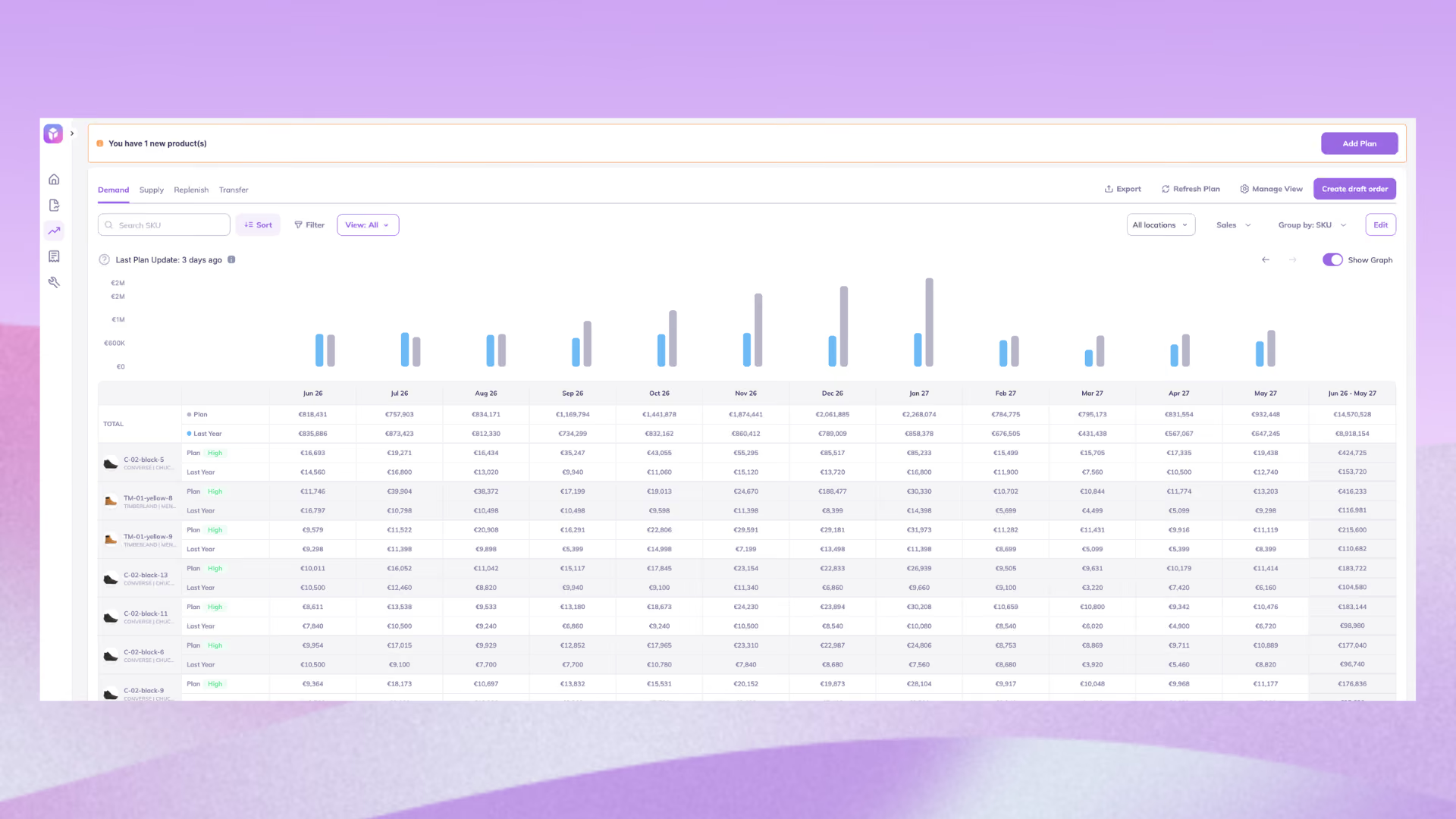
Build campaign demand into your forecast: Add the expected revenue uplift from upcoming Meta campaigns to your demand plan. Prediko then adjusts SKU-level forecasts, so purchasing plans for the spike before the campaign goes live.
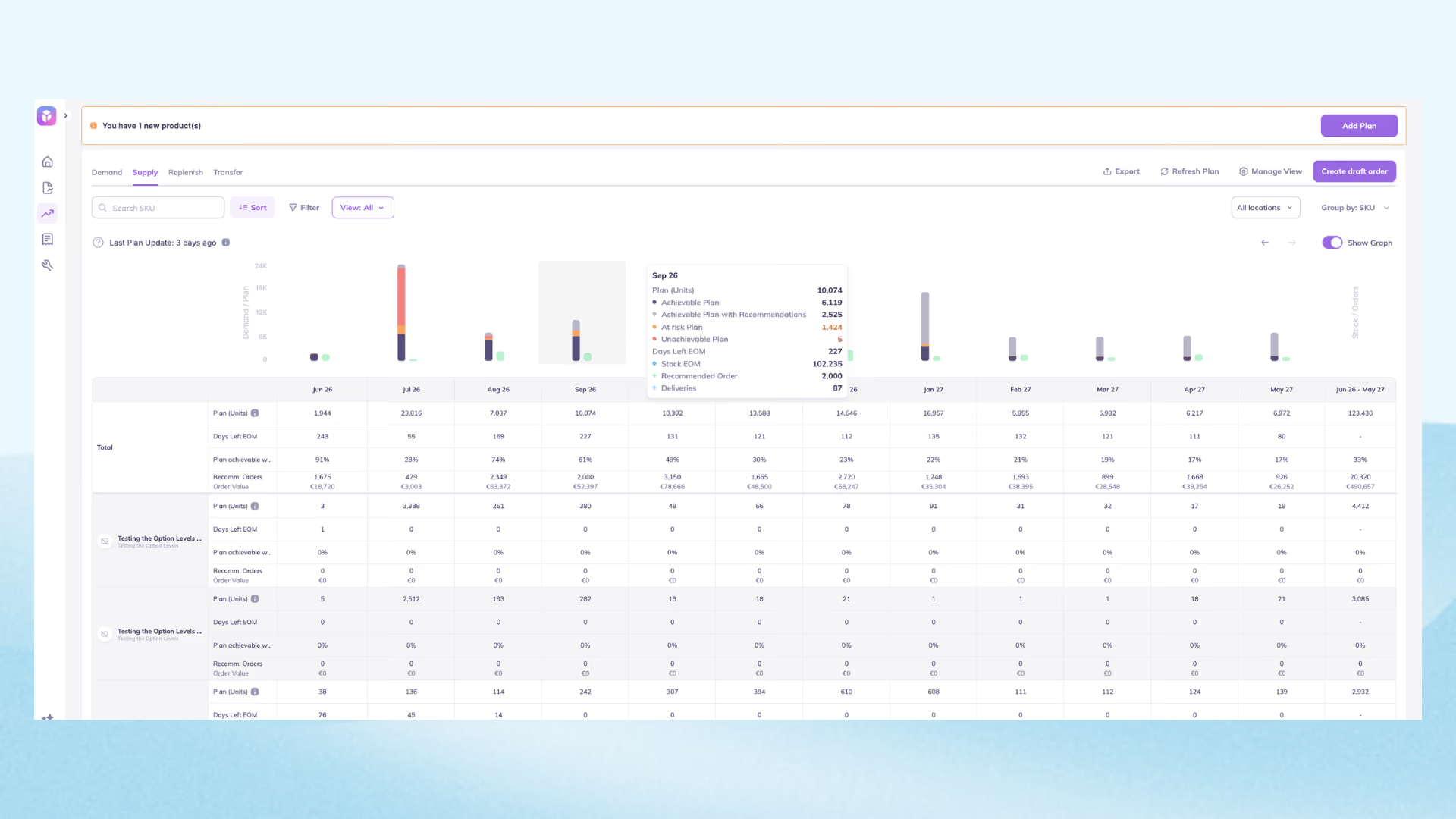
Plan supply across the year: Prediko’s supply plan shows whether current stock, incoming inventory, and future purchase orders can support your demand plan. This helps marketing see when there is enough stock to scale ads, and when purchasing needs more time.
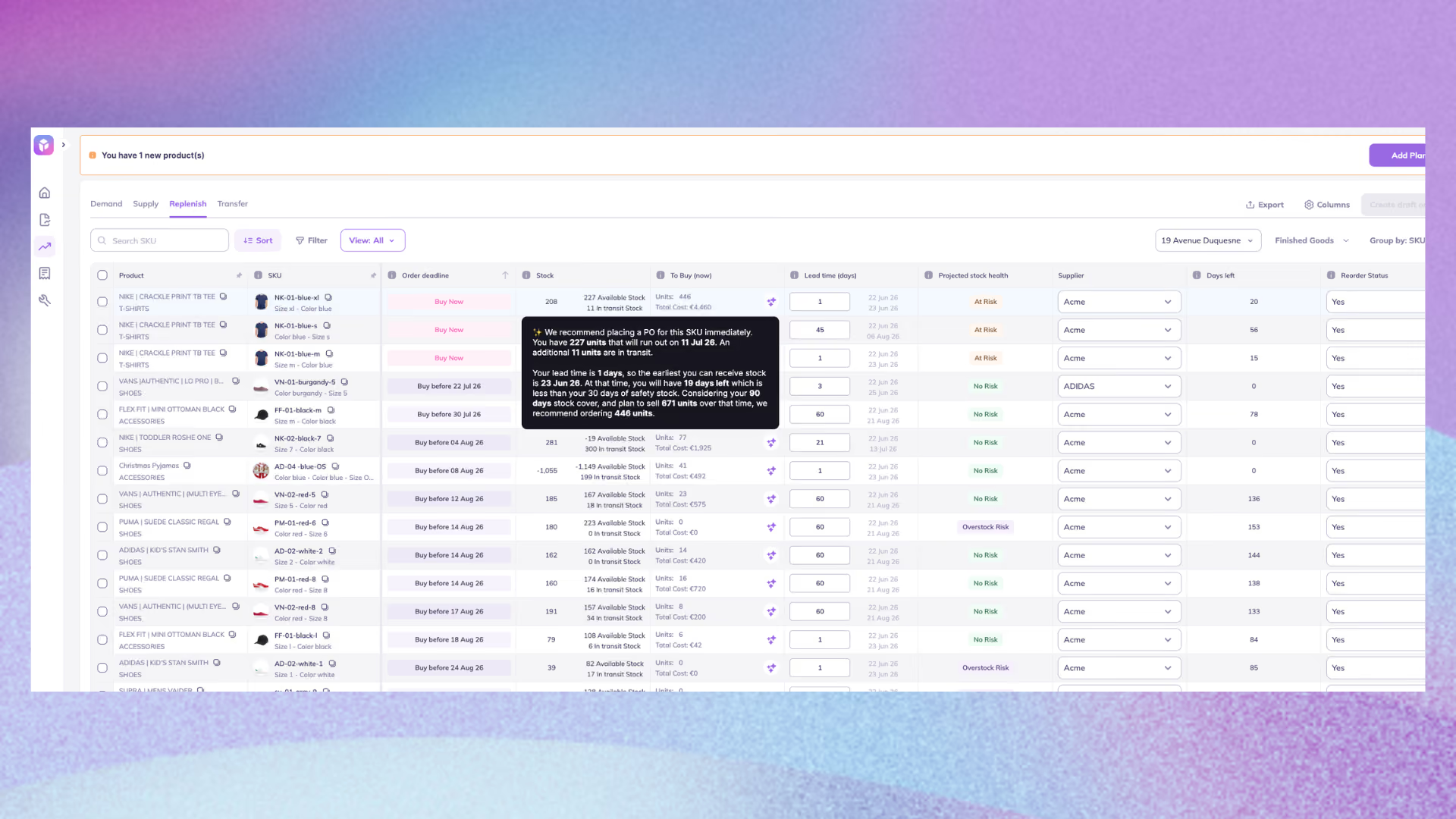
Catch low-stock risks before ad spend is wasted: Alerts use days of cover and supplier lead times to flag promoted SKUs that are running low. Your team can reduce spend, remove the product from an ad set, or reorder before it sells out.
Better ad performance starts with knowing what you can fulfil. Prediko connects campaign demand with inventory planning, helping marketing and purchasing work from the same plan.
Start a 14-day free trial to see how it works.
Frequently Asked Questions
Why does Meta mark my product "out of stock" when I have plenty in stock?
Meta cross-checks your feed against Pixel signals and a crawl of your product page. If your site loads slowly, your Pixel fires before stock data is ready, or your OG tags are inaccurate, Meta can default to "out of stock" even when your actual inventory is fine. Check Meta's Sharing Debugger tool to see what the crawler actually reads on your page.
Does Meta check my Shopify inventory in real time, or is there a delay?
It depends on your sync method. Native Shopify-to-Meta integrations generally update within a few hours, but delays are more likely during high-traffic periods. For fast-moving catalogs or frequent flash sales, push feed updates every 1-4 hours instead of relying on the default schedule.
How do I stop ads from running on a product that's about to sell out?
Meta does not offer one universal auto-pause switch for individual products. Set your product set filters to exclude SKUs below a chosen inventory threshold, not just SKUs at zero. Waiting until a product hits zero to react is often too late if the ad's already mid-flight and driving traffic.
Why aren’t my Facebook dynamic ads showing certain products?
Common causes include incorrect availability, missing products in the selected product set, or a mismatch between Pixel content IDs and catalog IDs. The product may also lack enough browsing activity for retargeting. Start with Commerce Manager → Catalog → Diagnostics to identify the exact issue.
How should I manage seasonal products that regularly go out of stock?
Keep seasonal products in your catalog so you retain their history. Mark them out of stock during the off-season, then update them when inventory returns. You can also group seasonal SKUs into a dedicated product set so they can be activated or excluded together.










.avif)