




Connecting Shopify to Xero takes ten minutes. Getting them to actually sync your inventory is a different problem.
The native integration handles payouts. Not stock counts. Not POs. So your books look connected, but the numbers that matter for running the business: what you have, what it costs, what you need to reorder, are still living somewhere else.
Learn how to sync inventory from Shopify to Xero, choose the right setup method, and fix common sync issues before they break your numbers.
What Does "Syncing Inventory from Shopify to Xero" Actually Mean?
Before picking a tool, it helps to get precise about what you're trying to sync. Because "inventory sync" means different things depending on who you ask.
There are three layers:
- Sales and order data: every transaction, refund, and Shopify fee flows into Xero as an accounting record
- Stock quantity sync: when a unit sells on Shopify, the quantity count in Xero updates to match
- COGS and inventory valuation: when stock moves, the cost of goods sold is recorded correctly in your Xero P&L
- Purchase order sync: POs created in your inventory tool flow into Xero, so your payables stay current without manual entry
Most "Shopify-Xero integrations" only cover layer one. The rest (the ones that actually make your books useful for running the business) require a more deliberate setup.
3 Ways to Sync Inventory from Shopify to Xero
With an understanding of what you need, let’s quickly look at the different approaches you can take for Shopify-Xero sync.
Option 1: Xero's native Shopify integration
Best for: Shopify-only stores that want clean accounting records and don't need real-time stock count sync in Xero.
Xero has a built-in Shopify connector. It's free to set up (Xero subscription required), and it handles the accounting side well: sales, refunds, fees, and Shopify Payments payouts all flow into Xero automatically.
✅ What it does well:
- Syncs sales invoices and payments
- Maps Shopify Payments payouts to your Xero bank account
- Handles refunds and discounts
- Offers guided onboarding, no dev work needed
❌ What it doesn't do:
- Update stock quantities in Xero when items sell
- Record COGS at the point of sale
- Sync multi-location inventory and purchase orders
- Handle multi-currency without a Xero Premium plan
How to set it up (Step-by-Step)
- In Xero, go to App Store → Search "Shopify" → Connect
- Log in to your Shopify account and grant Xero the required permissions
- Choose your Xero organisation and the bank account to post Shopify payouts to
- Set your sync start date. If you're switching mid-year, start from the beginning of your financial year to keep comparisons clean
- Map your tax rates. This is where most people go wrong. Verify that Xero tax codes match your Shopify tax settings before flipping the switch
- Run a test sync with 1–2 recent orders before enabling bulk historical sync
- Reconcile the test orders in Xero and confirm amounts match your Shopify payouts dashboard
💡 One thing to check before you start: Make sure your Xero chart of accounts has a dedicated revenue account for Shopify sales, a separate account for Shopify fees, and a clearing account for Shopify Payments. Setting these up in advance makes reconciliation much cleaner.
Option 2: Third-party sync apps
Best for: Stores that need accurate line-item accounting, multi-currency support, or more control over how Shopify data maps to Xero accounts.
The native integration is fine for simple setups. But if you're running promotions, selling in multiple currencies, or need COGS recorded properly, you'll hit its limits fast.
Third-party apps sit between Shopify and Xero and give you more control over exactly what syncs, how it maps, and when.
Here’s how some of the available options stack up against each other.
How to set up a third-party sync app
- Install the app from the Shopify App Store
- Connect your Xero account via OAuth
- Map your Shopify payment methods and tax codes to the correct Xero accounts
- Configure sync frequency: on-demand or scheduled
- Enable line-item sync so each order posts individually (not batched into payout summaries)
- Test with a recent refund to confirm it hits the right Xero account
The catch with most of these apps: they sync orders well, but stock quantity updates and purchase order management are still outside their scope. Your POs are still living in a spreadsheet or your inbox, not in Xero.
Option 3: Inventory planning and PO app
Best for: Shopify D2C brands that want replenishment and purchase orders that sync directly to Xero, closing the gap that Options 1 and 2 leave open.
Options 1 and 2 handle your accounting. Neither touches your purchase orders. So POs are still being built in spreadsheets, sent over email, and manually entered into Xero after the fact. That's the layer that breaks first when your catalog grows.
An app like Prediko closes it. It connects to Shopify for AI-powered demand forecasting and automated replenishment, and it connects to Xero specifically for PO sync: purchase orders created in Prediko flow into Xero automatically, and any updates made in Xero sync back to Prediko. Both systems stay aligned without duplicate entry.
What syncs between Prediko and Xero
- POs created in Prediko sync to Xero automatically (every 24 hours, or manually on demand)
- PO updates made in Xero sync back to Prediko
- No manual hand-off, no duplicate data entry
What Prediko handles on the planning side
- AI forecasting that adjusts for seasonality, promotions, and lead times
- Real-time stockout and overstock alerts, before the problem hits
- Automated reorder recommendations with vendor minimums built in
- Unlimited SKUs and users from just $49/month
How to Get Started with Prediko
- Install Prediko from the Shopify App Store
- Connect your Shopify store; Prediko pulls your sales history and product catalog automatically
- Enable the Xero integration inside Prediko and authorise the connection
- Set your lead times and safety stock thresholds per SKU or supplier
- Generate purchase orders in Prediko; they sync to Xero automatically, and any updates in Xero reflect back in Prediko
5 Most Common Shopify-Xero Inventory Sync Failures (+How to Fix)
Even with the right setup, things go wrong. Here's what to watch for.
1. Payout-only syncs that hide your real revenue
The native integration and some apps post a single Shopify payout to Xero (say, $10,000). But that payout is actually $11,200 in gross sales, minus $320 in fees, minus $880 in refunds.
Without line-item breakdown, your Xero P&L shows net revenue, not gross. Your margins look wrong. Your accountant has questions. :(
Fix: Use a connector that posts invoice-level data, not just bank deposits.
2. SKU mismatches breaking the sync
If your product SKUs in Shopify don't exactly match the item codes in Xero, the sync either fails silently or creates duplicate items. One trailing space or capitalisation difference is enough.
Fix: Audit your SKUs in both systems before connecting. Export product lists from each platform and do a quick spreadsheet match.
3. COGS never making it into Xero
Most order-sync apps don't record the cost of goods. Sales hit your revenue account; the cost side is missing. Your gross profit in Xero is overstated until someone manually adjusts it.
Fix: Use a sync tool that records COGS automatically, or set up a periodic journal entry process with your accountant. Prediko tracks inventory movements on the planning side, which makes these reconciliations much cleaner.
4. Purchase orders living outside your systems
Most Shopify-Xero setups handle sales data but leave PO management in a spreadsheet or email thread.
When a PO isn't in Xero, your payables are incomplete. When it isn't in your inventory tool, your incoming stock isn't factored into reorder decisions. You're flying blind on both ends.
Fix: Use a tool like Prediko that creates POs and syncs them to Xero automatically. POs belong in your decision-making systems, not your inbox.
5. Inventory values drifting after returns
Returns and exchanges are where syncs break down. A refund in Shopify that also involves a stock return needs to both credit the customer and increment the inventory count. Many tools handle the financial side but miss the stock reinstatement.
Fix: Test your refund flow explicitly before going live. Process a test return and verify both the Xero credit note and the Shopify stock adjustment.
Read More: Best Inventory Management Software for Xero
Which Shopify-Xero Sync Approach Is Right for You?
Best Practices for Keeping the Sync Clean
Few things to keep in mind for making the most of your Shopify-Xero inventory sync.
- Standardise your SKUs from day one. Every product in Shopify and Xero (or your inventory platform) should use the same SKU format. No exceptions. This is the single biggest source of sync failures.
- Do a monthly spot-check. Pick 5 SKUs at random and compare the stock count in Shopify against what's in Xero or your inventory platform. Drift that catches at 5 SKUs is easier to fix than the drift you catch at 500.
- Lock in your COGS accounting method early. FIFO or weighted average. Pick one and stick to it. Switching methods mid-year creates headaches and requires your accountant to restate inventory values.
- Sync from the start of your financial year. If you're setting up a new integration mid-year, start the sync from your financial year start date. Partial-year data in Xero makes comparisons messy and tax time harder.
- Test refunds before going live. Refunds touch inventory, revenue, and payment accounts all at once. They're the most likely thing to break. Run a test return before you push any integration live.
How Do You Create Accurate POs That Sync Into Xero?
Most brands know they need purchase orders in Xero. Fewer know how to make sure those POs are actually correct before they send them.
A PO built on gut feel or a stale spreadsheet creates problems on both ends: you overorder slow SKUs, underorder fast ones, and your Xero payables reflect commitments that don't match what your business actually needs.
Prediko fixes that upstream. It connects to Shopify and looks at how fast each SKU is selling, how long your supplier takes to deliver, and how much safety stock you want to hold.
From there, it builds a PO calendar for you and tells you exactly what to order, how much, and when. No guesswork, no manual calculations.
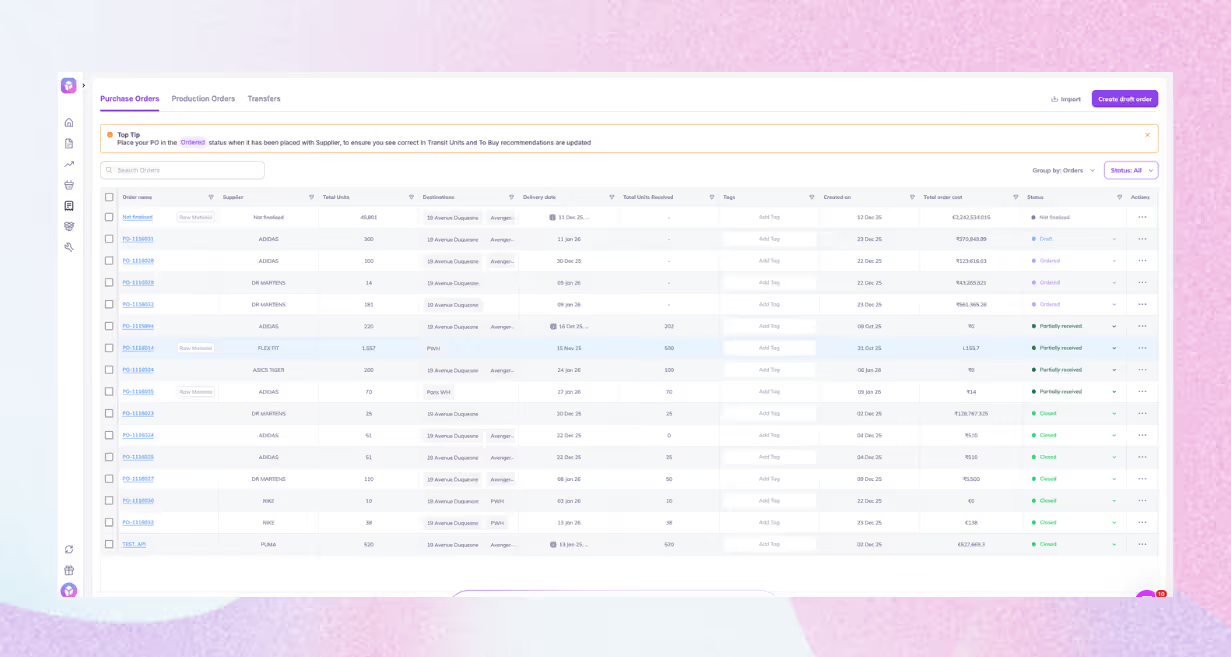
You review the recommendation, adjust if needed, and raise the PO inside Prediko. It syncs to Xero automatically. Any updates in Xero reflect back in Prediko. The PO is right before it leaves your desk and it's in your ledger without anyone doing double entry.
The result: fewer stockouts, less cash tied up in overstock, and purchase orders your accountant doesn't have to chase.
Plans start at $49/month: unlimited SKUs, unlimited users, and a 5-star rating on the Shopify App Store. Start a free 14-day trial.
Frequently Asked Questions
Does Xero sync inventory with Shopify automatically?
Xero's native Shopify integration syncs sales data, payments, and refunds, but it doesn't update stock quantity counts automatically when items sell.
What's the best app to sync Shopify inventory to Xero?
It depends on your complexity. For clean accounting with line-item detail, A2X or Bold Xero Sync work well. For PO sync, inventory planning, replenishment automation, and stockout prevention, Prediko is the strongest Shopify-native option.
Does Xero track COGS from Shopify sales?
Not by default. The native integration doesn't record COGS; it posts revenue only. To get COGS in Xero, you need either a dedicated accounting connector that maps cost entries, or a periodic journal process with your accountant.
How do I fix inventory sync errors between Shopify and Xero?
Check SKU consistency first. Mismatched product codes are the usual culprit. Then review account mappings, and if refunds are the issue, test a fresh return through Shopify and Xero.
Can Prediko sync with Xero?
Yes, but specifically for purchase orders. POs created in Prediko sync to Xero automatically, and updates made in Xero sync back to Prediko.
Is Xero's Shopify integration free?
The integration itself is free to set up if you already have a Xero subscription. Some third-party connectors add a monthly cost, but they can be worth it if they reduce manual work, sync errors, and cleanup time.










.avif)