




Demand planning for Shopify POS is different because you're forecasting demand across both online and physical stores, not just your website.
If your demand plan ignores POS data, you'll likely overstock some locations, understock others, and miss revenue opportunities.
That's why leading omnichannel brands use Shopify POS data to improve inventory allocation, replenishment, and forecasting decisions.
We'll explain how demand planning works for Shopify POS merchants, why POS data matters, and how to build a planning process around online & POS.
What Is Demand Planning (and How Is It Different from Forecasting) for Shopify POS?
Demand forecasting predicts what you’ll sell. Demand planning turns that forecast into action: what to buy, how much to buy, where to stock it, and when to reorder.
For Shopify POS merchants, that distinction matters. This means planning across both online and store-level demand.
You're not just forecasting total sales, you're forecasting where those sales will happen. A product may sell differently online, at your flagship store, and at your second location.
That's why effective demand planning requires channel-level visibility, not just a single sales forecast.
Why Shopify POS Data Should be Your Foundation
There’s a reason why most demand planning tools feel incomplete for Shopify merchants: they were built for online-only brands.
An online-only brand has one data source: its Shopify store. Demand planning is straightforward: look at historical orders, adjust for seasonality, add a margin for marketing spend, and generate a forecast.
But add Shopify POS into the mix, and the equation gets a lot more interesting as suddenly you're not planning one number, you're planning many.
We see this constantly at Prediko. One apparel brand with four retail stores + a warehouse came to us needing to set target stock per variant per location, so they could check actual stock against target each week and know exactly what to reorder for each store.
A single company-level number wasn't enough. The team needed location-level demand to allocate inventory correctly. That's the shift Shopify POS introduces, and Prediko is built to handle it with a native Shopify POS sync.
With the Shopify POS unified dashboard, you get data that a lot of online-only tools simply don't see:
The Stocky Gap for POS Pro Merchants
For years, Shopify POS merchants used Stocky to make sense of this unfied data: setting min/max levels, planning transfers, and deciding what to reorder.
Now that Shopify is sunsetting Stocky on August 31, 2026 for good, merchants are left with the data but not necessarily the planning tools that sat on top of it. This is where Prediko fits, and it's built in collaboration with Shopify for exactly this transition.
Where Stocky was geared toward POS use and basic tracking, Prediko is a Shopify-native AI inventory platform focused on the planning layer Stocky never did well: demand forecasting, supply planning, automated replenishment, and purchase orders tied to your actual demand.
Its forecasting model is trained on more than 25 million SKUs across industries, so it reads your historical sales, layers on seasonality and growth, and forecasts at the SKU, product, and category level.
5-Step Demand Planning Process for Shopify POS Merchants
Now, let's walk you through how demand planning actually works when you're running Shopify POS + Shopify ecommerce.
Step 1: Pull unified data from all channels
To achieve success with your demand plan, you need an accurate data foundation. With Shopify POS, your data lives in one place: Shopify's unified dashboard which will give you
- Historical sales data (daily, weekly, monthly, by SKU, by location)
- Seasonal patterns (when does each product sell? How consistent is the pattern?), lead times (how long does it take each supplier to deliver?)
- Promotional calendars (what marketing campaigns are scheduled)
- External factors (economic shifts, competitor actions, weather, social media trends)
Bringing this all into one view is what you need as a foundation for the plan.
Step 2: Build your baseline forecast
Now you build the baseline: a starting prediction based on what actually happened. This means using your historical data to answer: If nothing changes, what would we sell next quarter?
Most forecasting tools do this with time series analysis. But good demand planning tools go further; some even do it with AI.
They look at product lifecycle stage (new launch, steady state, or declining), account for intermittent demand (products that only sell sometimes), weigh recent data more heavily than old data, and handle zero-sales SKUs intelligently instead of throwing errors.
Step 3: Adjust for external factors
You take that baseline forecast and layer on what's actually going to happen. This includes marketing pushes, product launches, supply constraints, and store events.
For example, a skincare brand launching a new vitamin C serum. The baseline forecast (based on similar products) might suggest 500 units for month one.
But with demand planning that understands external factors, you adjust upward if you have 50K Instagram followers who've been teased about the launch, your email list of 20K subscribers is getting a pre-launch announcement, and your POS stores have been running a "glow week" promotion that brings footfall to shelves
Now your plan is 1,200 units, spread across 800 online and 400 in-store. That's a plan you can actually execute.
Step 4: Generate purchase orders and stock transfers
Your system should automatically translate the forecast across locations into purchase order calendar, replenishment, and transfer recommendations, along with PO generation and tracking.
For Shopify POS merchants, the stock transfer piece is especially powerful. When you can see that your flagship store is about to run out of a bestseller and your warehouse has excess, the system can suggest a transfer before the stockout happens.
Step 5: Review, adjust, and repeat
The best demand planning systems make it easy to review and adjust forecasts, because there are always things you know that the system doesn't.
Review your plan weekly for fast-moving SKUs, monthly for your full assortment. The more regularly you touch it, the sharper it gets.
The right cadence also depends on demand volatility and lead times see when weekly or monthly forecasting makes more sense
This is the workflow Prediko's AI demand planning is built around: it reads your historical Shopify sales, factors in seasonality and growth, forecasts at the SKU and location level, and turns that into reorder recommendations and one-click purchase orders.
It's also why brands running many storefronts lean on it. 4Endurance, for example, uses Prediko to unify sales and inventory reporting across 10+ Shopify stores and cut hours off its weekly multi-store planning.

See how Prediko handles demand planning for Shopify POS from location-level forecasting to replenishment and purchase orders.
Key Features Your Demand Planning Tool Needs
Not all demand planning tools are built for Shopify POS. Here's what to look for
1. Unified channel data
The tool must pull from both Shopify online and Shopify POS in a single view. If you have to manually merge data from two systems, you've already lost.
Managing separate stock counts for each location is how imbalances and delays creep in. Unified data means one source of truth.
2. Integration depth with Shopify
You don’t just need just API connections. You need tools with native sync; that understand Shopify's data model, its inventory structure, and its POS data fields will give you a much richer planning experience than tools that treat Shopify as just another data source.
3. Location-level forecasting
A total forecast for your whole business isn't helpful when you have multiple locations.
You need forecasts at the SKU × location level, because your flagship sells different products than your factory outlet.
4. AI-powered accuracy
Simple historical averaging gets you in the ballpark.
AI-powered forecasting factors in seasonality, product lifecycle, promotions, external signals, and learns from its own errors.
It gives you forecasts that get better over time.
5. Automated purchase and transfer recommendations
The tool should suggest how many to order, from whom, and when, based on supplier lead times, minimum order quantities, and your cash flow constraints.
And when one location has excess and another is about to stock out, the tool should flag it and suggest a transfer.
This is where you make the most of the inventory that's already in your business instead of ordering new stock.
6. Scenario planning or editable forecasts
This lets you test the impact of a promo, a price change, a product launch, or a supply disruption before you commit. It's your risk-management layer.
Best Practices for Shopify POS Demand Planning
Shopify POS gives you the data. These best practices help you use it effectively for forecasting, replenishment, and inventory allocation.
1. Know your product lifecycle per location
Every product has a stage: launch, growth, maturity, or decline. And each stage looks different at each location. A product might be in growth at your flagship (sold out twice this month) and in decline at your factory outlet (been sitting on the shelf for weeks).
In Shopify terms, track this by looking at your Sell-through rate per variant per location. If a variant's sell-through at a location drops below 40% month-over-month, it's likely entering decline. If it's above 80%, it's a growth item. Forecast them differently.
2. Forecast by variant × location
Your warehouse has 500 units of the medium blue sweater. Your online channel is selling 80/week. Your flagship store is selling 15/week. Your mall location is selling 3/week.
A total-level forecast would say "100 units per week, order when you hit 200." A location-level forecast tells you to keep 80 at the flagship (where the demand is) and 50 in the warehouse for online and to move stock if the flagship starts running low.
3. Build safety stock into fast-movers only
Safety stock is your buffer for when things go wrong because they will. But you don't need the same buffer everywhere.
Fast-moving, high-demand products get thicker safety stocks at each location. Slow-movers get thin ones. AI helps you calculate the right level based on demand variability and supplier reliability at each specific location.
Tip: Use the "Days of cover" metric (available in advanced Shopify reports or third-party tools like Prediko) to identify which variants are running low at which locations. Variants with days of cover lower or equal to lead times at any location need attention.
4. Sync your marketing calendar with your demand plan
This one gets overlooked constantly. You plan your marketing without knowing what's in stock at different locations.
Your planners plan stock without knowing what's being marketed at your online store. As a result, you overstock on products that won't get promoted and stock out on the ones that will.
Demand planning that syncs with your marketing calendar is important so that you have a forecast adjusted for the campaigns and POs placed well in advance for the stock to be positioned at POS location before the D-day.
5. Review forecast accuracy regularly using Shopify data
Pull a variance report i.e. compare your forecasted units per location to actual POS and online sales from your Shopify Admin or inventory management tool. Are you consistently over-forecasting at the mall kiosk? Under-forecasting at the flagship? At which variants?
The data tells you where your planning process is working and where it needs adjustment. Do this monthly at a minimum.
How Prediko Does Demand Planning for Shopify POS
Today, there are tools that go far beyond Stocky, adding an intelligence layer on top of your inventory data. Prediko is one of them.
So how does Prediko handle demand planning when you're running Shopify POS + ecommerce?
- First, it connects natively to your Shopify store and POS, pulls all the data, and builds a unified inventory view. No manual uploads and separate spreadsheets needed. Every sale, every return, every stock transfer - it's all in the system.

- Then it builds forecasts at the SKU × location level using AI. Not simple averages. Machine learning models that understand seasonality, product lifecycle, promotional lift, and demand variability. The models learn from every forecast you run, getting more accurate over time.

- The system then generates a purchase order calendar and stock purchase and transfer recommendations automatically. You don't have to calculate reorder points for each location. Prediko does it, and it tells you exactly what to order, from whom, and when or whether it's smarter to transfer from another location first.
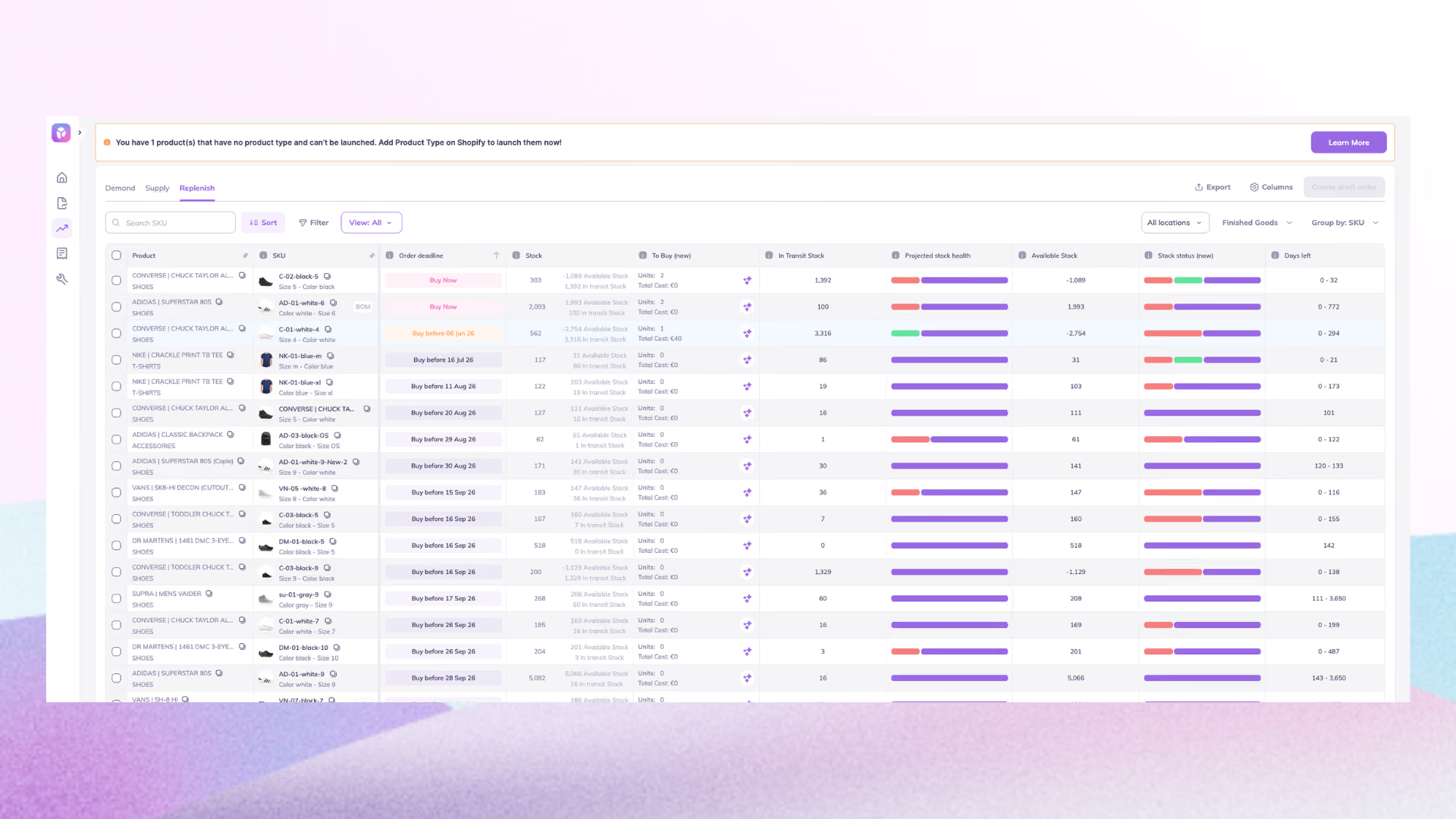
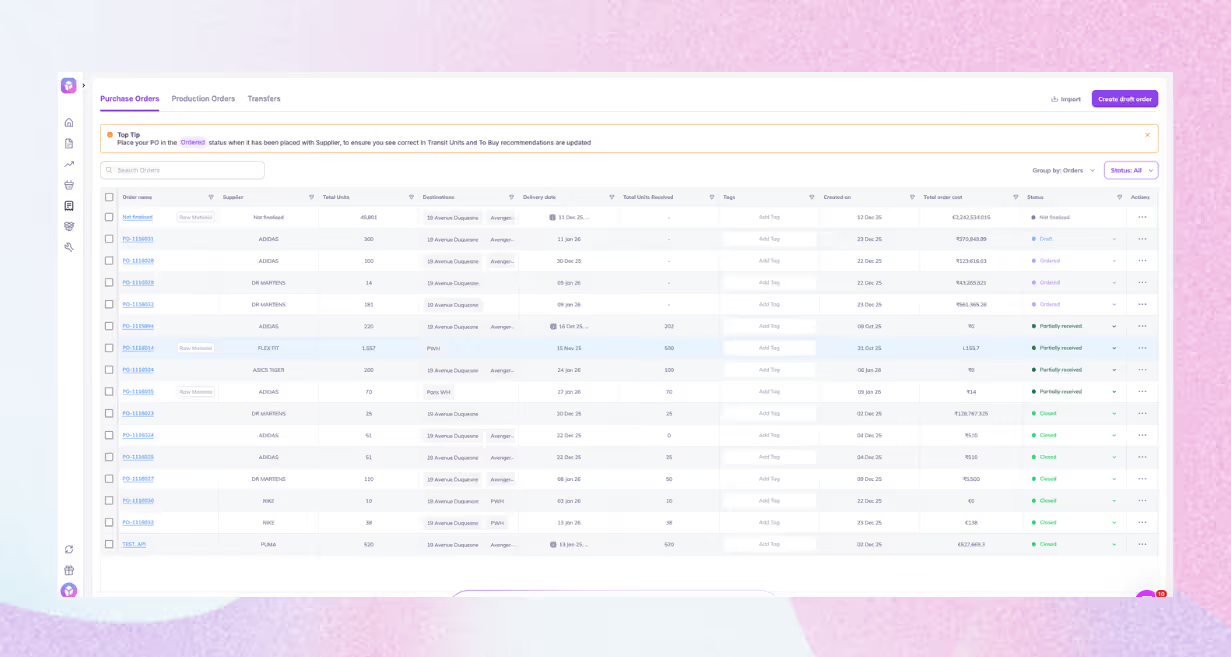
- It also generates POs in one click and lets you share them with suppliers directly from the platform. You can track inbound inventory in real time, so you can stay away from managing PO spreadsheets and follow-ups.
And because it's built for brands of all sizes (starting at just $49/month), it's simple enough to use without an expert inventory degree but powerful enough to handle multi-channel, multi-location complexity.
Don't Wait for Stocky’s August Deadline
If you're still using Stocky, the clock is ticking. On August 31, 2026, Stocky shuts down for good.
The brands handling this best aren't waiting until the last minute. They're already exporting data, testing alternatives, and making the switch before the deadline.
Good demand planning tools help you see stockouts before they happen and not react after you've lost the sale.
Make the move to Prediko and start planning your next reorder today.
Want to see how it works with your actual Shopify data? Start a 14-day free trial with Prediko and build your first unified demand plan today.
Frequently Asked Questions
What is demand planning for Shopify POS?
Demand planning for Shopify POS uses online and in-store sales data to forecast demand and plan inventory, transfers, and purchase orders - all in a unified system.
Why is demand planning important for Shopify POS merchants?
It helps Shopify POS merchants keep the right inventory in the right locations, reducing stockouts, excess inventory, and costly emergency replenishment.
How is demand planning different from demand forecasting?
Forecasting is predicting what customers will buy. Planning is deciding what to do about it: how much to order, from whom, where to position stock, and when. Forecasting gives you a number. Planning gives you an action plan.
Can I do demand planning with Shopify's built-in tools?
Shopify offers basic inventory reports and the Stocky app (shutting down on 31 August, 2026), but advanced forecasting, replenishment, and multi-location planning typically require a dedicated tool like Prediko.
How often should I review my demand plan?
Fast-moving SKUs should be reviewed weekly. Your full assortment should be reviewed at least monthly. The more frequently you review and adjust, the more accurate the plan becomes over time.









.avif)