




Stock levels can change for reasons that never show up in sales data.
Damaged goods, returns, counting errors, misplaced units, and warehouse discrepancies can all leave your recorded inventory out of sync with what is actually on hand.
Stock adjustments help correct those gaps, so your forecasts, replenishment plans, and purchasing decisions are based on accurate inventory data.
We explain what stock adjustments are, share best practices for managing them, and show how Prediko helps yr run stocktakes and stock adjustments.
What is a Stock Adjustment?
A stock adjustment is any correction you make to your recorded inventory so it matches the physical quantity you actually have on hand.
If your system says 500 units and a count turns up 470, that 30-unit gap is your adjustment. You're not changing reality, you're updating your records to reflect it.
The goal isn't zero adjustments; it's catching the gap early, understanding why it happened, and making sure it doesn't quietly repeat every month.
Common Reasons Shopify Merchants Make Stock Adjustments
Shopify's inventory admin lets you tag a reason every time you adjust a quantity, which is genuinely useful.
It turns a raw number change into a pattern you can actually investigate later. The most common reasons merchants log:
- Damaged or defective goods: items that arrive broken, get damaged in your warehouse, or fail quality control.
- Theft or shrinkage: inventory that goes missing with no transaction to explain it.
- Counting errors: a cycle count or year-end stocktake turns up a different number than the system shows.
- Unrecorded returns: a customer sends an item back, but it never gets added back into sellable stock.
- Restocks and receiving: new inventory arrives from a supplier and needs to be added.
- Quality control holds: stock that's pulled aside for inspection before it's cleared to sell.
- Safety stock reserves: units deliberately held back and marked unavailable.
Do you notice the pattern? Most of these aren't dramatic. They're small, everyday frictions: a missed scan here, an unlogged return there, that add up fast when you're managing hundreds of SKUs across channels.
How Stock Adjustments Work in Shopify
If you're adjusting inventory directly in Shopify, here's the flow:
- Go to Products and select the item you need to adjust.
- Find the Inventory section and either Set the new quantity or Adjust by a specific amount.
- Click Add reason and select what's causing the change: damaged, restock, theft or loss, and so on.
- Save. Shopify logs the change in the item's adjustment history, along with the reason, the date, and who made it.
That history matters more than it looks. It's your audit trail, the record that shows whether a "shrinkage" pattern is a one-off or a recurring problem with a specific supplier, location, or SKU.
This manual process of adjusting the numbers works fine for one store with a few hundred SKUs. It gets a lot messier once you're selling across Shopify, POS, wholesale, and a 3PL warehouse at the same time because now every one of those channels can generate its own version of "what we actually have."
Types of Stock Adjustments Every Merchant Should Know
Not every adjustment looks the same. Here are the ones you'll run into most as an ecommerce or omnichannel merchant:
- Quantity increase: more stock on hand than recorded (a receiving error, usually).
- Quantity decrease: less stock than recorded (damage, theft, or miscounts).
- Cost adjustment: correcting the recorded cost of inventory after a supplier price change.
- Write-off: removing inventory that's no longer sellable at all.
- Write-down: reducing the value of slow-moving or outdated stock you'll need to discount.
- Reclassification: moving stock between categories, like raw materials becoming finished goods.
- Location adjustment: correcting where inventory sits without changing the total count, common when items move into "quality check" or between warehouses.
You won't touch all seven types every week. But knowing the difference helps you tag adjustments accurately, which is what makes your inventory views trustworthy.
What Actually Causes Stock Discrepancies
Before you can prevent adjustments, it helps to know where they come from. The usual suspects are
- Human error. Miscounts, mis-scans, and typos during manual data entry.
- Multi-channel sync gaps. A sale on Shopify POS doesn't reflect online fast enough, so both channels sell the same "last unit."
- Unlogged returns. Stock physically comes back but never gets marked available again.
- Supplier errors. Short shipments or mislabeled cartons throw off your starting count before you've even opened the box.
- Theft and shrinkage. Especially common in retail and warehouse environments with multiple hands touching stock.
- Unit-of-measure mix-ups. Counting by the case when your system tracks by the piece (or vice versa).
One thing to note is that a hoodie brand running a flash restock across Shopify and three retail pop-ups doesn't have a "counting problem." It has a visibility problem. Nobody can catch a discrepancy in real time if every channel is reporting from its own spreadsheet.
Manual vs. Automated Stock Adjustments
Best Practices for Accurate Stock Adjustments
While stock adjustments are common, recurring issues point towards a systematic problem. To keep things flowing smoothly, here are a few best practices to implement.
1. Run cycle counts, not just year-end audits
Waiting for one big annual stocktake means discrepancies compound for months before anyone notices.
Smaller, rotating counts: a shelf a week instead of the whole warehouse in December can help catch problems while they're still cheap to fix.
2. Always tag a reason
An adjustment without a reason is just a number that changed. Tagging "damaged" vs. "theft" vs. "miscount" turns your adjustment history into a diagnostic tool. This helps you take preventive steps to avoid discrepancies.
3. Sync inventory across every channel in real time
If your Shopify store, POS, and 3PL aren't connected with each other continuously, you're not managing one inventory, you're managing three guesses. A single source of truth is what actually prevents most discrepancies from happening.
4. Review adjustment patterns monthly
One damaged unit is a shrug. Twenty damaged units from the same supplier every month is a conversation you need to have. Patterns only show up if you're actually looking at the history.
5. Automate what you can
Manual recounts and spreadsheet reconciliation eat hours every week, hours that don't need a human doing them. Automating the sync and flagging step frees your team up for the decisions that actually need judgment.
How Stock Adjustments Affect Your Financials
Stock adjustments aren't just an operations detail; they hit your books directly. The formula is simple:
Inventory Adjustment = Actual Inventory − Recorded Inventory
Turn that quantity gap into a dollar value using your cost (not retail price), and it flows straight into your cost of goods sold and your ending inventory value.
Get sloppy with adjustments, and your gross margin numbers get sloppy right along with them, which makes purchasing decisions and cash flow planning a lot harder than they need to be.
How Prediko Keeps Stock Adjustments Under Control
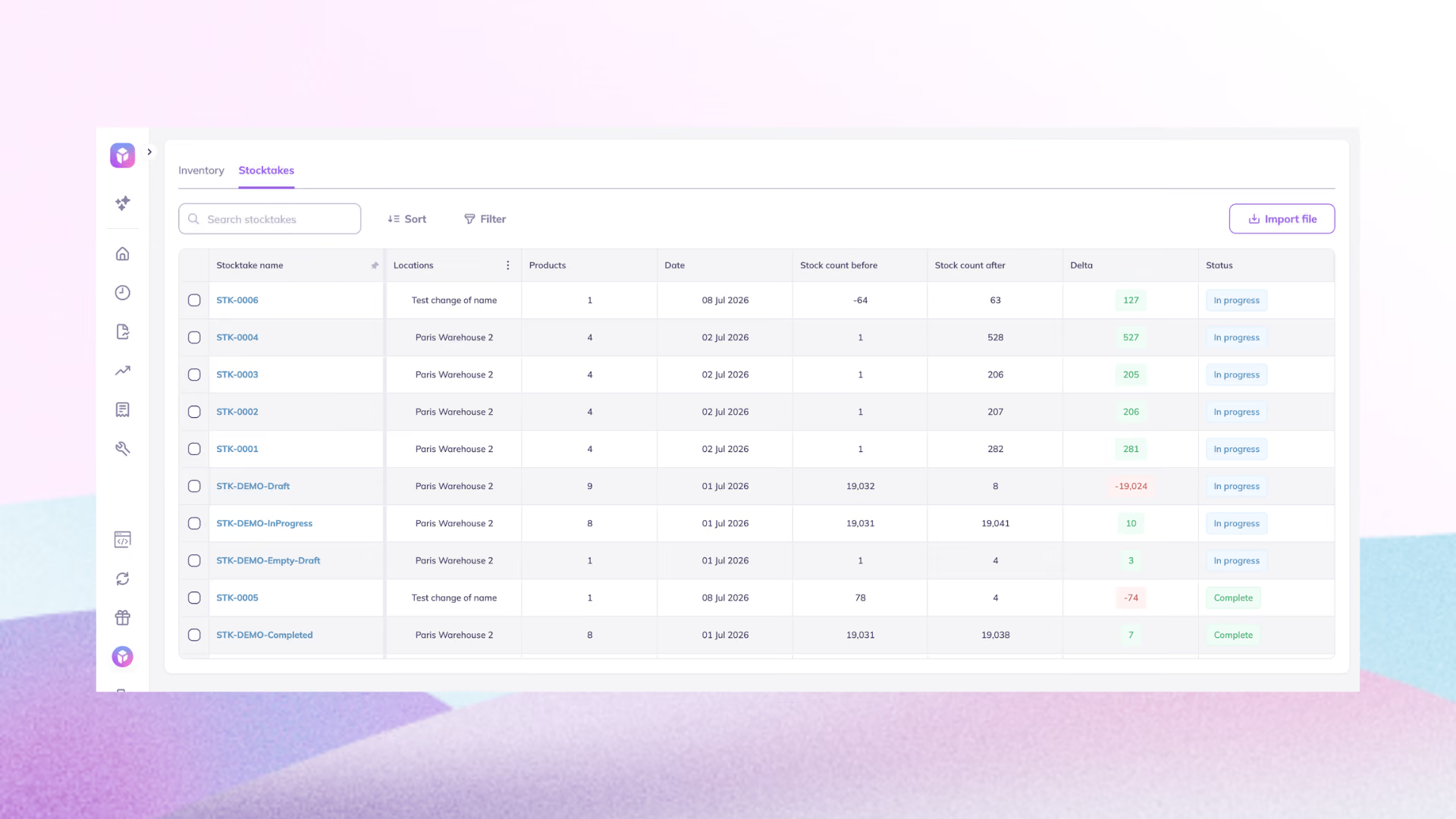
Most of the discrepancies surface during a physical count, which is exactly where spreadsheets fall apart. Prediko turns a stocktake into a real, trackable workflow instead of a once-a-year struggle:
- Start a count in one click. Kick off a count for a single warehouse, name it yourself or let Prediko auto-name it. Every count is logged, so nothing gets lost.
- Count however your team actually works. Scan barcodes one by one, import a spreadsheet if that's already your process, or filter to a set of SKUs and type counts in by hand.
- Use a barcode scanner or your phone. Connect a scanner for fast, high-volume counts, or hand someone a phone to move between aisles, stores, or warehouses. Mis-scan something? Undo it instantly without stopping the count.
- Get a stock adjustment report with a live variance view. Prediko shows stock adjustments live, SKU by SKU, while you count, then creates a detailed report explaining the patterns in discrepancies.
- Push the final count to Shopify in one click. Once you're confident in the numbers, Prediko sets your records to the counted quantities, syncs them straight to Shopify with no manual re-entry, and keeps a full audit trail of what changed and why.
That real-time view feeds straight into Prediko's AI demand forecasting, so a stock adjustment doesn't just fix today's number; it corrects tomorrow's reorder thresholds too.
Keep Stock Adjustments Automated and Accountable
Stock adjustments will always exist as physical inventory and digital records drift apart; that's just the nature of running a real business.
What separates a well-run operation from a firefighting one is how fast you catch the drift and how much manual work it takes to fix it.
Want to stop finding out about discrepancies after a customer already hit a sold-out button?
Start your free trial with Prediko. Brands using Prediko have cut stockouts significantly and saved over 10 hours a week that used to go into manual inventory operations.
Frequently Asked Questions
How do you record a stock adjustment in Shopify?
Go to the product's inventory section in your Shopify admin, choose Set or Adjust by, enter the new quantity, and add a reason (like damaged, restock, or theft) before saving. Shopify logs the change in the adjustment history automatically.
What's the formula for a stock adjustment?
Stock Adjustment = Actual Inventory − Recorded Inventory. A negative result means you need to decrease your recorded stock; a positive result means you need to increase it.
How often should you make stock adjustments?
Ideally, as often as discrepancies are found, through rolling cycle counts, not just a single year-end stocktake. Weekly or monthly counts on a rotating basis catch problems while they're still small.
Is a stock adjustment the same as a stock write-off?
Not quite. A write-off is one specific type of adjustment, removing inventory that's no longer sellable at all. A stock adjustment is the broader category that also includes receiving corrections, cost updates, and location changes.
Can stock adjustments be automated?
Yes. Real-time inventory platforms like Prediko sync across every sales channel and warehouse, flagging discrepancies as they happen, while offering a detailed stock adjustment report.











.avif)