Amazon penalizes sellers who run out of stock. And that punishment hits hardest when it happens to your best-sellers.
Even a short stockout can wipe out months of momentum. It’s common to see a top product drop off page 1 after just a few days out of stock, followed by weeks (and thousands in PPC) spent trying to win back the ranking it once held.
That’s why avoiding stockouts starts with building a reliable demand plan.
We’ll break down how to do Amazon inventory forecasting in a way that’s automated, accurate, and directly translates into clear replenishment decisions.
Why Automated Amazon Inventory Forecasting is Essential
With Amazon’s fast-moving demand, long replenishment timelines, and constant ranking pressure, manual planning leaves too much room for late decisions and costly mistakes.
Here’s why automation is essential.
1. Stockouts directly reduce revenue and rank
When inventory hits zero on Amazon, sales stop immediately, and the product drops out of search and category placements. Each day out of stock results in direct revenue loss with no way to recover the missed sales.
At the same time, keyword rankings decline as sales velocity collapses. And when you restock, rankings don’t bounce back overnight. This recovery lag means a single forecasting mistake can lead to extended sales loss well beyond the stockout period itself.
Plus, with the introduction of Amazon’s Low Inventory Fees, stockouts can now hurt performance and increase costs.
2. Buy Box eligibility depends on inventory stability
Frequent stockouts signal unreliable availability to Amazon. When a product repeatedly goes out of stock, the Buy Box (where buyers click to buy) rotates away faster and may not return immediately after inventory is replenished.
Amazon deprioritizes sellers with inconsistent availability even when pricing, account health, and fulfillment metrics remain competitive. Accurate inventory forecasting supports stable in-stock rates, which is a direct requirement for maintaining consistent Buy Box visibility.
And this now matters beyond Amazon. With Shopify introducing the Buy with Prime button, inventory stability isn’t just an Amazon marketplace advantage; it can directly impact conversion across your Shopify storefront, too.
3. Excess inventory increases storage and long-term fees
Excess inventory starts costing you the moment it reaches Amazon fulfillment centers. Monthly storage fees apply immediately, rise during peak seasons, and accrue whether the product sells or not, turning forecasting errors into recurring costs.
If units remain unsold for too long, long-term storage fees kick in on top of those monthly charges. Over-forecasting doesn’t just create dead stock; it creates compounding costs that grow the longer inventory sits inactive.
4. Cash flow gets locked in unsold inventory
Capital tied up in slow-moving SKUs cannot be reused to reorder fast-selling products. This creates gaps in replenishment cycles, even when demand exists, because available cash is sitting in inactive inventory.
As a result, sellers often cut PPC spend, delay new product tests, or postpone expansion. Poor forecasting shifts cash away from growth activities and into holding costs, tightening cash flow across operations.
What Do You Need to Automate Amazon Inventory Forecasting
You need a few things ready when trying to automate Amazon inventory forecasting. Here is a list of prerequisites.
1. Seller Central sales and inventory records
You start by pulling Seller Central reports because Amazon’s numbers define your inventory reality. Forecasting can’t override how Amazon classifies inventory, so your system needs to mirror those definitions first.
This data becomes the anchor for everything else; it tells you what Amazon considers sold, what’s actually available to customers, and what inventory is already committed. Without it, automation has no true baseline, and every calculation becomes unreliable.
2. Demand signals that show buying pressure
Next, you need demand signals because relying only on sales data makes forecasting late by design. Inventory decisions need to happen before customers place orders, not after.
You can pull demand signals from Amazon search trends (SQP/Brand Analytics), ads performance, listing traffic (sessions/page views), and upcoming promotions/events.
This helps detect rising or falling interest even before shipped units change, based on which your system adjusts reorder timing proactively.
3. Returns, refunds, and unsellable inventory records
To forecast inventory accurately, you need visibility into what comes back after a sale. Order data alone does not capture this.
Your Amazon business inventory forecasting system should ingest return counts, refund events, and the condition of returned units, specifically whether they re-enter sellable inventory or are written off as unsellable.
This data ensures reorder quantities are based on actual consumption rather than gross outbound units.
4. Inbound shipments and reserved inventory status
Your forecasting setup needs a clear view of inventory that isn’t immediately usable. Treating all on-hand units as available leads to inflated supply assumptions.
Capture data on inbound shipments, inventory reserved for customer orders, and units held by Amazon for transfers, removals, or investigations. This ensures your system calculates availability based only on inventory that can actually fulfill demand.
Steps to Automate Amazon Inventory Forecasting End-to-End
Now, we’ll walk you through the steps for setting up an end-to-end workflow to automate Amazon inventory forecasting.
Step 1: Centralise, clean, and segment your data
Automated forecasting starts with getting all sales and inventory data into one place. When data is scattered across spreadsheets or incomplete reports, accuracy breaks down fast.
You need consolidated, SKU-level inputs—sales history, current inventory, inbound units, and stock movements.
This data must be cleaned to remove gaps, duplicates, and timing inconsistencies, then segmented so fast movers, slow movers, and seasonal SKUs are forecasted differently.
Prediko is a Shopify app that handles this by syncing your Seller Central data through CED Commerce, fetching your Amazon data end-to-end, and structuring it into clean, forecast-ready inputs.
Step 2: Incorporating promotions, ad spend, and seasonality
Once your base data is reliable, the next step is accounting for periods where sales are artificially inflated or suppressed.
Promotions, Prime Day events, and ad spend changes can spike demand short-term. If you treat these weeks like “normal” demand, your forecast gets distorted.
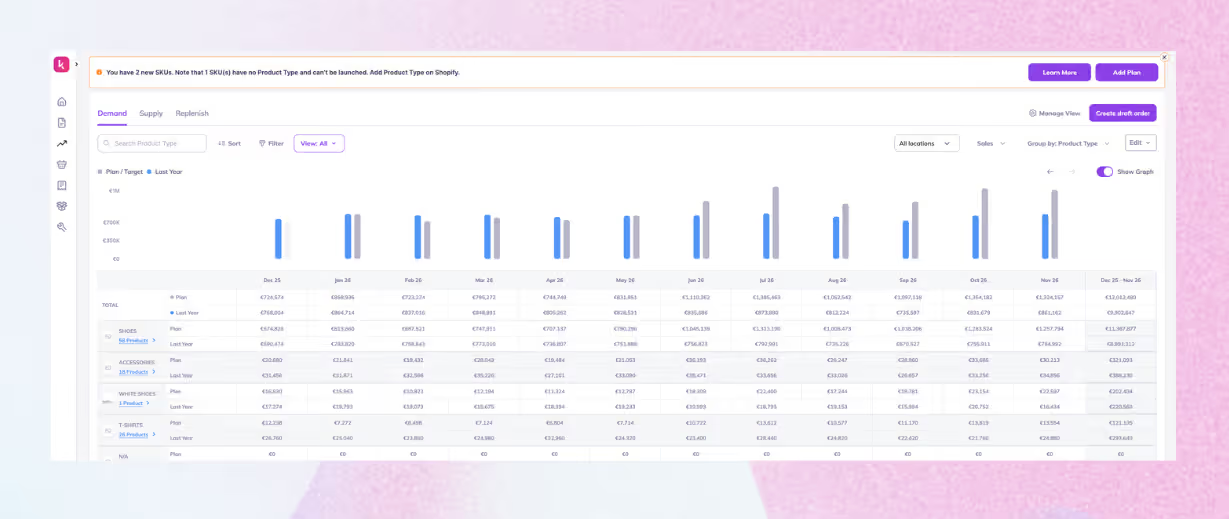
Prediko ingests all these demand patterns, lets you input expected spikes, and adjusts the baseline automatically, so your forecast isn’t skewed by one-off events.
Step 3: Choosing the forecasting engine/architecture
This step determines how forecasts are generated and refreshed. You can run forecasting through spreadsheets, custom SP-API workflows, or ML models. each with a different setup and maintenance effort.
Prediko’s app provides a ready-made and trained AI forecasting engine for both Amazon and Shopify, accounting for inventory states, lead times, safety stock, promotions, and demand volatility.
Forecasts are generated automatically at the SKU level using synced sales and inventory data, without requiring custom builds or engineering support.
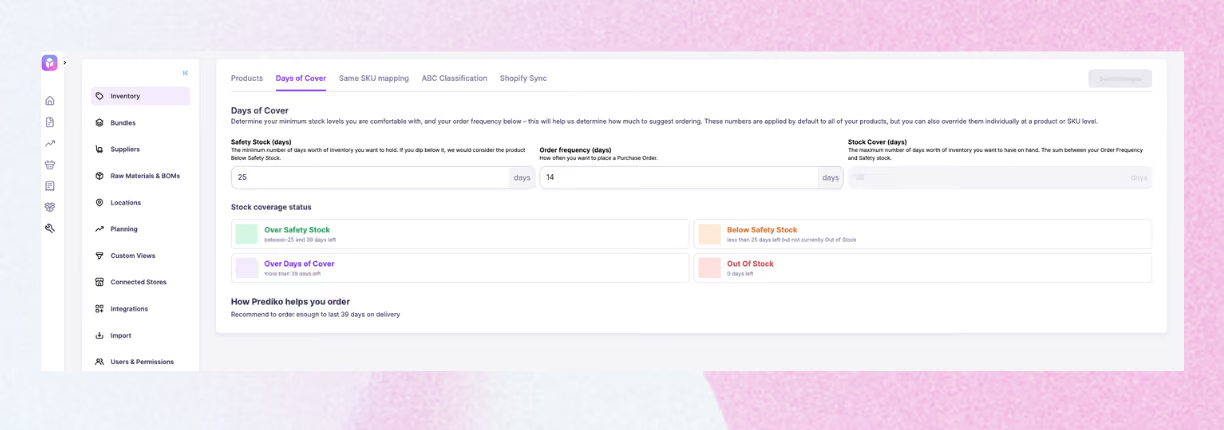
Step 4: Define SKU-level forecasting rules
Forecasts are only useful when they translate into clear actions at the SKU level. That means setting rules based on how each product should be managed, rather than applying one global approach to everything.
Typical rule definitions include
- Reorder frequency based on sales velocity
- Safety stock levels based on demand variability and lead time
- Target days of cover for each SKU or SKU group
Using Prediko, you can define these rules once, and the system automatically applies them to generate reorder recommendations.
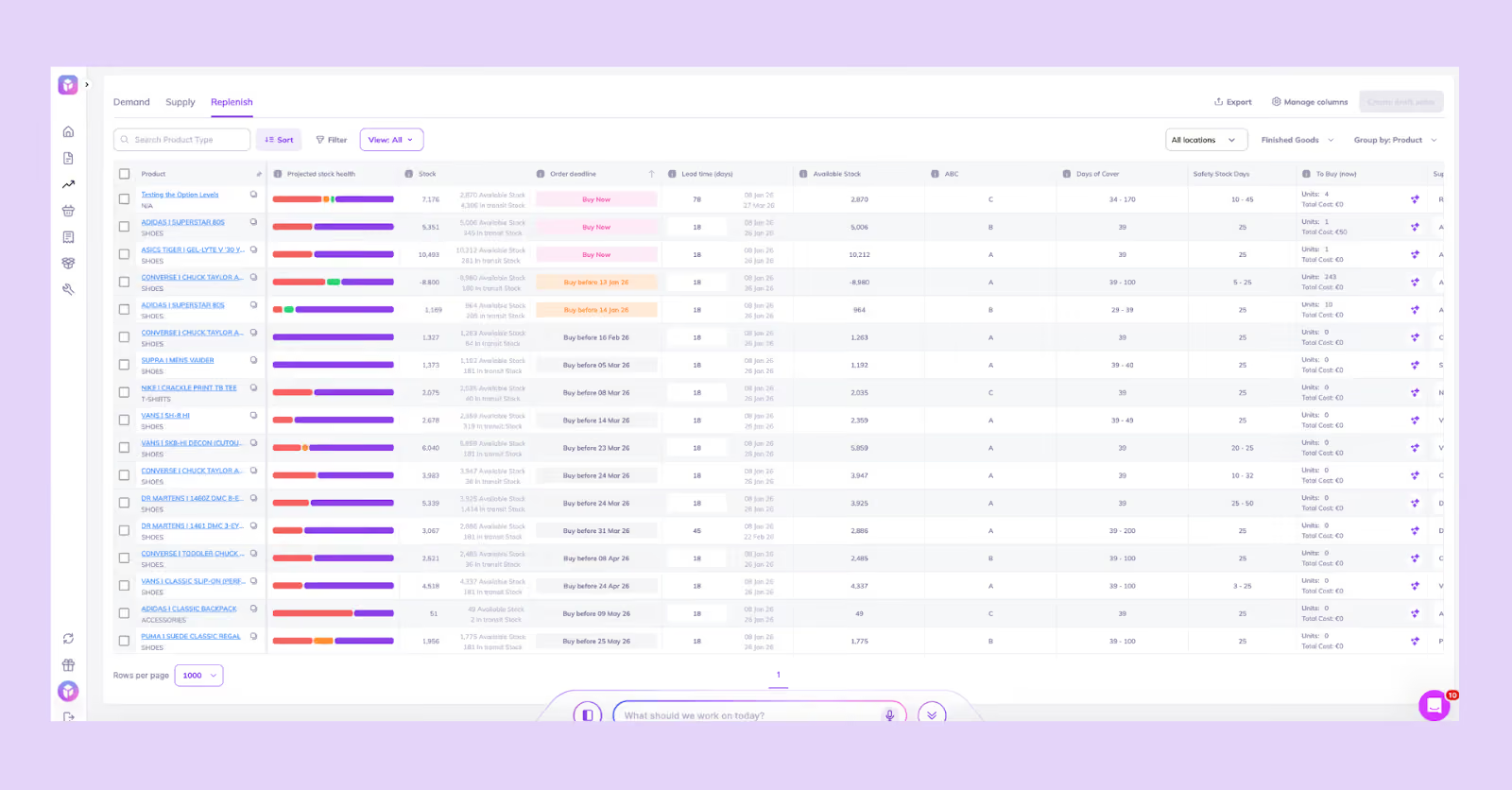
Step 5: Setting up automated reordering based on forecasts
Once forecasts and SKU rules are in place, you can automate reordering.
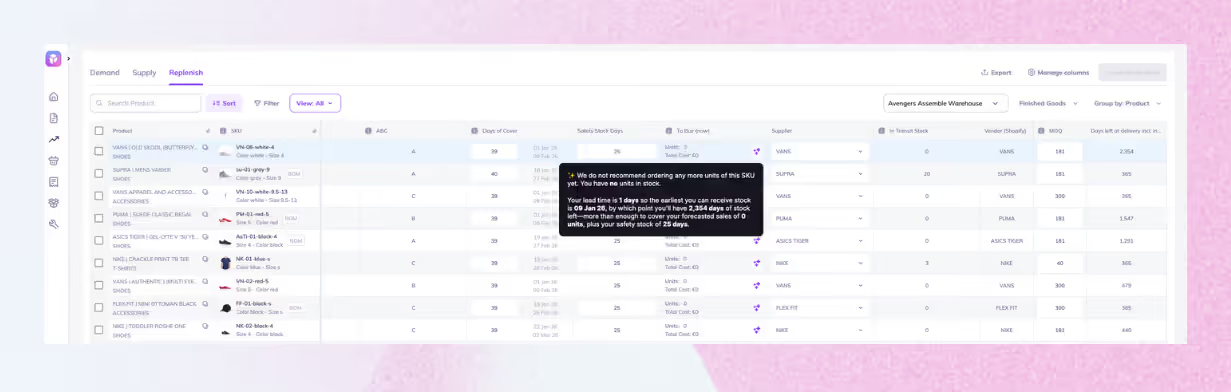
Instead of using static reorder points, have dynamic thresholds that update as demand, inventory, and lead times change.
Prediko recalculates reorder recommendations whenever new sales, inventory, or lead time data is synced, so quantities and timing stay current without manual updates.
Step 6: Add alerts and oversight layers
Automation still needs guardrails. Set up low-stock alerts and notifications for delayed inbound shipments or sudden demand spikes, so you can act before availability drops.
Add an oversight step before PO drafting to review exceptions, like unusually large reorder quantities or unexpected timing shifts. This way, you stay in control while still running a largely automated workflow.
Prediko sends timely reorder alerts and generates PO drafts for your review, and you only approve what you’re ready to place.
Step 7: Integrate with Purchase Order Workflows
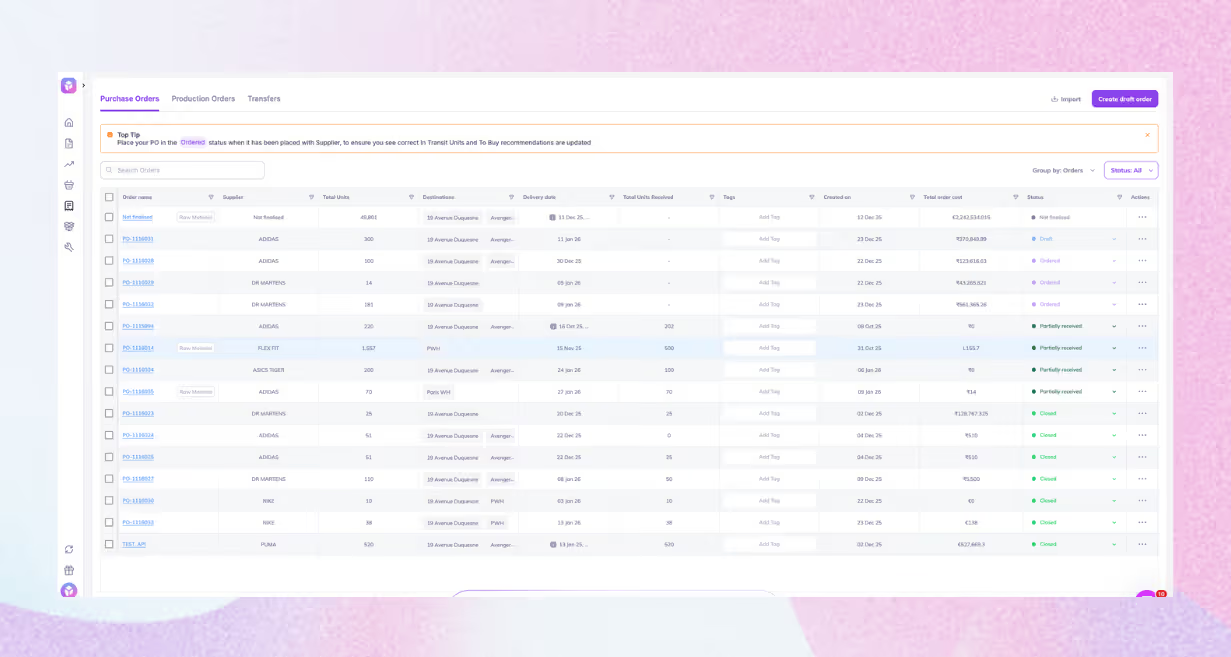
The final step is turning reorder recommendations into purchase orders.
Connect forecasts to PO creation by accounting for approvals, supplier constraints, MOQs, and 3PL/vendor coordination. This reduces delays and keeps execution aligned with the plan.
Prediko flags MOQs and lets you share POs directly with suppliers, and then track them end-to-end, so ordering stays organized and follow-ups don’t slip through the cracks.
Build vs Buy: Choosing the Right Tools for Automated Amazon Inventory Forecasting
Once your forecasting logic or workflow is clear, the next decision is operational: do you build the system in-house, or use a tool that already handles Amazon’s inventory complexity?
Here are a few pointers to help you choose.
1. Cost and ROI comparison
Building an inventory forecasting system seems like a one-time cost compared to a subscription, but the true expense is in time, rework, and ongoing maintenance. Forecasting is not a one-off build; demand, catalog, and Amazon's inventory issues constantly change.
When estimating build cost, include full ownership: engineering time for maintenance, analyst time for validation and fixing issues, and the cost of inventory mistakes (stockouts, excess, aged inventory) during tuning.
Buying an Amazon inventory forecasting software converts these into a predictable expense. ROI is typically seen in fewer stockouts, lower overbuying, and reduced manual planning time. Remember to compare the benefits to your current baseline, not an ideal future.
2. Speed of setup and time to value
If you are already dealing with stockouts, storage pressure, or cash tied up in slow movers, time matters more than perfection.
A build typically needs a pipeline phase before you can even trust the inputs. Next, you need a modeling phase, and then you need a validation phase.
A buy path compresses those phases because the product is designed around Amazon's constraints. In practical terms, the difference often comes down to what you have to set up before the system becomes usable:
- Build path setup work usually includes data ingestion, cleaning rules, SKU normalization, and inventory state reconciliation
- Buy path setup usually looks like connecting accounts, choosing forecasting settings, and confirming lead times and reorder policies
That difference is why buying is often chosen when you need reliable recommendations quickly.
3. Depth of forecasting needed
This is where many teams make the wrong decision: they overbuild for complexity they do not actually need, or they underbuy for complexity they already have.
Clarify the minimum depth you need right now, then choose the approach that delivers it consistently. A simple catalog can operate with basic demand estimates. A promo-heavy catalog cannot.
Here are common depth levels that map cleanly to build or buy choices
- Basic, stable demand, small catalog, manual oversight still acceptable
- Mid-tier, SKU-level forecasts, dynamic reorder points, and promotions need adjustments
- Advanced ML pipelines, multiple channels, long and variable lead times, scenario planning
If you are already operating at mid-tier complexity, buying a specialised tool is often the faster route to reliable outputs. If you are truly in the advanced tier and have the team, building can make sense.
4. Engineering capabilities and ongoing ownership
Building is not just “can you code”. It is “can you own forecasting as a system”. Ownership means monitoring, fixing edge cases, retraining, and keeping integrations healthy.
Ask yourself practical questions about capacity.
- Do you have someone who will own this every week, not just ship v1
- Can you monitor data quality and detect breaks before they hit reorder decisions
- Can you support changes when supplier lead times shift or catalog structure changes
If those answers are shaky, a buy decision reduces operational risk because maintenance is handled by the vendor rather than your team.
Monitoring Accuracy and Improving Your Amazon Inventory Forecasting System
The following section tells you how you can keep Amazon FBA inventory forecasting reliable and adaptable over time
1. Measuring forecast accuracy
Measuring accuracy helps you catch issues early, before they turn into stockouts or excess inventory. The goal isn’t perfect prediction, but knowing how far your forecast drifts and in which direction.
MAPE shows average error at the SKU level, helping you spot products with unpredictable demand. Bias shows whether you consistently over-forecast or under-forecast.
Together, they tell you whether the forecast is simply noisy or systematically wrong, two very different problems to fix.
2. Forecast cycles and review cadence
Forecasts lose value when they are updated inconsistently. A fixed review cycle gives you something to compare against and prevents reactive changes driven by short-term noise.
High velocity catalogs usually require more frequent recalculation because demand shifts faster. Slower-moving catalogs benefit from longer cycles that smooth volatility. What matters is choosing a cadence and sticking to it so that accuracy trends are visible.
3. Backtesting changes before they go live
Any change to forecasting logic should prove itself before going live. Backtesting lets you validate updates on historical data without risking real inventory.
By testing new assumptions across past promotions, seasonal peaks, and demand drops, you can see whether they improve performance consistently or only in one scenario while breaking others.
4. Using forecast errors as feedback
Forecast misses are expected. Ignoring them is the mistake. Each miss signals something the system didn’t account for, whether it’s demand volatility, promotion timing, stockouts, or data gaps.
Reviewing these patterns regularly helps you refine assumptions and prevent repeated errors. This only works when error review is routine.
5. Accounting for supplier behaviour in accuracy reviews
Forecasts can look wrong even when demand was predicted correctly. Supplier delays are a common reason. Tracking actual lead times and delivery consistency alongside forecast performance helps separate demand error from supply error.
When suppliers regularly miss timelines, buffers, and reorder timing need to reflect reality. This keeps forecasts aligned with how inventory actually arrives and not expectations
6. Calibration and adjustment frequency
Calibration is about restraint as much as correction. Updating inputs like lead times or safety stock too often creates instability, while updating them too rarely lets small errors compound.
A scheduled calibration cadence keeps the system aligned with current conditions without reacting to every short-term fluctuation. For most catalogs, monthly or quarterly reviews strike the right balance.
Shopify + Amazon Inventory Forecasting That Actually Executes
Managing inventory across Shopify and Amazon adds a layer of complexity because demand moves in multiple places, but your supply chain is still one.
The right Shopify and Amazon inventory forecasting tool helps you stay in stock on both channels, avoid over-ordering, and turn demand signals into clear replenishment decisions without relying on spreadsheets.
If you’re scaling across Shopify and Amazon, Prediko is the perfect fit. It combines forecasting with automated reordering and purchase order workflows, so you are not just predicting demand, you are acting on it accurately and consistently.
Take Prediko for a spin with a free 14-day trial.
Frequently Asked Questions












.avif)