Stock Management on Shopify
Improve stock management on Shopify with practical guides on inventory tracking, stock levels, automated restocking, replenishment and preventing stockouts and excess inventory.
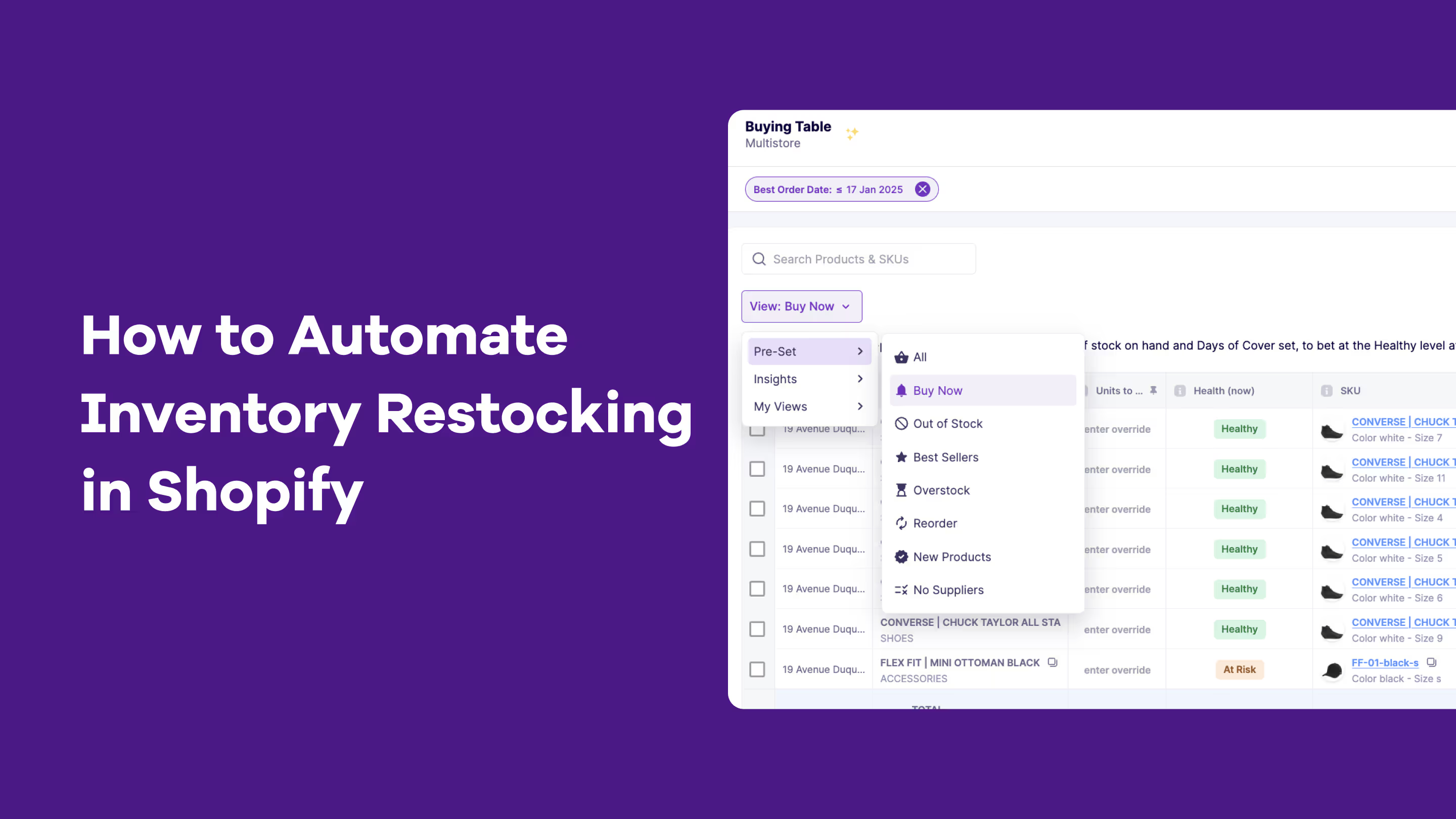
How to Set Up Automated Inventory Restocking in Shopify?
Automated inventory restocking uses real‑time tracking, demand forecasting and reorder rules to trigger purchase orders, reduce stockouts and overstocks, and keep Shopify stock aligned with sales velocity, supplier lead times and channel‑wide inventory.
You’ve just received an email that hits you like a punch in the gut.
“This is the second time I've had issues with your orders. I purchased an item last week, and now you tell me my order is canceled because it's out of stock. This is unacceptable!”
Panic sets in. You know this is just the beginning. What starts as one bad review can quickly turn into a flood of negative feedback across social media. If you’re restocking inventory manually, inaccurate counts, delayed updates, missed orders (and such emails) are bound to happen, costing you money. But there’s a way out.
Automation saves time, reduces human errors, and ensures stock levels are always accurate. This means faster restocking, more satisfied customers, and ultimately, improved profitability.
In this article, we'll learn how automation can simplify inventory restocking, key features to look at in inventory restocking tools, popular options available, and steps to automate the process.
Why Automate Inventory Restocking?
Managing inventory manually may seem manageable at first, especially for small businesses or those just starting out.
Typically, businesses rely on spreadsheets or paper logs to track stock levels, record sales, and order new inventory. They have to physically count their inventory, rely on manual calculations to predict demand, and place orders with suppliers based on guesswork or outdated data.
While this approach might work in the short term, it is prone to errors, requires a lot of time and effort, and can still lead to issues like stockouts and overstocking.
Automated inventory restocking, on the other hand, saves the day by
- Giving you a real-time view of your inventory
- Predicting demand by analyzing historical sales data
- Making it easy to add more products to your roster
- Automatically triggering reorders on time
- Eliminating manual entry, calculations, and guesswork
Key Features to Look for in Inventory Restocking Tools
Now that you understand automation can solve a lot of your restocking headaches, the next step is finding the right automated inventory management software that can handle restocking workflows, demand forecasting, and real-time tracking.
But with so many options out there, how do you choose the right one for your business? Below are four important features to look for when evaluating your options.
- Real-time inventory tracking
Real-time inventory tracking is important to get an accurate view of your stock levels at any moment, without waiting for the next manual count.
Manual stock counts can quickly become outdated due to delayed updates or human errors. With automation, you can access up-to-the-minute inventory data and adjust your purchase orders (POs) accordingly.
Plus, you can set up alerts when stock drops below your set thresholds, helping you prevent stockouts.
- Demand forecasting and analytics
Accurately predicting demand is one of the hardest parts of inventory management and relying on guesswork or outdated data can lead to irreversible mistakes.
Your inventory restocking tool should automatically predict future demand by analyzing historical sales data, trends, and seasonal patterns. This ensures that you order just the right amount of stock, keeping it aligned with customer demand and reducing overstocks and stockouts.
- Automatic supplier notifications and purchase orders
When you thought you still had 20 units in stock and planned to reorder next week, you suddenly realize you’re out, just when a customer places an order. Manually restocking often comes with such surprises.
Automation makes this easy by setting reorder triggers based on predefined stock levels, and automatically generating and sending purchase orders to suppliers when it’s time to replenish your inventory.
This helps businesses manage thousands of SKUs across multiple suppliers and eliminate gaps in availability without spending hours monitoring inventory or creating purchase orders.
- Integration with Shopify and other business tools
Your inventory restocking tool must integrate with your existing tools, like Shopify or other eCommerce platforms, accounting software, and sales channels.
Manual restocking often requires cross-checking data across different platforms. With automation, data flows smoothly across your tech stack, so that your sales, stock levels, and financial data are always in sync.
For instance, when a sale occurs on your Shopify store, your inventory counts update automatically across all channels, including physical stores and other marketplaces. Such tools also automate cross-channel inventory allocation and stock transfers between locations.
Popular Inventory Restocking Apps for Shopify
If you're running your business on Shopify, here are some of the top inventory restocking tools available in the Shopify App Store.
1. Prediko's AI Inventory Management App
Prediko is an AI-powered inventory management solution that goes beyond just inventory restocking. It helps you manage every aspect of your supply chain, from production to demand forecasting. With its carefully designed features, it ensures you have the right amount of stock at the right time.
Its core features include:
- Buying Table: Get suggestions on what to buy, when to buy it, and how much, helping you keep the right inventory levels. Receive low-stock alerts when it’s time to restock.
- AI Demand Planning: Prediko’s AI algorithm distributes your revenue target across the next 12 months by analyzing your historical sales data, seasonality, and growth trends.
- Insights & Analytics: Track granular data like product performance, number of POs that are late or due, and excess SKUs, etc with reports delivered straight to your inbox. Get daily notifications about current stock status and automated nudges (based on lead times, stock cover units, and safety stock) to reorder the right number of units.
- Purchase Order Management: Prediko auto-syncs in real-time with Shopify, allowing you to create purchase orders directly from the Buying Table with a click. You can track the POs in real time and connect with suppliers from the app itself or via email.
- Raw Materials Management: Manage bills of materials and made-to-order production, while accurately predicting the demand for raw materials.
2. Sumtracker
Sumtracker is an inventory management tool ideal for both single-store and multi-store owners. It allows you to sync and restock inventory across platforms like Shopify, Amazon, Walmart, eBay, and Etsy.
The platform also makes managing product bundles easy by automatically updating inventory based on bundle components.
3. Assisty

Assisty is yet another inventory management and planning tool that allows you to keep your inventory in line with actual demand. It delivers precise reorder suggestions based on factors like sales data, vendor lead times, inventory thresholds, and seasonal trends.
The tool offers customizable settings for you to adjust inventory management workflows to your specific needs, from setting reorder points to forecasting demand.
4. BrightStock

BrightStock is a dedicated inventory restocking software that allows you to schedule automatic restocks.
You can search through your SKUs, select the products, and choose restock frequency, whether it's once, every few days, weeks, months, or even years. You can also set the restock quantity as a fixed amount or automatically adjust based on existing stock.
5. Qoblex

Lastly, we have Qoblex, an inventory management software that allows you to connect multiple sales channels to one master inventory, which automatically adjusts according to sales.
The platform alerts you when products fall below reorder points, helping prevent stockouts. With reorder and stock-on-hand reports, you can better plan future purchases and backorders. Qoblex also makes it easy to track and manage bundles and their components.
Step-by-Step Process to Automating Inventory Restocking in Shopify
Follow the below four steps to automate your Shopify inventory restocking processes.
- Setting up inventory tracking in Shopify
The first step in automating inventory restocking is setting up proper inventory tracking. This begins with enabling tracking features in your Shopify settings and accurately establishing your initial inventory counts for all your SKUs
Here’s how:
- Go to your Shopify Admin, click on Settings, then select Inventory
- For each product, enable the Track Quantity option
- Assign stock quantities to each product to reflect what you currently have in your store/ warehouse
If you're managing multiple warehouses or stores, you'll need to set up different locations.
- Choosing the right app for your store’s needs
Your next major decision is selecting an inventory restocking app that integrates with Shopify and supports automation. The app should match the complexity of your store, such as whether you sell across multiple channels or have complex product bundles.
For instance, if you sell on Shopify and Amazon, pick an app like Prediko that can sync and restock inventory on both platforms, so you don’t oversell or undersell on either site.
Create a checklist of features you need. Focus on both your current needs and growth trajectory and see how the app can scale with you. Most apps offer free trials to help you test before committing.
Check out our overview of the top five inventory restocking tools above, including Prediko, BrightStock, and others available in the Shopify App Store.
- Integrating the app and configuring automation rules
When you're ready to implement your chosen inventory solution:
1. Install directly from the Shopify App Store, which ensures compatibility and secure data exchange with your store.
2. Follow the app's setup wizard for initial configuration:
- Connect your sales channels
- Import existing inventory data
- Set up supplier information
- Configure warehouse locations
3. Set up your automation rules
- Define reorder points based on product type and sales velocity
- Input supplier details, including lead times and minimum order quantities (MOQs)
- Configure notification preferences
- Set up custom alerts and reports
Fast-moving items might need automatic restocking at 30% of the remaining stock, while slow-moving items could wait until 15%. For instance, if you're selling 10 units weekly and your supplier takes two weeks to deliver, you might want to set your low stock alert at 25-30 units to maintain a safe buffer.
For seasonal items, set up rules based on historical and future demand patterns.
For small-to-medium businesses looking to scale efficiently, these integrations provide enterprise-level inventory management capabilities without the associated overhead. The key is choosing a solution that can grow with your business while maintaining seamless communication with your existing Shopify setup.
Note: Carefully document all your settings and rules for future reference
4. Testing and monitoring the system for smooth operations
After setting everything up, it’s important to test the tool to ensure it’s working correctly. Run mock scenarios and monitor the system for any issues, like missed restocks/alerts or inaccurate inventory counts.
You may also start with a pilot program using 5–10 products and run it for a few weeks while closely monitoring the results. As you gradually expand to more products, maintain regular audits. Even with automation, human supervision remains important, so establish clear cues for intervention.
Remember that successful automation is a gradual process. Starting small and scaling up methodically is far more effective than trying to automate everything at once.
3 Important Tips for Optimizing Inventory Management
If you’re in eCommerce and want to operate smoothly without many bumps, here are three important things to keep in mind.
- Combine restocking automation with demand forecasting
Go from reactive inventory management to predictive by combining restocking automation with demand forecasting. Choose a tool that has both restocking and forecasting features or offers integrations.
Once you have a consolidated view of your data, look for patterns across restocks and sales, not just obvious seasonal trends, but also correlations with events, promotions, etc.
For example, if you notice that sales of certain products spike during rainy seasons or after payday weekends, adjust your restock triggers accordingly. Your tool should automatically forecast such seasonal and growth trends by collecting past data.
Pro tip: Review and adjust your reorder points bi-annually or based on trend lengths.
- Tracking supplier performance to avoid delays
Tracking supplier performance is super important because even the best inventory tools can't help if your suppliers aren't reliable.
Monitor key supplier metrics regularly including lead times, order accuracy, stock quality, and responsiveness. Create a simple scorecard for each supplier that tracks metrics like the percentage of on-time deliveries, complete orders, and average delay time.
This data helps you identify which suppliers need closer management or replacement. For instance, if you notice a supplier usually delivers 5-7 days late, adjust their lead time in your restocking tool to account for this delay.
- Using analytics to refine stock levels over time
Stock levels rarely remain consistent over time. Establish clear metrics for inventory tracking, such as safety stock days, days of cover, MOQs, days until next delivery, etc.A restocking tool typically provides an analytics dashboard to track these metrics at category and individual SKU levels. Use this data to adjust stock levels for each product.
For example, if analytics show that a product consistently sells out despite regular reordering, consider increasing its reorder point or quantity.
Make it a practice to review your analytics dashboard weekly for quick adjustments and conduct deeper quarterly reviews to identify longer-term trends.
Wanna dive deeper? Get answers to the 5 most pressing inventory questions from the Limited Supply Podcast in this article.
Why Automation is a Necessity for Scaling Businesses?
Automation, not just in restocking but across all aspects of your business, can help scale operations with minimal disruptions. Here’s how:
Reducing operational overhead
As order volumes rise, the time spent on purchase orders, supplier communications, and stock tracking grows exponentially. The need for more staff, frequent stock checks, and manual reordering increases operational overhead.
This impacts your profitability through high labor costs and the opportunity cost of time that could be better spent on other high-impact tasks. Automation eliminates repetitive tasks, allowing businesses to scale their operations without proportionally increasing their workforce.
For instance, a business that previously spent 15 hours weekly on manual inventory management can redirect that time to customer service, marketing, or business development with automation.
Improving customer satisfaction and retention
Maintaining stock and fulfilling orders on time becomes a task with high order volume. Manual restocking often leads to delays and subsequent stockouts, leading to customer frustration and unfulfilled orders.
Automated restocking allows customers to find the products they need when they want them helping you maintain quality service. This results in improved customer satisfaction, higher repeat purchase rates, and brand stickiness.
Managing increased inventory volumes and multi-channel sales
While expanding, businesses often venture into new product lines and sell across multiple platforms (website, marketplaces, physical stores). Manually juggling inventory across different stores/channels can lead to costly mistakes such as immediate store transfers, missed orders, and inaccurate stock planning.
Automated restocking tools integrate with multiple sales channels, enabling real-time inventory visibility, coordinated restocking across all platforms, and timely order fulfillment.
How ‘We Are Jolies’ reduced stockouts by 60%?
We Are Jolies (WAJ), a French underwear brand, faced major inventory challenges as it expanded into new product categories.
They struggled with overstocking, recurrent stockouts, and resource allocation. Plus, manual tracking errors and coordinating inventory across multiple warehouses made things worse.
To address this, WAJ began searching for inventory management apps in the Shopify App Store and found Prediko. By using the tool, WAJ gained real-time visibility into sales, revenue, and inventory across all channels and warehouses.
With Prediko’s forecasting capabilities, they were able to predict demand more accurately. The Buying Table feature highlighted products that needed reordering and the automated nudges alerted the team whenever a particular product or SKU was running low, making it easier to take action quickly.
WAJ also set up inventory reorder alerts that automatically notified their suppliers when stock levels were low, expediting the restocking process. All of this enabled them to accurately predict demand, increase their revenue, and restock on time, reducing stockouts by a whopping 60%.
Read full case study of We Are Jolies.
Restock on time, every time with Prediko
Automating inventory restocking in Shopify can help you keep repetitive tasks at bay while reducing stockouts, excess inventory, and order fulfillment times. With the right tools, processes, and best practices, you can ensure that your products are always available for customers.
If you managed to reach the end of this article, you’re all set to take the next step now. Explore the best inventory management apps for Shopify and start automating today.
Start with Prediko’s 14-day free trial,
.avif)
8 Best Shopify Back-in-Stock Apps: Features, Pricing and More
Do you want to stop losing sales when products sell out? Get all details about the 8 best Shopify back-in-stock apps to help you alert customers.
Stockouts are a lose-lose situation. On one hand, customers feel frustrated and abandon their carts. On the other, you lose out on sales and, at times, even your loyal customers.
As much as stores aim to maintain stock, unexpected customer demand can lead to these out-of-stock situations. But let us tell you, there’s a way to recover these lost sales—back-in-stock alerts.
Back-in-stock alerts are notifications sent to customers when a previously out-of-stock product becomes available again. This allows them to act quickly and make the purchase before the item sells out again, helping retain interest in the product and recover lost sales.
We will give you a thorough review of the top 8 back-in-stock apps, cover the best practices for setting up such alerts, and how Prediko's features help you avoid stock out and send inventory alerts on time.
What Is A Back-In-Stock App And Why Do You Need One?
A back-in-stock app notifies customers when their desired but out-of-stock products become available again. The notifications prompt them to return to the store and make the purchase.
Back-in-stock alerts can be sent via email, SMS, or push notifications, depending on the customer’s preference.
For Shopify eCommerce stores, this tool is invaluable as it offers benefits that go beyond recapturing lost sales due to stock outs:
- Minimize customers’ frustration associated with stock outs and keep them engaged
- Drive traffic back to your store, increasing chances for additional sales beyond just the restocked item
- Forecast demand better based on how many customers sign up for alerts of specific products and optimize stock levels accordingly
- Build a loyal customer on the basis of proactive communication and show that your business values customers’ preferences.
We narrowed down this list of the top Shopify back-in-stock apps according to user reviews.
Top 8 Shopify Back-in-stock Apps
Searching for "back-in-stock apps" on the Shopify app store brings up a whopping 68 pages of options. That's a lot to go through.
So, how do you know which one is right for your store? We’ll cover the features, ratings, ideal use cases, pricing, and potential limitations of the top 8 back-in-stock Shopify apps.
No. 1 👉 Prediko's Back in Stock & Inventory Management App
Prediko isn’t just a back-in-stock solution—it’s a comprehensive inventory forecasting and planning tool designed to keep your best-sellers in stock and your customers happy.
For Shopify store owners, staying ahead of demand is more than just having products on the shelf—it’s about knowing precisely when and how much to restock to keep customers coming back.
Prediko’s advanced inventory forecasting and planning features let you do just that, ensuring your best-sellers never miss a beat.
Key Features
Demand-Driven Inventory Forecasting: Prediko’s AI forecasting accurately predicts sales trends over the next 12 months, including seasonal peaks.
Comprehensive Out-of-Stock Insights: Prediko’s Buying Table goes beyond basic tracking. With detailed metrics like days out of stock, sales lost due to stockouts, and out-of-stock days across the year, you can identify and restock high-demand products to keep sales flowing.
.webp)
.webp)
Stock Health Monitoring: With real-time inventory health checks, you’ll get instant insights into which items are at risk of running out, helping you respond before customers experience an out-of-stock situation.
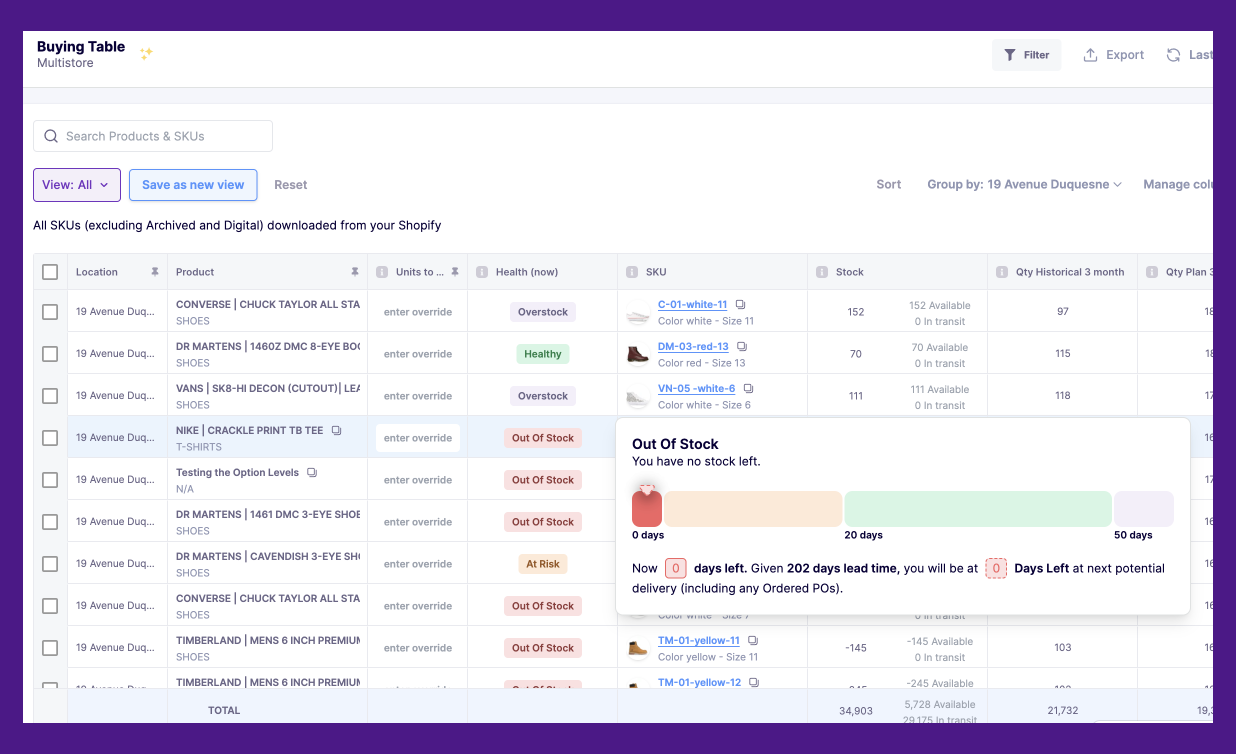
Automated Reorder Alerts: Don’t wait for products to sell out. Prediko sends timely reorder alerts so you can restock critical items ahead of time, maintaining consistent availability for your customers.
One-Click Purchase Orders: Easily generate purchase orders with recommendations tailored to stock cover levels, lead time, and demand patterns, keeping inventory optimized while preventing overstock.
Pricing
Our pricing scales with revenue of our customers. Our plans start from $49/month. Explore pricing
2. Stoq
Stoq (Restock Rocket) is an app built to help Shopify merchants manage both preorders and back-in-stock alerts. Their “Preorder” and “Notify Me” widgets that can be added to any store page. The tool supports multilingual alerts via email and SMS, helping you reach a global audience.
Key features
- ‘Customisable Preorder’ or ‘Notify me’ widget for out-of-stock products on any page
- Multi-lingual back-in-stock email/SMS alerts
- Customizations for preorder button and restock alerts
- Ideal for merchants who prefer quick setup, ease of use, and reliable customer support
Limitations
- Some issues with things not displaying properly due to store themes
- isn't compatible with FB/Instagram markets
Pricing:
The Lite plan is priced at $10/month, the Standard plan at $29/month, and the Pro plan at $69/month. All paid plans have additional charges for SMS and preorders beyond their limits. Stoq also offers a free plan for limited usage.
3. Notify Me!
Notify Me is a Shopify app designed to do more than just send back-in-stock alerts. It also offers a "Preorder" widget, giving Shopify stores an edge in managing out-of-stock items. The app supports back-order discounts and pre-orders with customizable options like partial payments and personalized notes, giving you the flexibility to keep customers engaged.
Key features
- “Notify me" or “Pre-order” widget on the product, home, and collection pages
- Show low remaining inventory with a live "only left"
- Automatic notifications via email, SMS, and push
- Preorder logic with custom discounts and partial payments
- Ideal for stores that prioritize pre order workflows
Limitations
- Users have found transaction fees to be non-transparent and high
- Limited functionality for multi-SKU store environments
- Certain industries, such as CBD, are not serviceable
Pricing:
Notify Me! offers a free Lite plan, with paid Essentials plan starting at $19.90/month. The Pro plan is priced at $39.90/month, while the Premium plan will cost you $69.90/month.
4. Alert Me!
Alert Me is an ROI-focused back-in-stock Shopify app that helps you track revenue from restock alerts and identify your most in-demand products. With easy-to-use sign-up forms on product and collection pages, shoppers can request an unlimited number of alerts.
Key features
- forms for shoppers to sign up for restock alerts
- Customize both buttons and alerts including changing color, backgrounds, etc to match your brand
- Easily track revenue that came in from the restock alerts
- Ideal for store owners who prioritize keeping track of the ROI of their restock alerts
Potential limitations
- Delayed responses from the support team
- Fewer design customizations for different elements like buttons and emails
Pricing:
It offers the ‘Growth Plan’ for $9.99/month and the ‘Pro Plan’ for $29.99/month, along with a free plan for limited notifications.
5. Swym
Swym is another back-in-stock Shopify app that lets you set up a "Notify me" button in just a few minutes. It uses AI to recommend back-in-stock messages which can be sent through SMS and email. The app also integrates with Facebook and Instagram to send alerts.
Key features
- Integrates with Shopify themes in any language
- Automatic back-in-stock, coming soon alerts via email and SMS
- Fully customize the restock alert sign-up form and decide when to show it
- Ideal for companies that want to send back-in-stock alerts on Facebook and Instagram
Limitations
- The product seems to be expensive compared to other options
- There are glitches, such as auto-sending hundreds of emails, even for out-of-stock products
Pricing:
The ‘Starter Plan’ is available at $19.99/month, with the Pro Plan at $59.99/month, and the Premium Plan at $99.99/month.
6. Hulk Restock Alerts
Hulk is a back-in-stock Shopify app that allows you to send automated reminders to customers when their awaited items are back. With Hulk, easily access your entire inventory from the app itself, allowing for easy management of back-in-stock alerts.
Key features
- Automatic email and SMS restock alerts
- Set up notify button on product photos
- Access to full inventory from the app
- Ideal for eCommerce stores that prefer an affordable solution
Limitations
- The app has some bugs, and the support team has been slow to resolve them
- The admin dashboard can be sluggish at times
Pricing:
The app offers only one paid plan priced at $9.90/month, which includes unlimited restock alerts.
There is a global plan available for $299, granting access to over 24 Hulk apps, including restock alerts. Hulk also has a free development plan for users to test the app on development stores before launch.
7. Appikon
Appikon is a straightforward Shopify app that offers fully customizable back-in-stock sign-up forms and buttons. It works well with all the Shopify themes, allowing you to integrate the alerts into any store design.
The solution also offers analytics to track alert performance, helping you understand customer interest in specific items and evaluate the ROI of the alerts.
Key features
- Back-in-stock alerts via email, SMS, and push notifications
- Create customizable and interactive storefronts for stockouts
- Track the alert performance in real-time
- Ideal for store owners who need a straightforward app for back-in-stock alerts.
Limitations
- Customer support can be difficult to reach
- The app is not user-friendly and flexible enough to accommodate the dynamic needs of Shopify stores
Pricing
The ‘Starter Plan’ is at $19.99/ month, with ‘Pro’ and ‘Premium’ plans at $29.99/month and $49.99/month respectively. They also have a free plan for 10 emails/month.
8. KB Back In Stock Restock Alert
KB Back In Stock Shopify app is a perfect blend of affordability and functionality, making it an all-rounder tool to recover lost sales.
It lets you share back-in-stock alerts through email and SMS. The app stands out from other tools by also offering price drop alerts and abandoned cart notifications. Moreover, it creates a waitlist for you to track product demand accurately.
Key features
- Send automatic back-in-stock email and SMS alerts
- Share price drop alerts to customers for on-sale products
Limitations
- Customizing the widget may require assistance from the support team
- Uninstalling the app can be somewhat complicated
Pricing:
There are three affordable plans available—the Basic plan at $5/month, the Starter plan at $9/month, and the Pro plan at $19/month. They also offer a free plan with a generous usage limit.
Ideal for:
Small businesses and brands that frequently run sales or have promotional periods.
9. PreOrder Globo
PreOrder Globo specializes in managing pre-order sales along with back-in-stock notifications. This app allows merchants to set up pre-order buttons with options for partial payments or discounts, improving cash flow before products are available.
PreOrder Globo integrates well with all Shopify themes, offering an easy setup process and flexible features to adapt to different business needs.
Key features
- Customizable back-in-stock email, SMS, and pop-up
- Enable pre-order button for out of stock product/variant or any product/variant on Shopify
- Set up the number of preorders and the date and time to start/end the preordering
- Options for partial payment, automatic discount on pre-orders, and pre-order countdown
Limitations
- Limited customizations for countdown timers
- There are some issues with UX like re-adding the products after putting them up for preorders
Pricing
There are two paid plans available. The Lite plan is at $9.90/month and the Pro plan is at $19.90/month. PreOrder Globo also offers a free plan, which includes limited presale orders and restock email notifications.
Ideal for
Shopify stores looking to run pre-sales and capture early interest in new products.
Best Practices for Back-in-stock Alerts
Back-in-stock alerts are a powerful part of your inventory strategy to recover lost sales from stockouts. Follow these best practices to create conversion-ready back-in-stock alerts.
1. Use multiple channels
Different customers respond to different communication methods. Using multiple channels and reaching them on their preferred one to send back-in-stock alerts increases your reach and chances of conversion.
Allow customers to choose how they receive alerts —via email, SMS, or push notifications. Klaviyo's out-of-stock email flows are great for creating and managing personalized, out-of-stock email alerts.
If you have a mobile app, consider sending in-app push notifications for restocked items to reach users directly where they shop.
Segment your audience based on their preferences and send alerts accordingly. Make sure each message is consistent across all channels but optimized for that specific format.
2. Personalize the alerts
Personalized alerts capture customer attention more effectively. Use customer data to personalize back-in-stock alerts. Include their name in the message, attach the link to the exact item they were waiting for, and even include product-specific details. Personalized alerts make the experience feel relevant, increasing open rates and engagement.
3. Create a sense of urgency
Urgency encourages faster customer action. Letting customers know that the item is back in stock but could sell out again soon creates a fear of missing out (FOMO), which can lead to faster conversions.
Use phrases like “Limited stock available!” or “Only a few left!” to convey scarcity. You could also show real-time stock levels (e.g., "Only 5 left!"). If possible, include countdown timers in your alerts to indicate how long customers have before stock runs out. Also, highlight how many other customers are viewing the restocked item to encourage quick purchases.
4. Include social proof
Showing that other customers are buying or loving the restocked product can build trust and encourage more sales. Including ratings, testimonials, user-generated content, or even showing how many people recently purchased the item can push hesitant customers to make a decision.
For example, “Back on popular demand—our best-selling moisturizer is now available!” or “Sarah from Germany bought this, a few minutes ago”. You may also mention how many people have signed up for alerts or how many units were sold recently (e.g., “Join 200 others on the waitlist!”).
5. Offer incentives
Incentives offer extra motivation to buy now rather than later. Small offers, like a limited-time discount or free shipping, make restocked items more appealing to consumers.
Add a limited-time offer to your back-in-stock alert, like “Get 10% off if you order today!” or “Free shipping on your restocked item for the next 24 hours!
You can also offer early access to restocked items for subscribers before announcing them publicly, creating a sense of exclusivity. Or bundle it with a complementary product and offer it at a discounted price.
Reduce Stock outs And Improve Inventory Planning With Prediko
While back-in-stock alerts can help you recapture lost sales, Prediko offers a proactive way to keep you away from stockouts altogether.
Prediko’s AI-powered inventory management solution is designed to maintain adequate stock levels and ensure that your best-selling products are always available. Its features make it ideal for Shopify stores looking to strategically plan their inventory and avoid lost sales.
- Real-time tracking: Centralize and track all your sales and inventory data in one place (multi-store, multi-warehouse, bundles, and subscriptions).
Monitor your inventory retail to understand stock tied up in your Shopify store. Sync with Shopify sales data to compare actual revenue against planned revenue, adjusting your strategy as needed.
- Automated inventory alerts: Receive daily and weekly email alerts on stock levels, highlighting products or SKUs that are in stockout or at risk.
Get reminders to purchase the right quantity at the right time based on current stock levels. Prediko gives a Health check of each individual SKU or product in your product catalogue.
- AI-assisted demand planning: Let AI algorithms analyze historical sales data (including seasonality) and forecast demand and revenue for the next 12 months.
Edit the plan to accommodate any changes throughout the year. Use 100+ filters to drill down your plan at the SKU, category, or product level.
.webp)
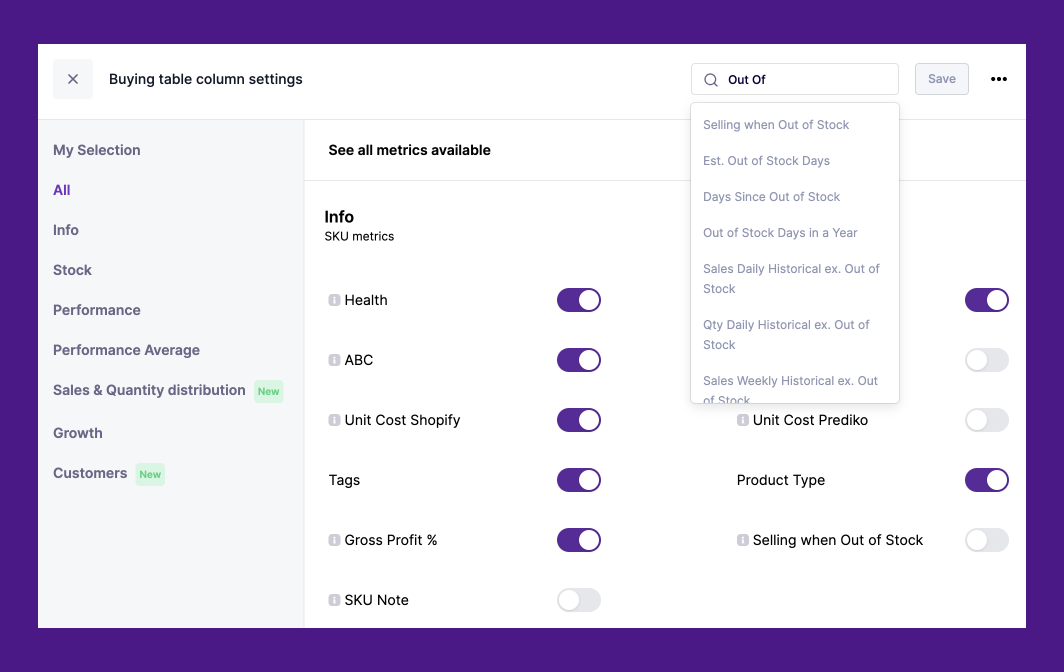
- Buying table: Get an intuitive Airtable interface that shows what to buy, when, and in what quantity. Access 90+ metrics like out-of-stock days in a year for an SKU, est. out-of-stock days based on current inventory, days since out of stock, etc within the Buying Table and make informed inventory decisions.
- Purchase order recommendations: Get live purchase order recommendations based on stock cover levels. Generate purchase orders in a click based on stock cover levels, lead time, and sell-through rates.
We Are Jolies (WAJ), a French underwear brand, struggled with frequent stockouts as they expanded into new product categories. Using Prediko’s AI-driven forecasting and restocking alerts, WAJ successfully reduced stockouts by 60%, ensuring their best-sellers remained available and enhancing customer satisfaction.
Curious about how Prediko can work for you? See rest of our success stories.
Shopify Inventory Alerts: Low Stock, Out of Stock, and Back in Stock Notifications for Better Management
Setup different types of inventory alerts for your Shopify store - Low Stock, Out of Stock, and Back in Stock motifications.
Shopify inventory alerts help merchants monitor low stock levels and receive notifications before products go out of stock. As SKU counts grow, inventory alerts become essential for preventing stockouts, improving replenishment planning, and maintaining inventory visibility across warehouses and sales channels.
In this guide, we explain how Shopify inventory alerts work, how to set them up, and the best tools for automating low stock notifications.
Note: Our Shopify inventory alert recommendations are reviewed regularly to keep pricing, integrations, automation capabilities, and operational details accurate. This guide was originally published in December 2025 and was last reviewed in May 2026. Because inventory tools evolve frequently, we continuously evaluate platforms based on Shopify compatibility, merchant feedback, inventory workflows, and replenishment functionality.
Types of Inventory Alerts in Shopify and How to Set them Up?
Before we begin talking about how to best use stock alerts, let's understand the types of alerts.
1. Low stock alerts
Alerts for when your product inventory falls below a specified threshold. To set up the low stock alert, you must install third-party Shopify restock apps to receive low stock alerts. The Shopify Help Centre suggests using Stocky.
However, despite being a popular Shopify app, Stocky has received negative reviews due to issues with inaccurate inventory data, manual updates, and unreliable reporting. As a user has rightly pointed out:
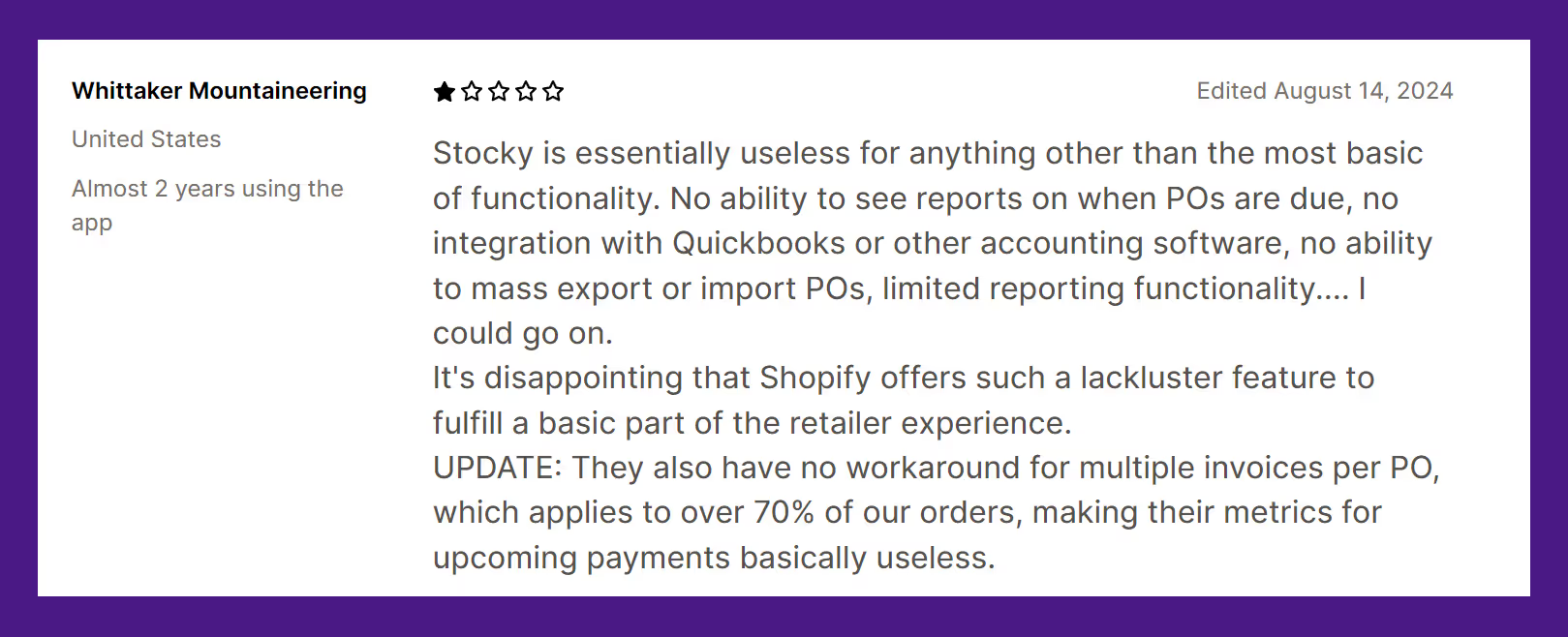
The app's mobile functionality has also been compromised by recent updates, making it less convenient for businesses that rely on on-the-go inventory management. These drawbacks have led many Shopify merchants to seek out more reliable Stocky app alternatives for their inventory needs.
2. Out of stock alerts
An out of stock on Shopify alert set up to notify you when a product's inventory reaches zero. To set them up, Shopify Help Centre suggests using certain Back in Stock apps but with their limited application, it doesn't compare well to other Shopify apps.
3. Backorder alerts
Shopify also notifies you when a customer orders an out-of-stock product that is expected to be restocked. Shopify Help Centre suggests using the Back in Stock App for setting up back orders as well.
As mentioned before, the app cannot compete with the benefits offered by other Shopify apps like Prediko, allowing you to send back-in-stock notifications when items are restocked.
You can leverage these by creating a Notify Me button on the website. Doing this builds anticipation in potential customers and informs them about product availability.
4. Pre-order alerts
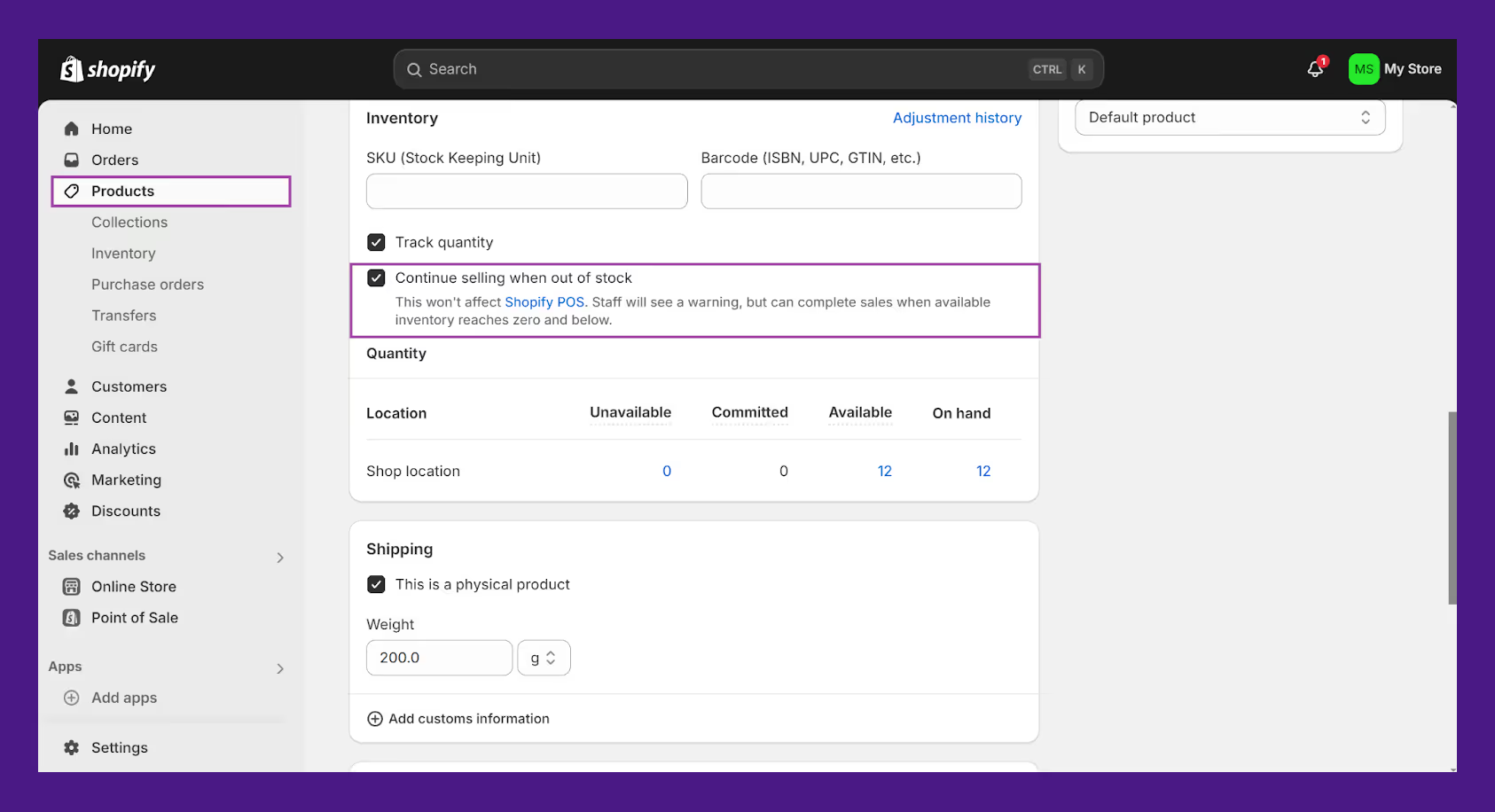
Shopify allows customers to pre-order a product that is currently out of stock. To set up notifications that alert you when pre-orders are placed, follow these steps:
- Go to your Shopify admin.
- Navigate to Products.
- Click on the product you want to allow pre-orders for.
- In the Inventory section, enable the “continue selling when out of stock” option
- Save the changes
Importance of Shopify Inventory Alerts
Whether you've been using simple ledgers, spreadsheets, or even building custom workflows in free tools like Shopify Flow to keep track of inventory- manually entering and monitoring different product variants can be daunting. Getting alerts for low-stock, out-of-stock products can help manage these pains.
One of the best ways to stay ahead of last-minute stockouts is by implementing a Shopify safety stock strategy. By maintaining buffer inventory for fast-moving SKUs, you can safeguard against supply delays, seasonal demand surges, or unexpected spikes during promotions.
👉 Also Read: If you’re managing multiple SKUs with different sizes, colors, or configurations, a Shopify variant inventory tracker can help you avoid overselling and stay ahead of complex stock movements.
For example, if you're running a sale on your website or inventory is running out faster than anticipated due to the seasonal demand of certain items, manually counting stock will be tedious and lead to inaccuracies. You can rely on periodic stock takes in situations like this, especially if you're dealing with many SKUs. Stock alerts help you stay on top of stock levels. They provide real-time updates on stock levels making it easy to monitor anomalies and adapt to them.
Apart from this, businesses today rely on multiple sales channels and often use various warehouses for fulfillment. Managing multiple locations can be taxing without stock alerts, especially if you’re relying on Shopify’s inbuilt inventory management system. It requires you to manually create different tables or views for different locations. There’s no unified view to track these tables individually as well. Stock alerts help single out the products or locations that need your immediate attention.
Does Shopify's Inbuilt Inventory Management Give Stock Alerts?
No. Shopify does not have built-in features that support customizable email alerts.
You’ll have to use third party Shopify apps to set up basic alerts like low stock, out of stock, back-in-order and preorder alerts.
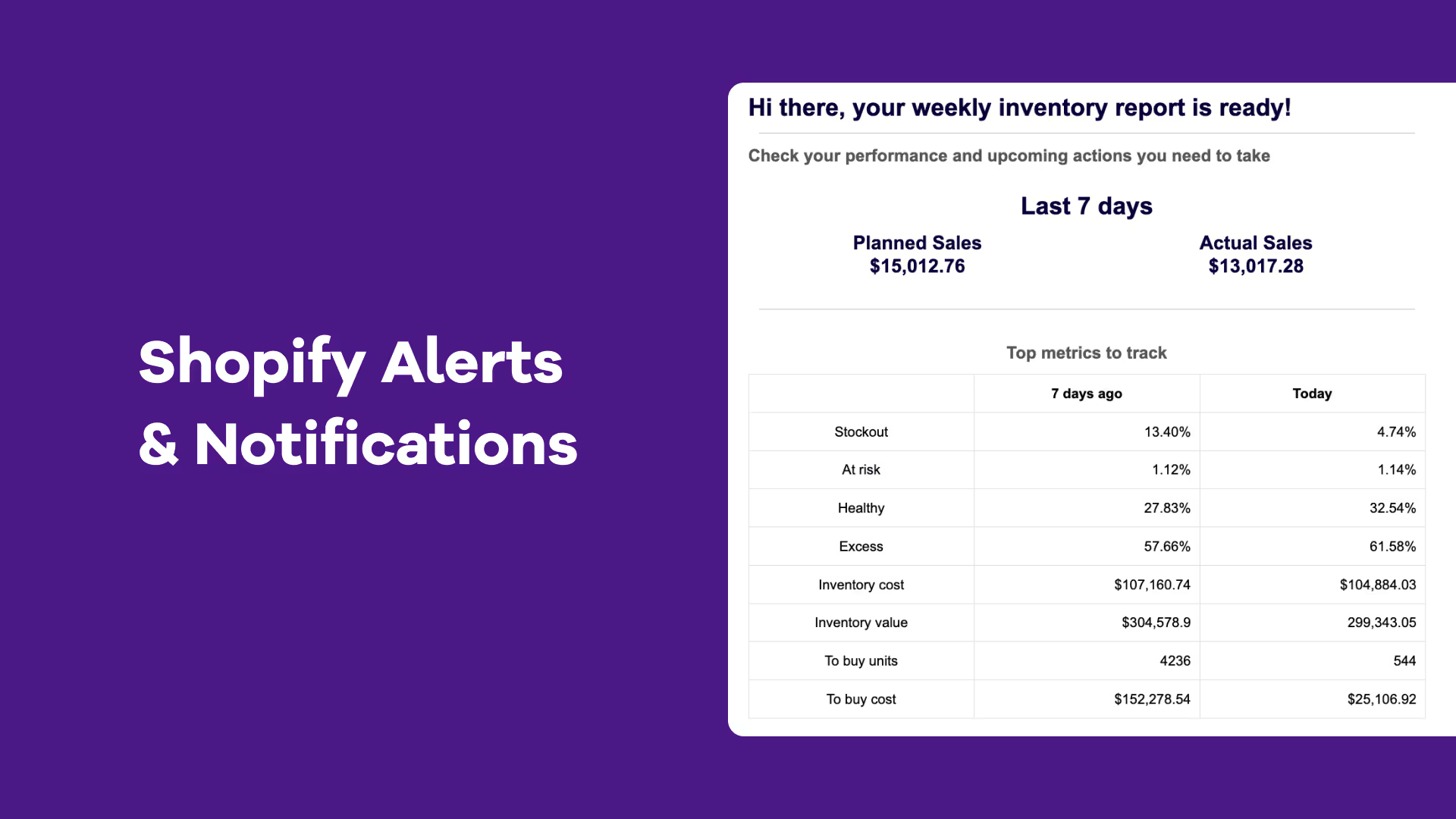
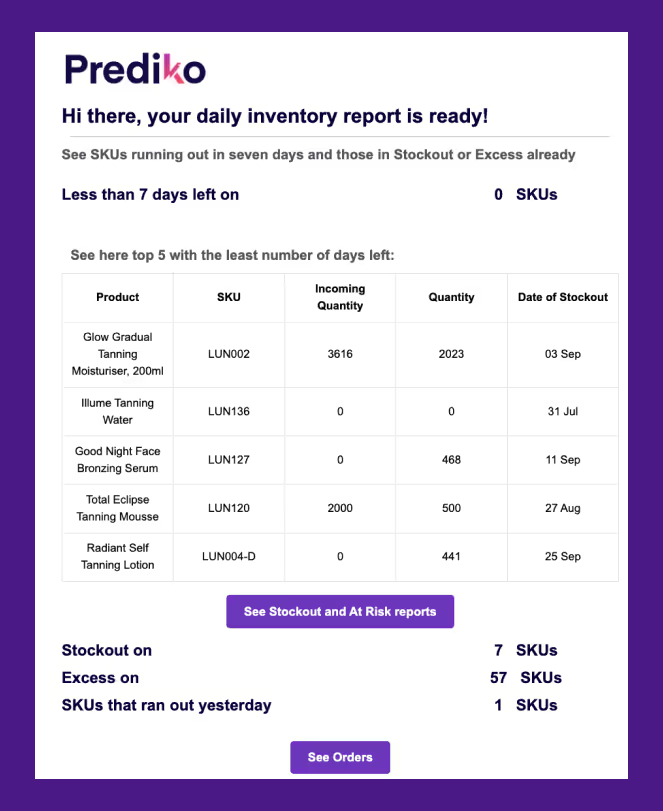
Prediko is a great Shopify inventory management app that provides daily email notifications that cover-
- SKUs that will run out in 7 days
- Stockout, At Risk, Healthy, and Excess Stock count
- SKUs that you ran out on the day before
Here’s how to set it up -
- Download the Prediko App from the Shopify App Store.
- Once downloaded, create account
- Enter your Stock Cover and the email notifications will be automatically activated.
- You can select “Unsubscribe” at the bottom of the email to opt out of receiving these emails.
See Prediko in action:
We also discussed how real Shopify brands approach alert-driven operations in our session on the Limited Supply podcast — including what alert thresholds actually work.
Limitations of In-Built Shopify Inventory Management
For small Shopify businesses, manually tracking inventory and restocking as needed might be sufficient. However, as businesses grow and product catalogs expand, manual methods become increasingly time-consuming and prone to errors (inventory might not get tracked on Shopify).
Relying solely on Shopify's built-in inventory alerts can also fall short, especially when dealing with complex inventory scenarios. Imagine having to set up workflows and alerts for 50+ SKUs.
While Shopify offers fundamental inventory alerts, they might not provide the granularity and automation required for growing businesses. Even if you set up reorder points and workflows in Shopify, they must be set up for individual products or variants.
Using the Shopify POS system can also prove challenging when integrating with additional software like your ERP. Not to forget, it can be a nightmare to monitor multi-location inventory when selling through multiple channels.
Whether you use Shopify or Shopify POS, the scaling issue and its inability to handle a large number of SKUs remain.
And that's just the tip of the iceberg. Relying solely on reactive alerts based on predefined thresholds might not be enough to address dynamic market conditions and evolving customer demand. While Shopify offers valuable reporting features like:
- Month-end inventory snapshot and value
- Average inventory sold per day
- Percent of inventory sold
- Product sell-through rate
- Days of inventory remaining
- ABC analysis by product
These reports can provide insights into inventory performance but still require manual analysis and interpretation to optimize the processes. Shopify doesn't automatically identify high-demand products or suggest adjustments to reorder quantities for low-performing SKUs.
As the number of SKUs grows, the cognitive load on the team increases, making it challenging to make informed decisions and avoid stockouts or overstocks.
To better understand your inventory management and optimize your product strategy, you'll need to go beyond Shopify's standard reporting.
An AI-powered inventory management system can automate many inventory planning and forecasting tasks, freeing up time for the team to focus on other strategic initiatives. Apps like Prediko can analyze sales trends and make informed decisions about inventory levels and reorder points:
Got more questions? Get answers to the 5 most pressing inventory questions from the Limited Supply Podcast in this article.
Why Choose Prediko for Smarter Inventory Management?
Shopify is a one-stop solution for e-Commerce businesses that are starting. But as we've mentioned, it does little to accommodate scaling businesses.
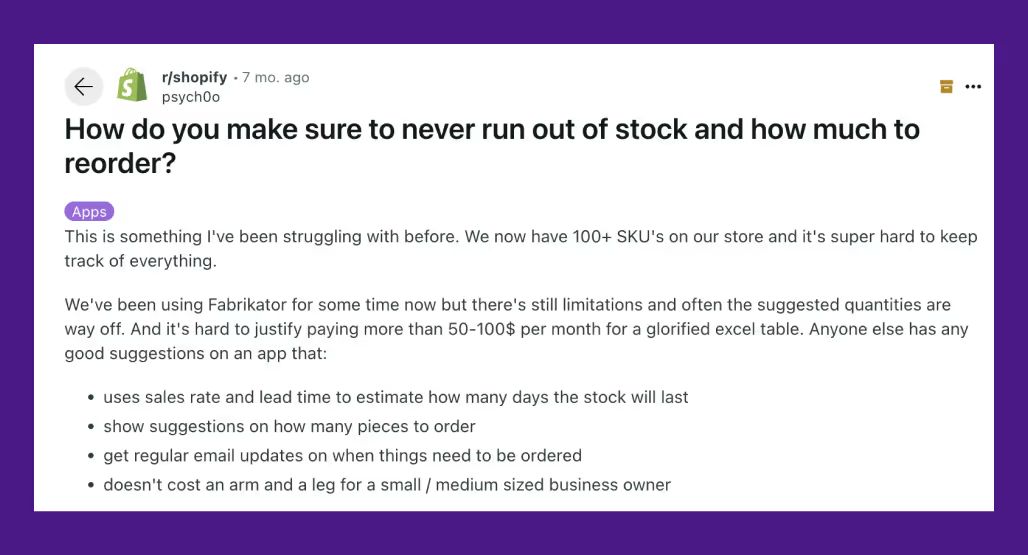
As a Reddit user rightly pointed out, you don't want to end up paying hundreds of dollars for "glorified Excel sheets" either. Once your business grows, you can't track stock quantities, enable stock alerts, and call it a day.
That's like putting a band-aid on a bullet wound.
You must look for an AI-powered inventory management system to manage inventory to avoid stockouts and overstocks and save money. It does all the heavy lifting and eliminates any guesswork in your inventory management process. Here's how:
1. Comprehensive Inventory Alerts
Prediko provides daily and weekly alerts through email that go beyond basic low-stock notifications. The daily alerts list account for stock levels:
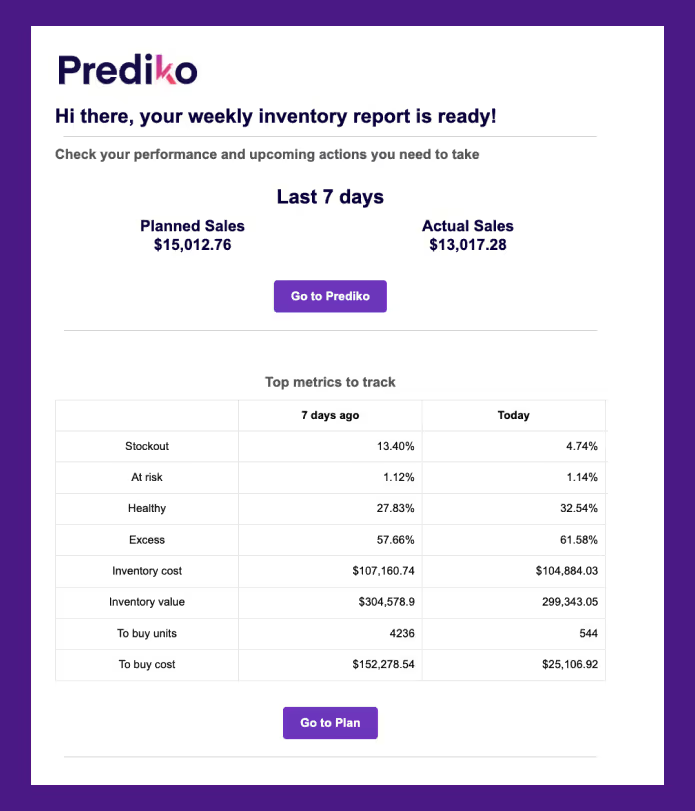
The weekly alerts provide insights into sales performance:
Apart from these alerts, the centralized view in Prediko offers buying recommendations based on historical data and current trends. Prediko considers factors like lead time and automatically suggests the best buying dates based on this information.
The Buying Table also provides comprehensive insights into your inventory performance, with over 90 metrics to guide your decision-making.
Read Case Study: These real-time updates helped We Are Jolies reduce stockout by 60%.
2. Intuitive and Informative Dashboard
Prediko has an intuitive dashboard that centralizes all the data you need to optimize your operations. It allows you to customize your inventory planning to the SKU, category, or product level with over 100 filtering options. The dashboard displays a precise health bar for each product, indicating stock levels and potential risks.
Using these real-time suggestions, you can generate purchase orders within the same dashboard, track their fulfillment and even communicate these POs to your vendors. Prediko's integration with ShipHero allows for real-time syncing of purchase orders even when using multiple sales channels and vendors.
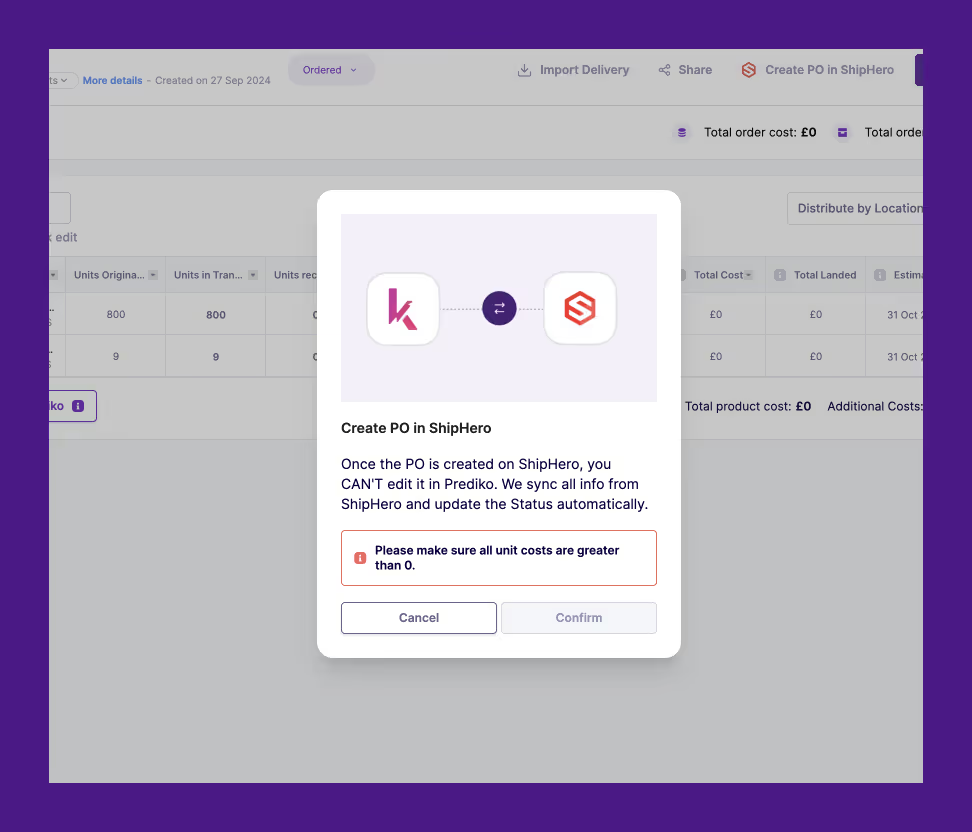
No more juggling between different tabs and tools to manage your inventory!
Read Case Study: That's precisely how Kate Hewko boosted inventory efficiency by 40%.
3. Enhanced Reporting
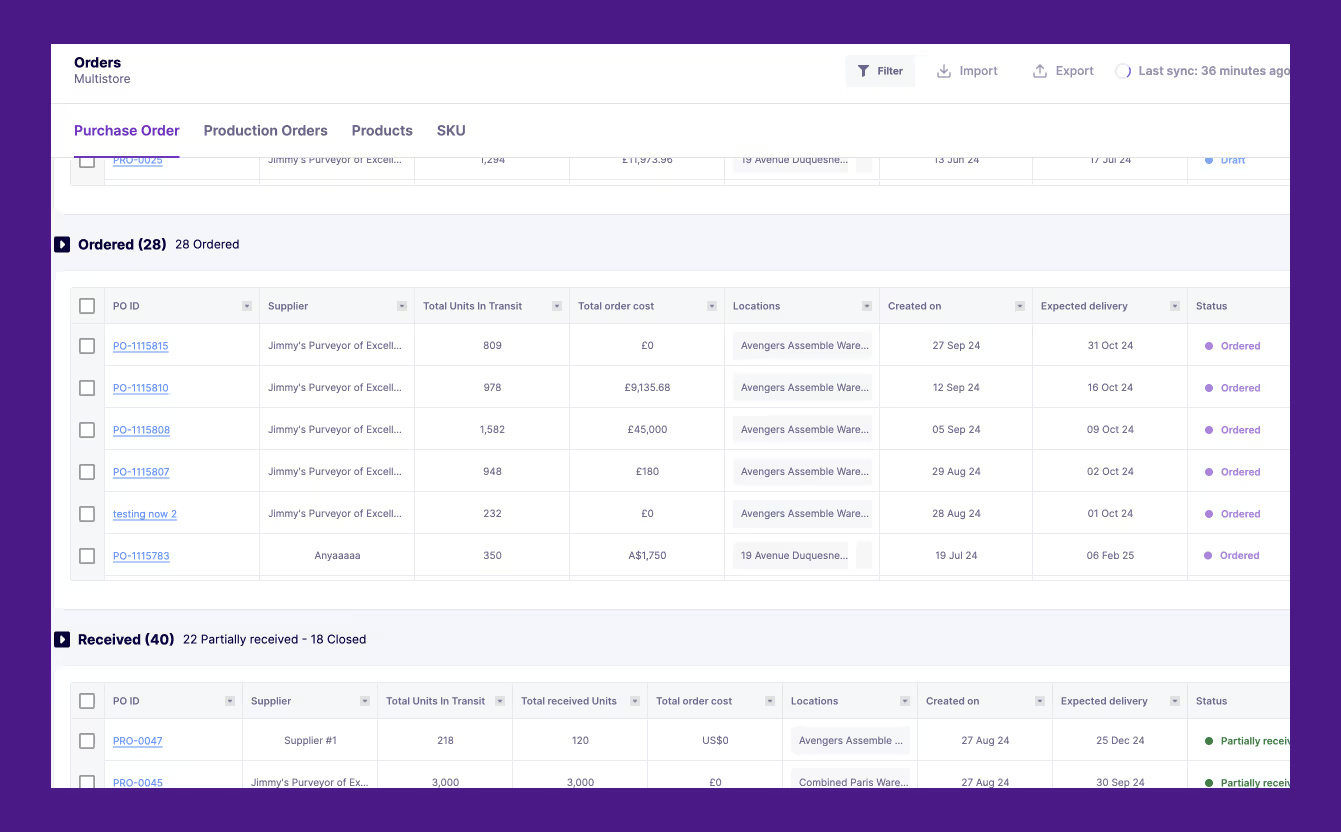
Prediko's reports complement Shopify's existing reports, providing deeper insights into inventory performance. Besides tracking bestseller levels, overdue POs, and helping with demand plan achievement to make informed decisions, the AI-powered system also provides a top-down plan to achieve your sales goals. You can measure your success by comparing actual revenue against your planned revenue. Our real-time integration with Shopify captures your actual sales data.
Start optimizing your inventory management today with a 14-day free trial of Prediko. Experience firsthand how our AI-powered platform can help you avoid stockouts, reduce excess inventory, and boost your bottom line.
Frequently Asked Questions (FAQs) related to Shopify Inventory Alerts
How Not to Run Out of Stock on Shopify
Prevent stockouts on Shopify with advanced inventory tools. Learn how to use demand forecasting, automated alerts, and data insights.
Running “out of stock” on Shopify can be a big problem, leaving you rushed to restock while customers miss out on what they want. It can hurt your sales and even might send shoppers to your competitors.
Just imagine a customer finds their favorite product in your store and adds it to their cart, and then—bam! It’s unavailable. Not only do you lose a sale, but your competitors gain one. These moments can damage trust and disrupt your growth.
But with right tools and strategies, you can avoid these costly stockouts by leveraging automated alerts to improve demand forecasting.
In this guide, we’ll explore actionable strategies for preventing Shopify “out-of-stock” situations, managing inventory smarter, and keeping customers satisfied. Stay ahead of stock issues with proven solutions tailored for Shopify stores.
Understanding Stock Outs on Shopify

We’ve all been there—excitedly adding a must-have item to the cart, mentally planning how great it looks or functions in our lives. And then...bam!
An “out of stock” message can stop us and ruin the shopping experience. It’s not just a minor inconvenience—it’s a frustrating letdown that leaves customers annoyed and abandoned.
The above meme is spot on. It's that moment of disbelief when your customers think, “Wait, what do you mean it's out of stock? I came here for this!” For Shopify store owners, the goal is not to apologize to their customers but to prevent this situation from occurring in the first place.
Stockouts are a lose-lose situation: on the one hand, they hurt your bottom line as potential sales are lost to competitors, while on the other, they damage customer trust and make your brand look unreliable. That’s not all—it can also hurt customer loyalty, miss chances to upsell, and waste marketing efforts on products that aren’t available.
But here is the good news: stockouts are not inevitable. By understanding the root causes and their flowing impact on your business, you can implement proactive strategies to keep your customers—and your revenue—happy.
Impact of Stockouts on Shopify Businesses
Stockouts can feel like minor hiccups, but their wave effects often cause significant damage to Shopify businesses and brands. Let’s break down the real-world consequences:
1. Lost Revenue
Every minute your product is unavailable, you’re losing sales. A survey by the National Retail Federation found that 43% of consumers would switch to a competitor if the item they want is out of stock. For Shopify store owners, even a single day of being "out of stock" can impact monthly earnings.
2. Customer Frustration
Consider your customers willing to buy a best seller but cannot find it. Their disappointment often drives them directly to your competitors, who may win their loyalty for good.
3. Damage to Brand Reputation
Stockouts don’t just hurt sales; they erode trust. Customers expect reliable availability. Consistent stockouts make your store appear unreliable and poorly managed—two perceptions no brand wants to cultivate.
4. Operational Inefficiencies
Inefficient inventory management disrupts your entire workflow. From inaccurate demand forecasting to rushed replenishment orders, stockouts strain resources and create unnecessary chaos.
5. Reduced Customer Lifetime Value (CLV)
Stockouts can harm long-term relationships. A frustrated customer who leaves your store might never return, reducing their contribution to your business. Shopify businesses thrive on repeat purchases, and stockouts risk that.
6. Missed Upselling Opportunities
When a key product is unavailable, it impacts upselling and cross-selling opportunities. Customers who come to buy one item often consider additional products—but not if the main product isn’t there.
7. Increased Marketing Costs
Stockouts waste advertising spend. If you’re driving traffic to an unavailable product, you’re burning marketing dollars without any return. Worse, this experience discourages potential customers from clicking your ads again.
Why Shopify Stores Face Stockout Issues?

Stockouts often seem unavoidable when running a Shopify store but are preventable. The key is to identify the root causes and address them strategically. Let’s explore the most common reasons behind Shopify's stock challenges.
Inefficient Inventory Tracking
Many Shopify businesses depend on outdated or manual tracking systems, which leave room for errors. Knowing what’s selling fast or running low is hard without real-time visibility.
This gap often leads to problems with Shopify's out-of-stock inventory, especially during sales peaks.
Supply Chain Inefficiencies
Delays in production, shipping, or supplier communication create a domino effect. If a product takes longer to arrive than expected, you risk empty shelves. Additionally, brands may struggle to view cumulative stock numbers across all locations, further compounding the problem.
Supply chain breakdowns are a significant factor in Shopify Plus out-of-stock scenarios. Building supply chain resilience can help mitigate these challenges. According to Prediko’s guide on supply chain resilience, businesses that adopt robust forecasting tools and real-time visibility reduce disruptions and maintain stock availability more effectively.
Poor Demand Forecasting
Misjudging demand is a common challenge, especially for growing Shopify stores. Without accurate forecasting, businesses either overstock (tying up capital) or understock, leading to stockouts. Seasonal trends and sudden sales spikes make forecasting even harder.
Got more questions? Get answers to the 5 most pressing inventory questions from our Limited Supply Podcast
Key Strategies to Avoid Running Out of Stock on Shopify
Avoiding stockouts requires proactive planning for anticipated demand and the right tools. By leveraging advanced systems and innovative processes, Shopify businesses can keep their inventory on track and seamlessly meet customer expectations.
Here’s how to tackle Shopify's out-of-stock challenges effectively.
Automated Alerts for Inventory Management
Timely alerts are a game-changer. Automated notifications provide real-time updates on low stock levels, upcoming stockouts, and replenishment needs.
With timely alerts, businesses can shift from reactive to proactive inventory management. Instead of addressing stockouts after they occur, these notifications empower you to prevent issues before they arise. This not only saves time and money but also helps maintain customer satisfaction by ensuring products are always available.
Tools like Prediko offers daily and weekly alerts to track inventory, ensuring you never miss critical changes.
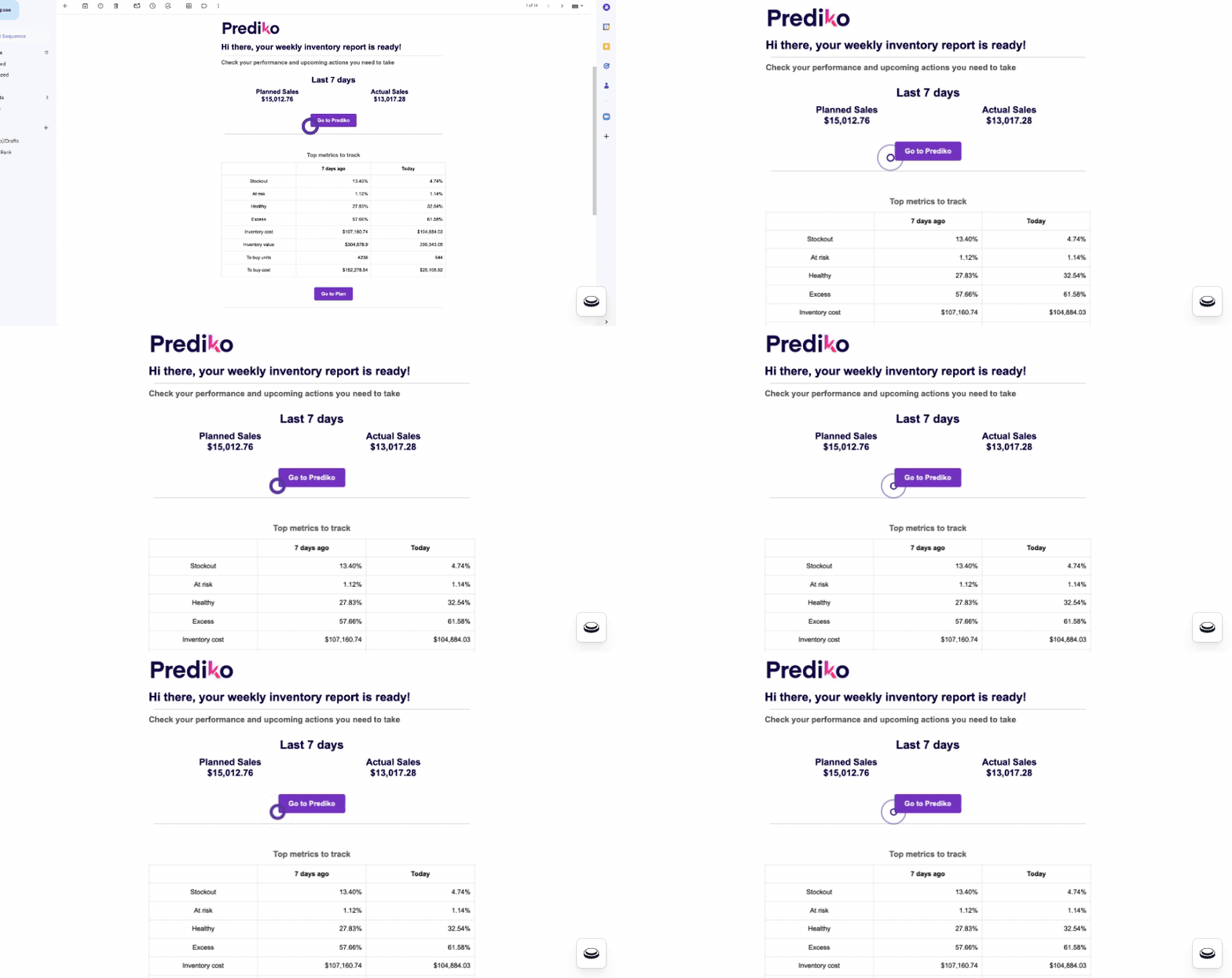
These alerts delegate you to act before running out, maintaining consistent stock levels. For example, Prediko’s alerts analyze your current stock and predict when it will run out, keeping you always one step ahead.
Advanced Demand Forecasting
Accurate forecasting helps Shopify businesses predict demand more effectively. AI-driven tools analyze historical sales, seasonal trends, and market data to offer precise insights. You can prevent out-of-stock inventory Shopify issues by understanding what sells and when.
Even with strong forecasting and alerts, unexpected demand spikes or supply delays can still catch you off guard. That’s why many brands implement a safety stock strategy — a buffer inventory that protects against last-minute stockouts and keeps high-performing products available.
Demand forecasting also enables smarter purchasing decisions, reducing the risk of overstocking or tying up unnecessary capital.
Streamlined PO Management
Purchase orders (POs) can be significantly complex when scaling Shopify stores. Tools like Prediko simplify this process. You can easily track purchase orders in one centralized location at every stage—creation, ordering, and receiving.
Efficient PO management ensures products arrive on time, helping you avoid Shopify plus out-of-stock situations caused by supply chain delays.
Data-Driven Insights and Reporting
Analyzing sales performance and inventory trends is crucial. Shopify store owners need detailed reports highlighting top sellers, stock turnover, and upcoming risks. Prediko’s advanced analytics provide actionable insights, helping you make informed decisions.
With these strategies, Shopify businesses can prevent stockouts and improve operational efficiency.
Case Study: How Obsidian Piercing increased best seller revenue by 200%.
Using Prediko's advanced inventory management features, Obsidian Piercing boosted its best-seller revenue by 200%. By leveraging daily and weekly stock alerts, Obsidian effectively monitored inventory levels, optimized product availability, and increased sales. Prediko's intelligent analytics and streamlined PO management helped the business drive consistent revenue growth.
How to Manage Unexpected Out of Stock Situations for Your Shopify Store?
Despite your best efforts, unexpected stockouts can still happen. The key is to have a plan in place to mitigate the impact. Here’s how Shopify businesses can handle Shopify out-of-stock situations effectively:
Implementing Pre-Orders to Maintain Sales
When faced with stock outs, consider offering pre-orders for out-of-stock products- or trigger customer notifications with a Shopify back in stock app. Pre-orders allow customers to reserve products in advance, ensuring you don’t lose a sale.

This strategy provides an opportunity to gauge demand and plan for restocking more accurately while also retaining customer interest. Clear communication about expected delivery dates ensures customers are aware of the waiting time, preserving satisfaction and loyalty.
Learning from Stockouts
Every stockout is an opportunity to improve your inventory management. Analyze why the issue occurred and take steps to avoid it.
- Review Sales Data: Identify trends that led to the stockout.
- Update Forecasting Models: Adjust demand predictions based on new insights.
- Strengthen Supplier Relationships: Work with suppliers to improve lead times.
- Improve Safety Stock Levels: Keep a buffer stock to handle sudden demand spikes.
With these strategies, you can turn stockouts into learning experiences and prevent them from recurring.
How Prediko Helps Shopify Brands Prevent Stockouts?
Prediko is more than just an inventory management tool—it’s a comprehensive solution designed to tackle out-of-stock inventory Shopify challenges head-on. From automated alerts to advanced analytics, Prediko equips Shopify businesses with the tools they need to stay ahead of stockouts.
Inventory Alerts
Prediko offers daily alerts that provide actionable insights.
These alerts include current stock levels, projected stockout dates, and recommended actions. With these updates, Shopify store owners can act proactively, reducing the risk of running Shopify out of stock.
AI-Driven Demand Forecasting

Predicting demand accurately is essential for avoiding stockouts. Prediko’s AI-driven forecasting analyzes past sales, seasonal trends, and customer behavior. It helps Shopify businesses plan inventory effectively and prevent Shopify plus out-of-stock scenarios.
Comprehensive PO Management

Prediko makes purchase order management seamless. Its Kanban view allows tracking of POs in each status: creation, ordering, and receipt. This ensures that products arrive on time and that inventory moves smoothly.
Customization and Performance Metrics

Prediko provides over 100 filters for customized reporting, allowing businesses to focus on what matters most. From net sales to AOV (average order value), these insights drive better decision-making and prevent inventory issues.
Prediko empowers Shopify businesses to turn stock challenges into growth opportunities by combining advanced features with an intuitive interface.
Turn Stock Challenges into Growth Opportunities
Managing stock on Shopify can be tricky, especially given fluctuating demand, supply chain delays, and the looming fear of running out of stock. However, you can turn these stock challenges into growth opportunities by understanding your inventory trends and utilizing tools like Prediko.
With more competent inventory management, predictive forecasting, and timely alerts, you can avoid stockouts, optimize replenishment cycles, and keep your customers happy and returning for more. Your Shopify store can overcome stock-related frustrations by proactively leveraging advanced tools to thrive. So why waste time? Choose Prediko for all your needs.
Book a demo or start with a 14-day free trial and change your inventory management today.





.avif)