Shopify Partners Collaboration
Explore Shopify partner collaborations, ecommerce integrations and practical insights on inventory operations, automation, app ecosystems and growth for modern Shopify brands.
Manage Your Stock With Timely Push Notifications | Prediko x PushOwl
Learn how to move and manage your excess stock with the power of push notifications.
As eCommerce landscape continues to evolve, it’s important for D2C brands to juggle inventory management and customer engagement & experience.
By utilising Prediko's Buying Table feature with PushOwl's push notification capabilities, eCommerce companies get more out of their existing inventory and create a loyal and repeat customer base.
Understand your current inventory situation
Prediko’s app integrates into your Shopify store in just 1-click. After taking into account your Shopify historical data, we estimate your future sales.
Using existing inventory data and the supply chain parameters, we build an interactive buying experience from which you can easily create purchase orders for the items based on their stock quantity.
Our buying table gives you real-time visibility into your inventory and stock situation.

There are 50+ customizable columns and filters, enabling users to tailor their reports with the most relevant data for making informed purchasing decisions.
Columns such as "quantity daily historical excluding stock out" and "quantity daily plan" provide insights into average daily sales, adjusted for stockout periods, to give a more accurate picture of product performance.
The Buying Table integrates customer-related data, including "new customers first order" and "average order value (AOV)," allowing businesses to analyse how specific products attract new customers and contribute to overall sales.
Using Buying Table Intelligence For Push Notification Campaigns
PushOwl’s activate feature helps D2C eCommerce brands launch a push notification campaign in just 2 minutes and 7 seconds, ensuring swift and efficient engagement with shoppers. PushOwl also provides an easily customizable web widget for visitors to opt into push notifications on product pages, making it simple to start engaging with them immediately.
Here are three ways you can easily manage your inventory through Push Notification campaigns:
a) Efficiently manage out-of-stock product situations
Prediko's Buying Table helps brands to identify soon to be out-of-stock products. Brands can use PushOwl's quick campaign launch capability to notify customers immediately when these products are going to be back in stock.
This sort of a push notification campaign comes useful especially when it comes to apparel inventory management systems.

Such a campaign can easily help in managing out-of-stock situations and help brands create a positive customer experience.

b) Get rid of excess inventory
Brands can easily identify excess stock with Prediko's Buying Table and set up push notifications with help of PushOwl to offer discounts or special promotions.
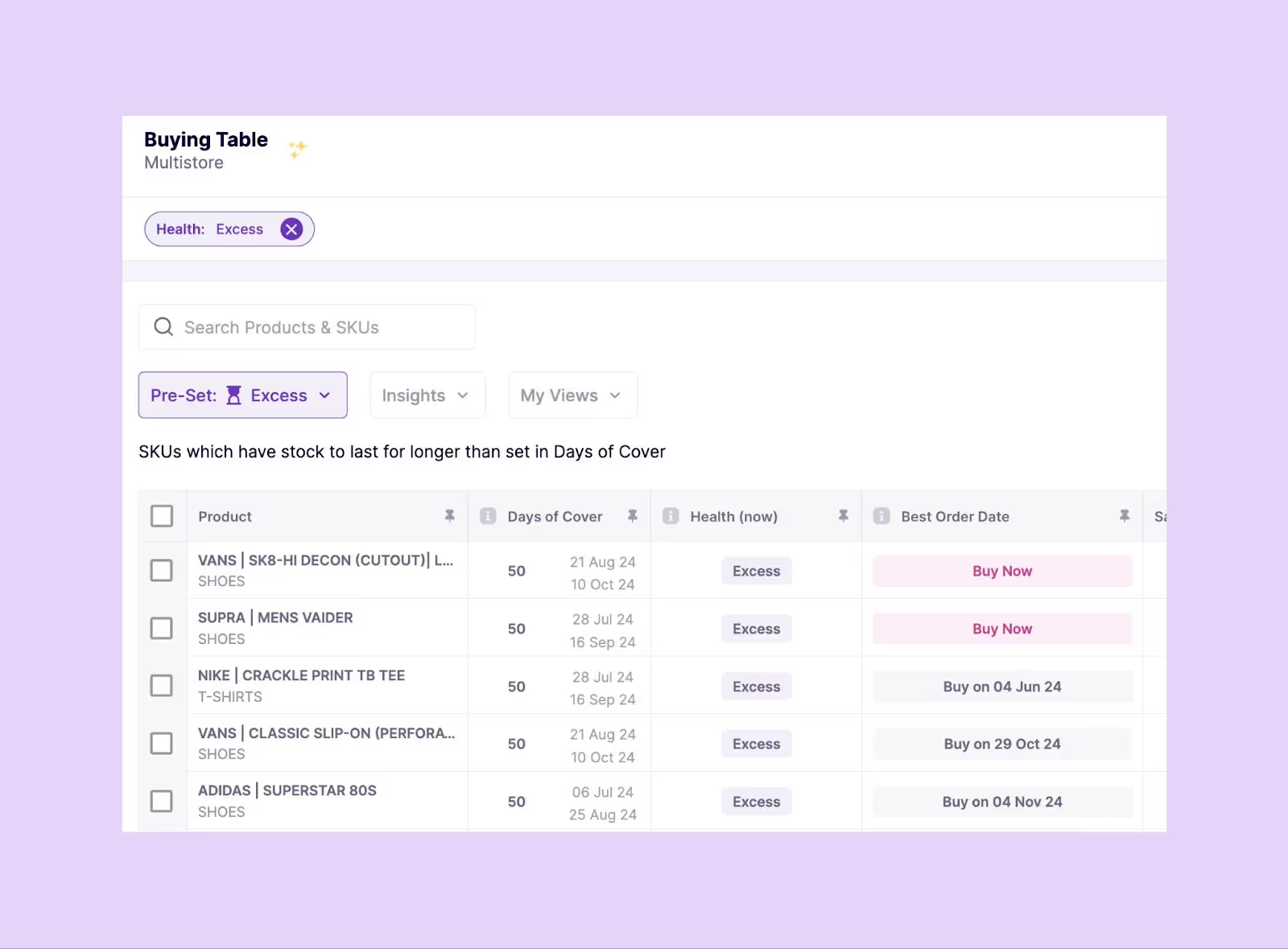
This helps in moving inventory faster through inventory turnover and reducing overstock situations.

c) Personalised Push Notification Campaigns
Leverage AI-assisted campaign copywriting and personalised notification capabilities of PushOwl to create targeted campaigns based on the historical and planned sales data from Prediko's Buying Table.

Below you can see an example of a personalised push notification campaign that was sent based on when the inventory was back in stock.

For modern D2C brands that offer products or SKUs that run out of stock quickly and they don’t want to compromise or hamper customer experience or engagement because of it, Prediko and PushOwl offer the perfect combination of inventory management and customer engagement.
Everything You Need to Know About Restocking Inventory on Shopify
A complete guide to inventory restocking for brands running their store on Shopify.
Managing inventory is one of the trickiest parts of running a successful Shopify store. Order too little, and you risk losing sales because of stockouts.
Order too much, and you’ll end up tying up cash and spending more on storage. Add to that the unpredictability of demand—thanks to seasonal trends, promotions, or unexpected factors—and it often feels like a guessing game. But here’s the good news: Inventory restocking apps can make this a whole lot easier. These tools use data, automation, and even AI to help Shopify merchants figure out exactly how much stock they need and when to reorder.
You can Set Up Automated Inventory Restocking in Shopify to reduce manual guesswork and ensure timely replenishment across SKUs.
Learn how these apps work or which one might be the best fit for your business.
Why is Inventory Restocking So Challenging?
Restocking inventory might sound straightforward, but it can be full of hurdles that affect your bottom line:
- Stockouts = Lost Sales
Being out of stock on Shopify is a nightmare for any merchant. Not only do you lose revenue, but it can hurt your relationship with customers too. If they can’t find what they’re looking for on your site, they might just turn to a competitor—and they may not come back.
- Overstocking Ties Up Resources
On the flip side, overstocking is a problem as well. It’s more than just the cost of storing extra products—it also means tying up cash that could be better invested elsewhere. Plus, if products are perishable or seasonal, they might just end up collecting dust.
- Demand is unpredictable
Sales can spike due to trends, promotions, or seasonality, making it tough to predict exactly how much stock you’ll need. The key is to strike a balance between not having too much or too little.
- Manual Processes are Time-Consuming and Error-Prone
Many merchants still rely on spreadsheets or manual systems to track inventory. While this can work when your store is small, it quickly becomes a mess as your business grows and inventory gets more complex.
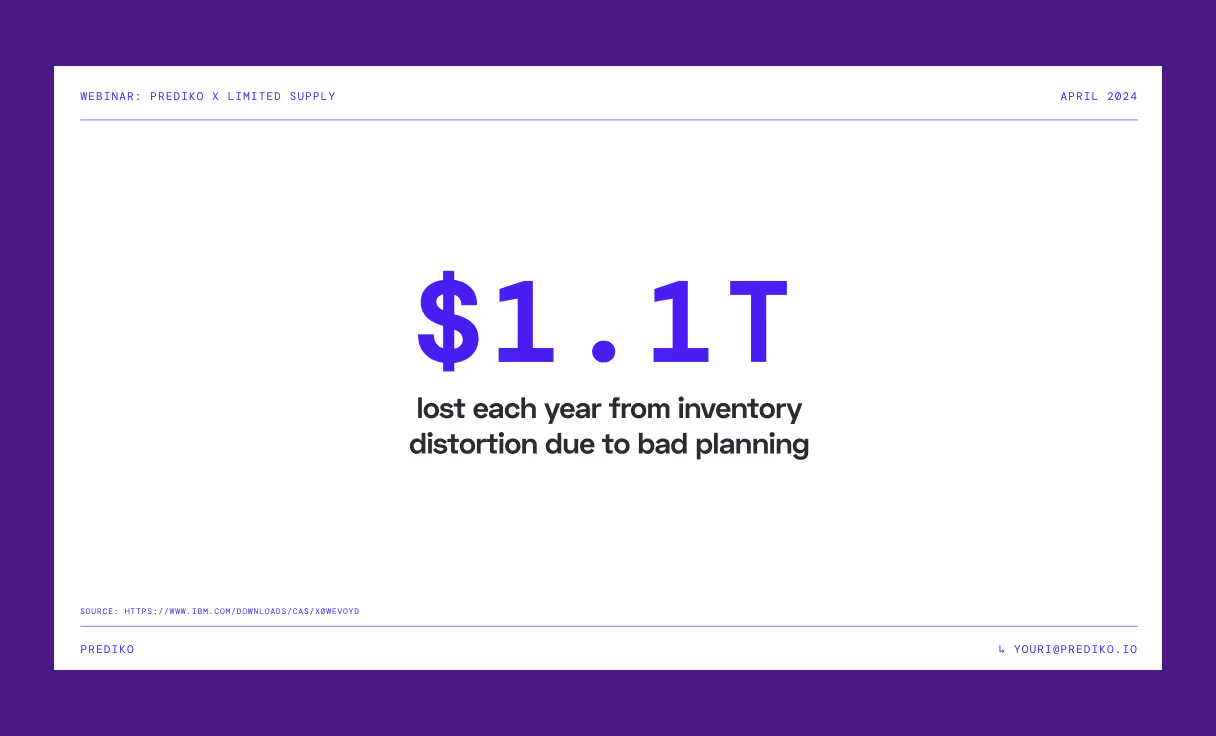
We covered rest of challenges when it comes to restocking in a webinar with the team behind Limited Supply podcast.
How do these Inventory Restocking Apps Help Shopify brands?
These apps work by using automation, AI, and real-time data to help you manage your stock more easily. Here’s how they can support your business:
- Demand Forecasting
One of the key features of Inventory restocking apps is their ability to predict demand. By analyzing your sales history, trends, and even seasonal patterns, these apps can tell you exactly when to reorder and how much to restock—keeping you from over or under-ordering.
While forecasting helps predict when to reorder, unexpected delays or demand spikes can still lead to stockouts. Implementing a Shopify safety stock strategy provides a buffer, ensuring you maintain service levels even when things don’t go as planned.
- Real-Time Inventory Tracking
With real-time inventory tracking, you can see exactly where you stand with your stock. These apps give you a snapshot of important metrics, like current stock levels, how fast products are selling, and how many days of stock you have left. This gives you the data you need to make quick, informed decisions.
- Automated Purchase Orders
Many of these apps will even automate the process of creating purchase orders. They’ll alert you when your stock is getting low, generate orders based on forecasted demand, and track shipments to ensure timely restocking. It’s a huge time-saver.
If you’ve been relying on Shopify’s native Stocky app for replenishment but feel like it's not keeping up with your restocking needs, you're not alone. Many merchants are switching to Stocky app alternatives that offer smarter purchase order workflows, automation, and better forecasting tailored for growing D2C brands.
- SKU-Level Insights
If you have a large product catalog, these apps can give you a breakdown at the SKU level. You’ll know exactly which products are selling quickly, and which ones are slow movers, so you can prioritize restocking your best sellers and cut back on products that aren’t performing.
- Optimized Cash Flow
Ordering more inventory costs money, and you want to make sure you’re investing it wisely. These apps help you manage your cash flow by aligning reorder dates with your available funds, ensuring you’re only spending on products that give you the best return on investment.
Got more questions? Get answers to the 5 most pressing inventory questions from the Limited Supply Podcast in this article.
What Makes Prediko a Great Inventory Restocking App?
Brands might feel overwhelmed when it comes to selecting the right restocking app. At Prediko, we have built an app that is practical and incorporated customer feedback.
- High Accuracy of our Demand Forecasting Algorithm
The accuracy of Prediko's AI is so good that one of our customers, LabFresh, gave us a shout-out on LinkedIn.
- Real-Time Inventory Level Sync
Prediko's app integrates smoothly with Shopify, pulling in up-to-date data about your stock levels, sales, and orders in real time. This ensures you’re always working with the most current information. - Simple, User-Friendly UI
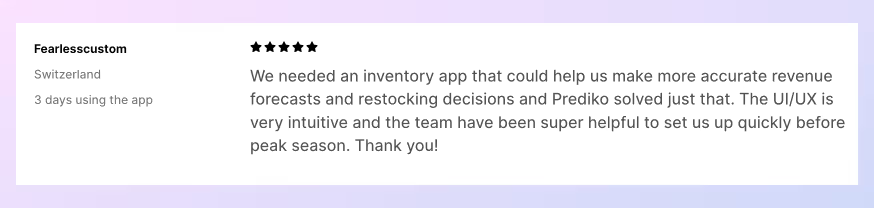
We get a lot of reviews on our app store listing that our UI is easy to use, even for non-techies.
- Automatic nudges to purchase SKUs when you are running low on inventory
Prediko's Buying Table takes all the data and information about a brand's SKUs, products and product categories and then prompts the users to create the PO to order the optimal amount. - Low stock alerts
Brands can set their own safety stock levels so when they go below that level, it triggers a low stock alert.
Best Restocking Apps for Shopify Merchants (as per reviews)
A detailed look at some of the top-rated back in stock apps on Shopify while highlighting their features
1. Notify Me: Preorder & Back in Stock
Features:
- Automatically notifies customers via email or SMS when products are back in stock.
- Offers preorder functionality to capture sales for out-of-stock items.
What makes it different from other apps:
Notify Me ensures customers stay informed about restocks, reducing lost sales and enhancing satisfaction. The preorder feature keeps revenue flowing even during stockouts.
2. Preorder Now by Website On Demand Studio LLC
Features:
- Enables preorders for products not yet in stock, maintaining consistent sales.
- Offers customization for preorder badges, buttons, and messages.
- Tracks preorder performance with built-in analytics.
What makes it different from other apps:
Preorder Now ensures customers can still purchase desired items, fostering trust and preventing lost revenue. Its customization features align perfectly with any store’s branding.
3. Early Bird Preorder Manager by ShopSide
Features:
- Allows merchants to set preorder limits for specific SKUs.
- Provides notifications for preorder updates and shipment details.
- Integrates seamlessly with Shopify to manage preorders alongside regular stock.
What makes it different from other apps:
Early Bird is ideal for gauging demand for popular or new items. Its user-friendly features let merchants manage preorders effectively and keep customers updated.
4. Sendvio Email Marketing & SMS
Features:
- Automates email and SMS campaigns for back-in-stock notifications.
- Includes tools for cart recovery, welcome emails, and upselling campaigns.
- Tracks customer engagement and campaign performance with detailed analytics.
What makes it different from other apps:
Sendvio goes beyond restocking notifications by integrating marketing capabilities that boost engagement and drive sales. It’s an all-in-one solution for communication and conversion.
5. Restock Rooster by Vole Nevole
Features:
- Send restock notifications through multiple channels, including email and SMS.
- Offers advanced inventory tracking and low-stock alerts for merchants.
- Provides customer insights to help prioritize restocking decisions.
What makes it different from other apps:
Restock Rooster is a time-saving app that automates communication and helps merchants prioritize inventory based on demand, ensuring efficient restocking.
6. Back in Stock Notifier by Blessify Infotech
Features:
- Sends instant back-in-stock alerts via email and SMS to waiting customers.
- Integrates with Shopify for seamless inventory updates.
- Allows customization of notification templates to match your branding.
What makes it different from other apps:
This app keeps customers engaged and reduces the chances of losing them to competitors by ensuring they’re the first to know when items are back.
7. Preorder Pro by Globo
Features:
- Supports preorders for Out-of-Stock items and products not yet launched.
- Provides customizable preorder messaging and payment settings.
- Tracks preorder volumes to help merchants adjust inventory strategies.
What makes it different from other apps:
Preorder Pro is an excellent tool for maintaining sales continuity during restocking periods, with robust customization options for a professional customer experience.
8. My Wishlist: Share & Remind by HulkApps
Features:
- Allows customers to create and share wishlists.
- Sends reminders when items in the wishlist are back in stock.
- Provides analytics on wishlist activity to help merchants plan inventory.
What makes it different from other apps:
This app boosts customer retention by turning wishlists into actionable sales opportunities. Its reminder feature ensures faster purchases upon restocking.
9. Yanet: Back in Stock App by Yanet
Features:
- Automates back-in-stock alerts via email and SMS.
- Integrates with Shopify to monitor inventory and trigger notifications.
- Offers analytics on stock performance and customer interest.
What makes it different from other apps:
Yanet simplifies inventory communication while providing valuable data on restocking priorities, making it an essential app for efficient inventory management.
Comparison of the best Inventory Restocking Apps
All these tools will help you restock smarter, save money, and grow your business.
At Taranker, you can discover the best tools for your Shopify store, including apps that streamline inventory management and improve bottom line. Explore the platform recommendations to find the perfect fit for your business and start optimizing your inventory management today
.avif)
Preventing Incorrect Orders in Shopify with Cart Limits for Better Inventory Management
Learn how to prevent incorrect orders on your Shopify store using cart limits.
Preventing Incorrect Orders in Shopify with Cart Limits
Do you find yourself dealing with high cart abandonment rates? This can severely impact your Shopify business. Cart abandonment results in lost sales, directly affecting your profits. However, implementing cart limits can effectively combat this issue. This allows you to provide a seamless shopping experience for your customers while also effectively managing your inventory.
Understanding Cart Limits on Shopify
Cart limits are crucial features on Shopify stores. They set the lowest and highest totals for orders and quantities in a shopper's cart. These limits control the size and value of orders in your cart. They stop mistakes and make shopping better. Here are the common types of Shopify cart limits:
Setting minimum and maximum purchase limits helps manage your inventory effectively. Here's how
Minimum Limits Prevent Stockouts:
- When your stock falls below the minimum limit, it's a signal to reorder.
This prevents stockouts, where you run out of a product, resulting in lost sales and unhappy customers.
Maximum Limits Prevent Overstocking:
- The maximum limit prevents customers from purchasing too much inventory.
This ties up capital and incurs additional costs like storage fees and potential product spoilage.
Benefits of Optimal Levels:
- Enhanced Customer Satisfaction: Adequate stock levels (thanks to minimum limits) ensure you can meet customer demands and avoid disappointing them with stockouts.
- Cost Reduction: Minimum limits prevent stockouts, while maximum limits prevent unnecessary spending on excess inventory, leading to cost savings.
- Efficient Supply Chain: Knowing when to reorder (based on minimum levels) enables you to place timely orders, ensuring your supply chain operates smoothly.
Shopify Order Limits:
- Minimum Order Total: Customers must spend at least a specified amount, ensuring each purchase meets a minimum threshold. For instance, a $25 minimum ensures customers spend enough before completing their purchase.
- Maximum Order Total: This limit prevents excessively large orders or potential fraudulent transactions. For example, a clothing store may set a $50 minimum for free shipping to encourage customers to buy more items.
- Minimum Quantity: The smallest number of items required in the cart before checkout. For instance, a subscription box service might require customers to select at least one item.
- Maximum Quantity: Restricts the number of items that can be bought at once to prevent over-purchasing or unfair practices. For example, limited sneaker releases may allow customers to buy only one pair at a time to prevent resale and ensure fair availability.
Why Use Cart Limits?
In Shopify eCommerce, putting limits on shopping carts is really important. It stops people from making mistakes when they order things, making the shopping experience better.
Also, it helps with managing how much stuff a store has in stock. This is important because if a store has too much stuff, it costs more money to keep it, and if it doesn't have enough, it can't make enough sales.
So, these limits help stores keep the right amount of stuff. It also helps prevent mistakes in keeping track of what's in stock.
Overall, using cart limits in Shopify makes ordering easier and helps stores manage their inventory better.
- Prevent Incorrect Orders: Prevent false orders by setting a range for the cart's total value. This helps avoid accidental or fake orders. The limits for orders match how customers usually buy, cutting down on errors.
- Preventing Stockouts and Overstocking: Cart limits dynamically adjusted based on real-time inventory levels prevent stockouts by ensuring customers can't order items out of stock. Similarly, they prevent overstocking by limiting the quantity customers can buy, aligning with inventory levels to maintain optimal stock levels.
- Enhance Customer Satisfaction: Preventing incorrect orders Shopify enhances customer satisfaction and trust. Shoppers appreciate an accurate, hassle-free experience without the frustration of unintentional purchases. Cart limits demonstrate your commitment to reliable service, fostering positive customer relationships.
- Optimize Inventory Management: Maintain accurate stock levels by optimizing inventory processes. To prevent selling too much, set the most you can order. This way, you avoid mistakes between what's in stock and what customers want. This alignment minimizes stockout risks. It ensures inventory matches customer needs.
- Reduce Cart Abandonment: Increase conversion rates by guiding informed purchases. Order limit notifications streamline checkout, reducing cart abandonment caused by unexpected totals and preventing false order Shopify. Customers proceed confidently, boosting sales for Shopify merchants.
Setting Up Cart Limits in Shopify:
Regular Monitoring and Adjustment of Cart Limits
Dynamic Adjustment: Adjust cart limits regularly based on current inventory levels, upcoming promotions, and anticipated demand to prevent overstocking or stockouts.
Seasonal and Trend Analysis: Analyze sales data to identify seasonal trends and popular items. Adjust cart limits accordingly to optimize inventory levels throughout the year.
Flexible Customization: Look for an app that lets you set limits on orders based on your shopping cart total or the amount you need.
Proven Reliability: Pick a well-rated app that shows it can stop fake orders and set limits well.
When you choose an app, you can better control cart limits on your Shopify store and prevent incorrect orders Shopify. Doing so prevents invalid purchases while elevating customer shopping experiences.
Popular Apps for Cart Limits

Shopify App Store is the right solution for merchants/vendors looking to prevent incorrect orders. The platform provides you with a multitude of resources to set Shopify order limits. The best of these resources are Cart Limit Apps like Shipfy.
Shipfy is a perfect tool for Shopify merchants seeking an intuitive solution to avoid incorrect orders and streamline cart limit management. With its user-friendly features and positive feedback, Shipfy offers a comprehensive approach to optimize the checkout process.
Key Functionalities
- Establish order limits based on cart value and quantity
- Customize shipping rates and delivery methods
- Conceal or rename shipping choices based on specific criteria
- Schedule shipping by day, time, or date
- Effortless installation and setup without coding requirements
Related Read: Most Useful Guide to Fixing Shopify Inventory Issues
Shpify provides flexible pricing plans to accommodate diverse business needs.
By utilizing Shipfy, Shopify merchants can effectively manage cart limits, prevent incorrect orders, and ultimately enhance customer satisfaction while boosting revenue streams.
Employing cart restrictions on Shopify proves immensely beneficial. It mitigates risks linked to faulty orders while enhancing operational efficiency.
With tools like Shipfy, merchants can easily set and manage cart limits. This ensures order totals and quantities adhere to defined thresholds. Effective cart limit strategies prevent erroneous transactions and streamline the checkout process. Satisfied customers tend to remain loyal.
Furthermore, explaining cart limits and focusing on user experience help make shopping easier. This incorrect orders Shopify and reduces the chances of order discrepancies. Utilize Shipfy for cart limits to optimize and secure Shopify operations effectively. This fosters a reliable e-commerce environment.
Improve Inventory Ticket Response Times by 50% | Why your customer support team needs Gorgias & Prediko ahead of Holiday Season
Improve inventory ticket response time by 50% using Gorgias x Prediko ahead of the Holiday Season.
As we approach the Holiday Season, brands start facing an influx of inquiries from shoppers wanting to buy multiple items, with questions related to their stock availability and delivery timelines especially during the holidays.
Gorgias highlights that 30-40% of support tickets during the holiday season are related to stock availability, with questions like "When will this item be available?" or "How do I get notified when it comes back?"
This surge of queries during the holiday season can easily overwhelm even the best-prepared customer experience and support teams.
Customers expect immediate, precise responses, and delays mean missed sales, frustrated shoppers, and lost loyalty.
The Challenge: How do brands manage inventory-related inquiries during peak holiday season ?
Say hello to the combination of Prediko and Gorgias—offering real-time inventory visibility and customer support automation to tackle these issues with ease.
.avif)
Prediko’s PO System in Action: Real-Time Inventory Updates for Customer Support Teams using Gorgias
1) Real-Time Sync with Shopify
Prediko is one of the highest-rated inventory management apps on the App Store because it syncs with Shopify and analyses inventory data in real-time. This gives brands accurate stockout and restock dates, automatically adjusting inventory levels as products are sold and factoring in items currently in transit.
Once a brand installs Prediko from the app store, Prediko syncs their historical sales data (including from the previous holiday season) and shows the entire product & SKU catalogue in the form of a Buying Table.

2) Stock Recommendations that anticipate ALL Holiday Season Demand
Based on existing stock levels, historical sales performance & lead times, Prediko generates real-time recommendations for brands that suggest the exact stock units to be ordered to meet the holiday season targets.
Just this BFCM, Prediko brands outperformed their peers with a 91% SKU availability rate and Inventory Health Metrics that positioned them to thrive all the way through the holiday season.

3) Directly create and track Purchase Orders with simplest UI
There can be multiple bottlenecks in the supply chain during a busy period like the holiday season. That’s why we make it easy to create, track and receive POs directly within Prediko.

Brands can also close certain line items in POs to indicate that those items are no longer in transit and have been received.
.avif)
Within Prediko settings, there is an option to sync received inventory with the Shopify admin inventory levels.

Once a PO is marked as 'Ordered,' Prediko’s system instantly syncs inventory levels with Shopify.
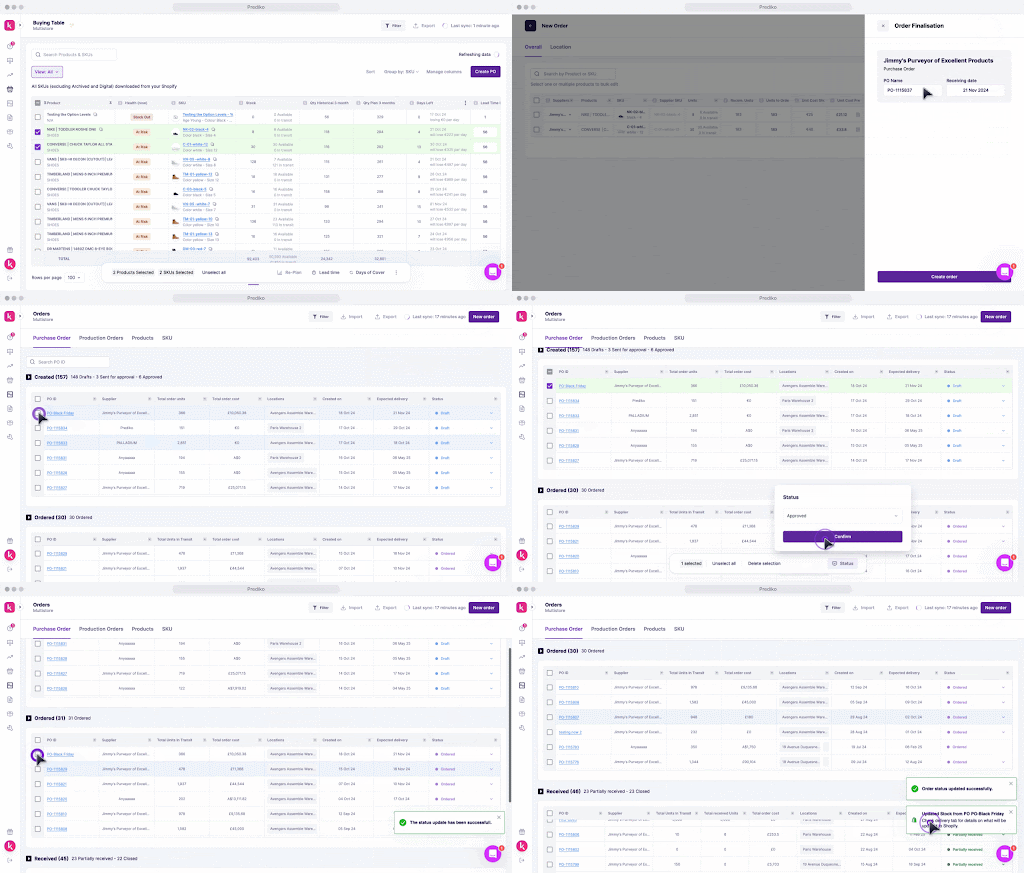
This makes the incoming units reflect instantly to Gorgias agents.
4) Mark units as received within Prediko
And when a PO is closed within Prediko, brands have the flexibility to mark how many units were received as compared to ordered.

The received units then get added to AVAILABLE units within Shopify admin.

All this information syncs in real-time with Shopify.

With Gorgias connected to Shopify, support agents can confidently answer questions like "When will this product be available?" by seeing real-time inventory and incoming stock data provided by Prediko.

This complete view ensures that agents can provide accurate restock timelines—reducing back-and-forth and building customer trust.
Gorgias Helpdesk and Automate - Use real-time inventory data from Prediko to solve tickets faster & create better customer experience
Gorgias stands out from other customer support apps because it provides a complete customer support platform. Their platform enables brands to manage questions about order tracking, returns, and order statuses from a single tab.
This comes in handy especially during busy periods like the Holiday season.
1) A common customer situation during Holiday season
A customer reaches out asking if an out-of-stock item will be back soon.
Thanks to Prediko’s real-time sync with Shopify, a customer support agent using Gorgias can see the incoming PO and provide an exact date for restocking.

This reduces average response time by up to 30%, turning a potentially lost sale into a positive experience
2) Automate Common Inventory Questions
Prediko’s real-time updates combined with Gorgias’s Automate feature mean that frequently asked questions about stock can be handled automatically. If a popular item is out of stock before the holiday season but has an expected restock date during or after, automated responses can be triggered to inform customers immediately.
By automating frequent inquiries about stock statuses, brands can reduce repetitive ticket volumes by up to 70%, freeing up agents to focus on more complex and high-value customer issues.
Tech retailer, Nomad, is a great example of this. By leveraging Gorgias’s Automate feature, Nomad was able to bring down response times by 70%, streamline support and improve the overall customer experience.

Take Control of Inventory Queries During Holiday Season 🎄
With Prediko and Gorgias, your support team will not only provide timely responses but also reduce cart abandonment rates and increase customer satisfaction as we enter into the new year.
Make this holiday season your most successful yet—equip your team with Prediko and Gorgias today.





.avif)